
Affiliate Disclosure: This post contains affiliate links. If you buy through them, we earn a small commission at no extra cost to you. We only recommend products we would genuinely suggest to a friend.
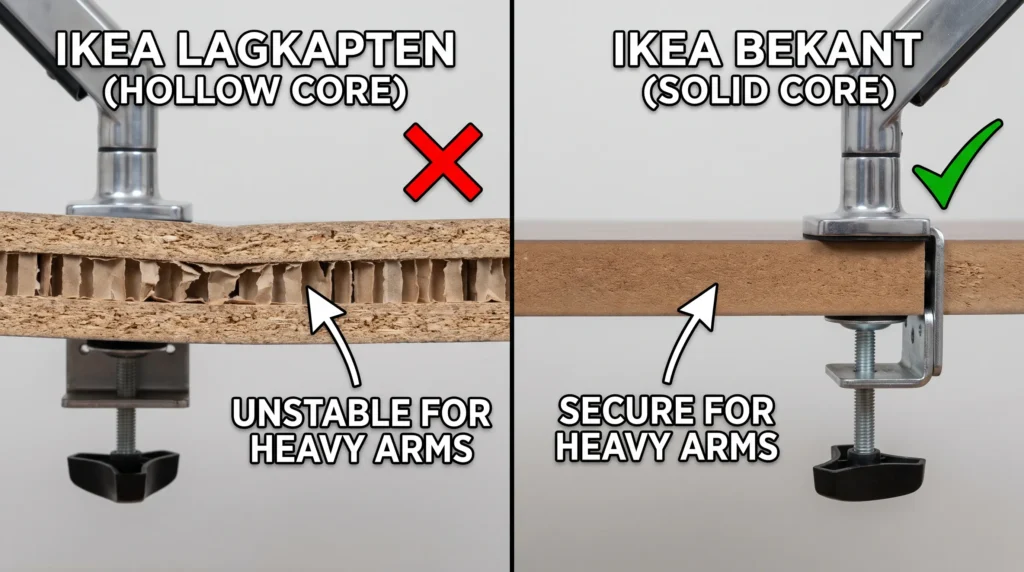
It depends on which IKEA desk you have. Some IKEA desks take a monitor arm clamp just fine. Others will crack, dimple, or give out under the pressure. The difference comes down to one thing: what is inside your desktop.
- LAGKAPTEN and LINNMON: Hollow honeycomb core inside. A monitor arm clamp can punch right through them without a spreader plate.
- BEKANT, MITTZON, and GERTON: Solid core. A monitor arm clamp works fine with standard protective pads.
- ALEX Desk: The edge you would clamp onto is a thin cable management lid. Avoid clamping here entirely.
This guide is for you if you have an IKEA desk and want to mount a monitor arm without damaging the desktop or leaving a wobbly screen.
Why Your IKEA Desk Model Matters More Than You Think
Most people assume that if a desk feels solid when you knock on it, a monitor arm will be fine. That assumption is wrong for a lot of IKEA desks.
The LAGKAPTEN and LINNMON, two of the most popular IKEA desks in the US, use a paper honeycomb filling inside. The outer surface is particleboard veneer, and it feels sturdy when you press down on it. But a C-clamp does not press down. It squeezes from the side.
If you are facing this same issue on a bamboo standing desk instead of an IKEA desk, our guide on monitor arm clamp compatibility for bamboo standing desks walks through the same fix.
When you tighten a monitor arm clamp onto the edge of a LAGKAPTEN, you are concentrating 10 to 15 pounds of force onto roughly 5 square centimeters of cardboard honeycomb. The desk surface dimples first, then cracks. Repairing a crushed LAGKAPTEN means replacing the whole tabletop.
LINNMON owners commonly report the same pattern in online reviews: the desk feels solid at first, but a clamp mounted without a spreader plate starts to give way within the first couple of weeks of regular use.
IKEA Desk Monitor Arm Compatibility: Every Popular Model
| IKEA Model | Core Type | Desktop Thickness | Clamp Safe? | What You Need |
|---|---|---|---|---|
| LAGKAPTEN | Hollow honeycomb | ~0.9 in (23mm) | Risky | Spreader plate required |
| LINNMON | Hollow honeycomb | ~0.7 in (18mm) | Risky | Spreader plate required |
| BEKANT | Solid core + steel frame | ~1.2 in (30mm) | Safe | Direct clamp, protective pads |
| MITTZON | Solid core | ~1.1 in (28mm) | Safe | Direct clamp, no extras needed |
| ALEX Desk | Hollow + metal cable lid | ~0.6 in (15mm) lid | Avoid clamp | Use freestanding riser |
Our take: if you already own an OLOV or ADILS base and want a monitor arm, do not skip the spreader plate above. If you are still deciding which legs to buy specifically to run a monitor arm, ALEX gives you the sturdiest base to start from.
If you’re planning to pair this desktop with a full standing desk frame instead of the basic IKEA legs, our Standing Desk Frame Compatibility Guide checks width, depth, and thickness across four popular frame brands.
If You Have a LAGKAPTEN or LINNMON: The Fix That Actually Works
The problem is the concentration of force. The clamp’s bottom screw pushes against roughly 1 square inch of hollow honeycomb. A spreader plate fixes this by distributing that same force across 8 to 12 square inches instead.
Think of it like this: pressing one finger hard into cardboard will eventually poke through. Pressing the flat of your palm with the same force leaves no mark. That is exactly what a spreader plate does.
Recommendation: LAGKAPTEN and LINNMON owners: buy a spreader plate first, clamp second. Do not skip this step.
Huanuo Monitor Mount Reinforcement Plate (HNDA1)
- Material: Alloy Steel
- Dimensions: 2 x 7 x 11 inches
- Works with: C-clamp monitor mounts, universal fit
- Supports: Single and dual monitor arms
- Best for desk types: Particle board, honeycomb core, MDF, glass
Note: Huanuo themselves recommend this plate for particle board and hollow desks.
(affiliate link)
VIVO Monitor Mount Reinforcement Plate
- Material: Alloy steel with non-scratch rubber padding
- Dimensions: 7.9 x 6.1 x 0.1 inches
- Works with: Standard C-clamp mounts
- Supports: Single monitor arms up to 25 lbs
(affiliate link)
Does Your Leg Choice (Alex, Olov, Adils) Change This for LAGKAPTEN?
The spreader plate fixes the tabletop problem, but LAGKAPTEN owners often pair the same top with different legs, and that choice affects how much the whole desk wobbles once a monitor arm adds extra leverage at the back edge.
How to Install a Monitor Arm on a LAGKAPTEN or LINNMON (Do Not Skip Step 3)
- 1. Knock on your desk edge first
Tap the edge where you plan to clamp. A hollow sound means a honeycomb core inside. A solid thud means denser material. Either way, if it is a LAGKAPTEN or LINNMON, use the spreader plate regardless. - 2. Place the large spreader plate on top of the desk
The large plate sits on the desk surface, directly above where the clamp will grip. Rubber side facing down against your desk. This is what protects the top surface. - 3. Place the small plate under the desk
The smaller plate goes under the desk, between the honeycomb surface and the clamp screw. This is the critical piece. Without it, the screw pushes directly into hollow cardboard.
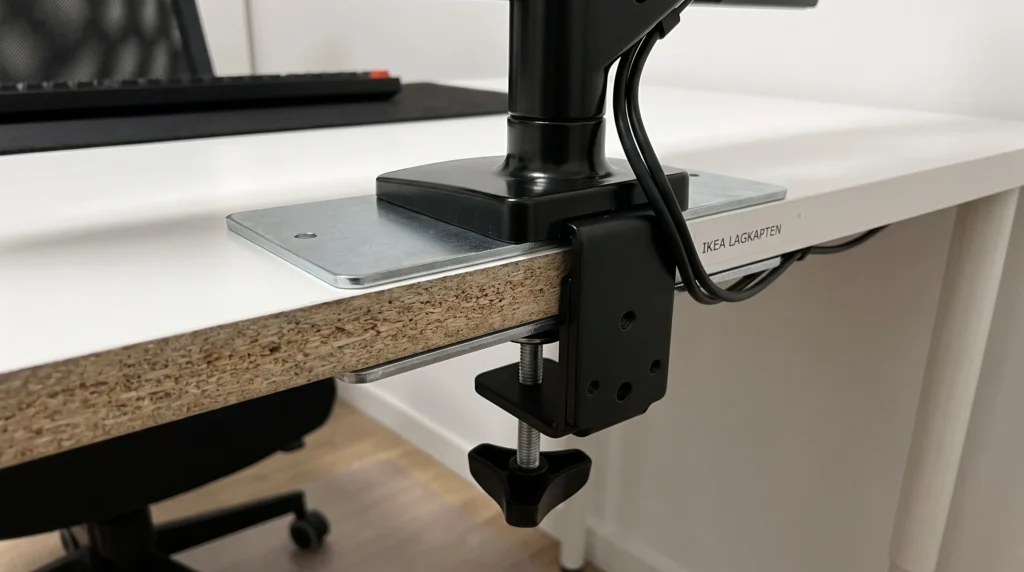
- 4. Hand-tighten only, then stop
Tighten the clamp until it is snug with no wobble. One quarter-turn more with your hand. Stop. Do not use a wrench on a hollow-core desk. Overtightening splits the honeycomb even with a spreader plate in place. - 5. Check it after one week
Check the clamp tension after 7 days of use. Hollow-core desks compress very slightly under sustained pressure. A quick finger-tighten keeps everything solid.
When I tested a basic C-clamp arm on my own LAGKAPTEN, the surface started dimpling within the first week, even with hand-tightening only.
If You Have a BEKANT or MITTZON: Straightforward Setup
Both the BEKANT and MITTZON use solid-core tops with no honeycomb filling. A standard monitor arm clamp works on these desks without a spreader plate, though the rubber protective pads that come with your monitor arm should still be used to prevent surface scratching.
BEKANT-specific note: The BEKANT has a powder-coated steel underframe running the full length of the desk. This actually adds extra rigidity right where your clamp would grip. It is one of the better IKEA desks for monitor arm mounting.
MITTZON-specific note: The MITTZON edge is flat and square, which means the clamp jaw seats cleanly. No shims or adapters needed.
Recommendation: BEKANT, MITTZON, and GERTON owners: your desk can handle a direct clamp. Use the rubber protective pads that come with your monitor arm.
If You Have an ALEX Desk: Do Not Clamp the Cable Lid
The ALEX desk has a trap most people fall into. The back edge of the ALEX desk is a cable management lid, not a solid desktop. It is roughly 0.6 inches of hollow panel. Clamping a monitor arm onto this lid will crack it.
If you want a monitor arm with an ALEX desk, you have two options. The first is a freestanding monitor stand that sits on the desk surface without clamping. The second is a grommet mount drilled through the main desktop surface, not the cable lid.
If you are also setting up the ALEX desk near a wall or against a window, double check your desk is not wobbling before mounting anything, since a wobbly base can put extra strain on a freestanding stand.
When to Skip the Clamp Entirely and Use a Grommet Mount Instead ❌
- Your IKEA desktop is thinner than 0.8 inches (20mm).
Even a spreader plate cannot fully protect a very thin hollow surface under sustained monitor arm pressure. - You are mounting dual monitors totaling over 20 lbs.
A single clamp point handles dual-monitor torque less reliably on hollow-core tops. A grommet mount distributes this across a much larger area. - Your desk has a fully beveled or rounded edge with no flat section.
A C-clamp jaw needs a flat surface to grip. A rounded edge causes uneven pressure and a monitor that rocks over time.
Quick Checklist Before You Clamp (60 Seconds)
- Identified my exact IKEA model name from the table above
- Knocked on the desk edge: hollow sound = honeycomb = spreader plate required
- Measured the edge thickness at the clamp location
- Confirmed spreader plate is on hand if I have a LAGKAPTEN or LINNMON
- Confirmed monitor arm weight rating exceeds my monitor weight by at least 20%
- Located a flat, square section of the desk edge to clamp onto
Still not sure which option is right for your specific setup? Send us a message through our contact form on our site, and we will help you figure it out.
FAQ
Will a monitor arm clamp work on a LAGKAPTEN without damaging it?
Is the IKEA LINNMON desk hollow inside?
Can I mount a dual monitor arm on an IKEA LAGKAPTEN?
Does the IKEA BEKANT need a spreader plate for a monitor arm?
Will a monitor arm clamp damage my ALEX desk?
What is the best monitor arm for a hollow-core IKEA desk?
How do I know if my IKEA desk is hollow inside without taking it apart?
My LAGKAPTEN already has a dent from the clamp. Can it be fixed?
Can I add reinforcement to my LAGKAPTEN to make it stronger for a monitor arm?
Every measurement and spec in this guide comes from our own research. If you notice something that doesn’t match, whether it’s a wrong number or a calculation mistake on our end, tell us through the comments or our contact form. We’ll fix it right away.
Related Guides
- Monitor Arm Clamp on Bamboo Desk: $12 Fix Prevents Damage
- Can Any Desktop Fit a Standing Desk Frame? (4 Brands Checked)
- Why Does My Standing Desk Wobble on Carpet? Causes, Fixes & What Actually Works

I got interested in home office setups and noticed most buying guides online tell you if a product is ‘good,’ but never tell you if it will actually fit your specific desk. Does It Fit My Team exists to close that gap, with real measurements, verified sources, and straight answers.