
Affiliate Disclosure: This post contains affiliate links. If you buy through them, we earn a small commission at no extra cost to you. We only recommend products we would genuinely suggest to a friend.
No, not automatically. A standing desk frame only fits a desktop that falls inside that brand’s published width, depth, and thickness range, and those ranges are more different from brand to brand than most buyers expect. We checked four popular frame-only options, FlexiSpot, Uplift, VertDesk, and NewHeights, and the compatible desktop sizes vary by as much as 30 inches in width alone.
Key Takeaways
- Desktop width and depth must fall inside the frame’s published range, and this range varies significantly by brand
- Minimum desktop thickness matters as much as size, most frames need at least 0.6″ to 1.125″ to mount securely
- Your usable weight capacity is the frame’s rated capacity minus your desktop’s own weight
- Hollow-core or particleboard desktops (common in budget flat-pack furniture) can fail with screw-in frames
- NewHeights works differently from the other four brands; it is custom-built to your size rather than sold in a fixed range
Who this is for: This guide is for you if you’re buying a standing desk frame without a top, whether to reuse an existing desktop, build a custom surface, or save money, and you want to confirm it will actually fit before you order.
Can Any Desktop Fit a Standing Desk Frame?
The short answer is no. Every frame-only standing desk is engineered around a specific range of desktop widths, depths, and thicknesses. Go outside that range and you risk a desktop that overhangs the legs, wobbles at standing height, or can’t be screwed down securely.
The good news is that these ranges are published by every major brand, so checking compatibility before you buy takes a few minutes with a tape measure, not a guess.
Standing Desk Frame Compatibility By Brand (4 Brands Checked)
| Brand | Frame Width | Compatible Desktop (W x D) | Min. Thickness | Weight Cap. | Affiliate Links |
|---|---|---|---|---|---|
| FlexiSpot (E5 Standard) | 43.4″-66.9″ | 47.2″ – 78.7″ x 23.6″ – 31.5″ | 0.6″ – 1″ | 220 lbs | Check the current price on Amazon |
| Uplift (V2/V2-Comm.) | 41.3″-72.2″ | 42″-96″ x 27.7″+ | Not published | 355 lbs | Check the current price on Amazon |
| VertDesk (v3/v3+) | 34″-70″ | 36″-84″ x 24″-36″ | 1″-1.125″ | 275-450 lbs | Check the current price on BTOD |
| NewHeights (Elegante XT) | Custom-built | Made to order | 1.125″ | 300-450 lbs | Check the current price on BTOD |
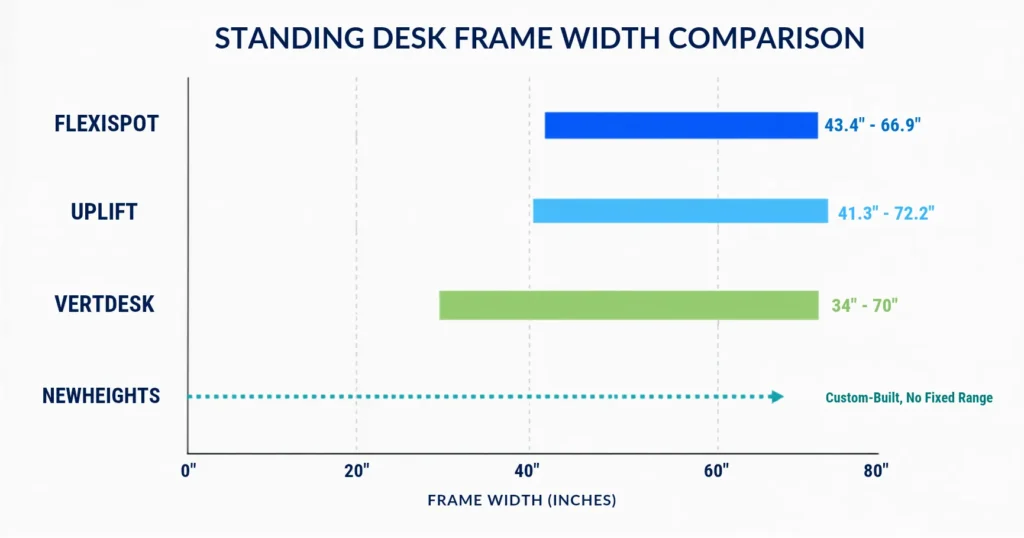
Note: NewHeights doesn’t sell a fixed-size frame the way the other three brands do. You choose your dimensions, and RightAngle builds the frame to match, so there’s no “compatible range” to check against, the fit is built in.
The 3 Measurements That Decide If Your Desktop Fits
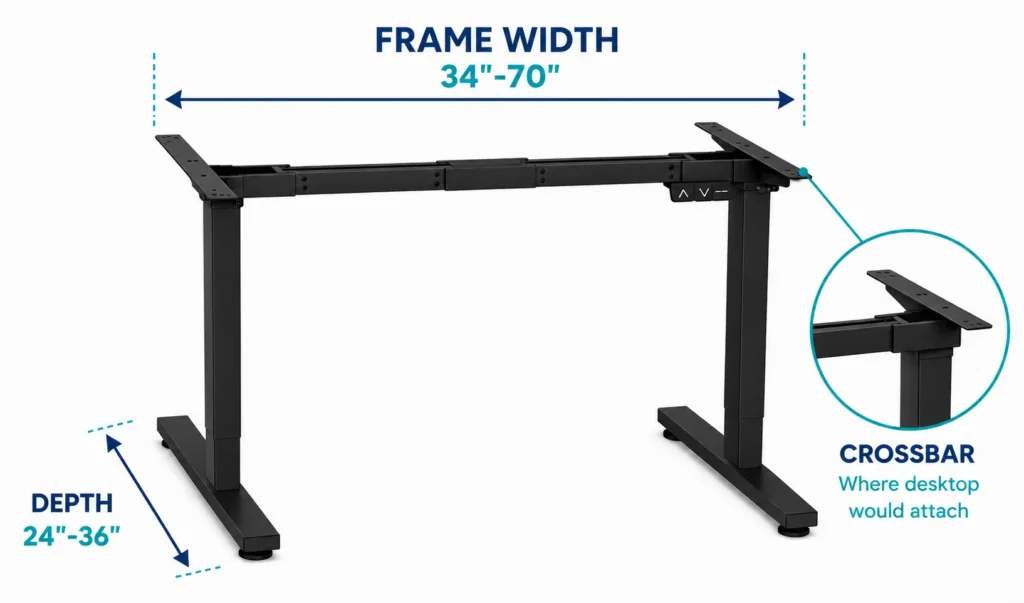
Before you buy a frame-only standing desk, measure your existing or planned desktop against these three numbers.
- Width: Measure your desktop’s total width and check it against the frame’s compatible range in the table above. Too narrow, and the desktop won’t reach the mounting brackets on both legs. Too wide and it will overhang, creating a wobble risk at standing height.
- Depth: This matters more than most buyers expect, especially if you also plan to add a monitor arm or CPU holder later, since those need extra desktop depth behind the frame’s crossbar. Check the frame’s minimum depth requirement, not just its maximum.
- Thickness: This is the one people skip, and it’s the one that causes real damage. Screw-in mounting brackets need enough material to bite into without poking through the top surface. FlexiSpot’s published minimum is 0.6″, while NewHeights recommends closer to 1″ to 1.125″ for a secure, wobble-free mount.
If your desktop is thinner than the frame’s minimum, the screws can pierce straight through the surface. This is especially common with cheap, hollow flat-pack desktops that look solid but are mostly empty honeycomb board inside.
If you’re specifically planning to reuse an IKEA-style desktop with a new frame, our Will a Monitor Arm Fit My IKEA Desk? guide covers how to check if that hollow-core construction can handle mounted hardware at all, worth reading before you commit to reusing one.
How to Calculate Your Usable Weight Capacity
The weight capacity listed on a frame’s spec sheet is not what you actually get to use. Your desktop itself eats into that number before you’ve placed a single monitor on it.
The formula: Frame’s rated capacity minus desktop weight equals your usable capacity for monitors, PC, and accessories.
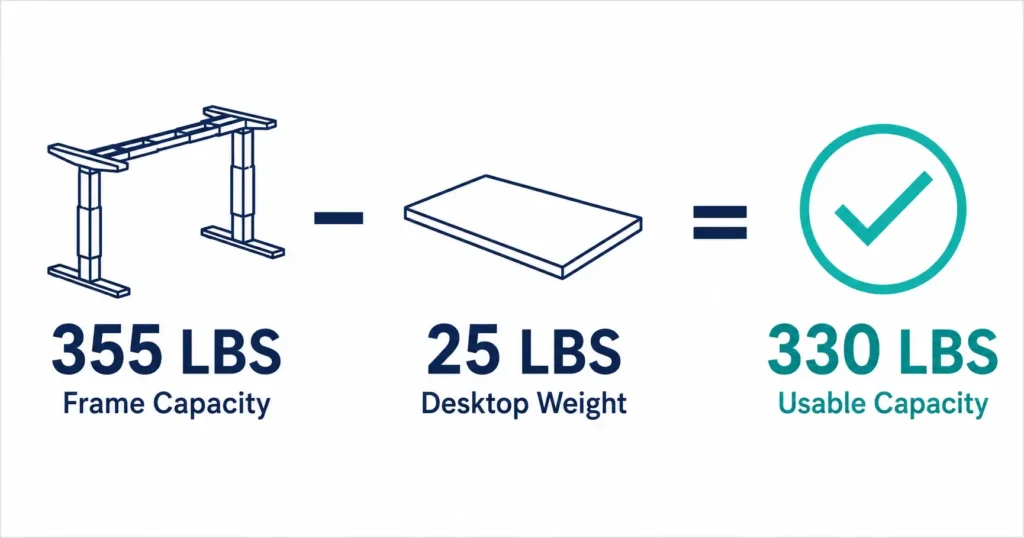
This is also where brand choice matters most for heavier setups. VertDesk’s v3+ (450 lbs) and Uplift’s V2-Commercial (355 lbs) leave the most headroom for a solid wood top plus a multi-monitor arm and desktop tower
Which Desktop Materials Work Best
- Laminate over MDF or particleboard: The most common choice for a reason, lightweight, scratch-resistant, and easy for any frame to lift. Works with every brand in the table above.
- Solid wood or butcher block: Heavier, and it eats further into your usable weight capacity, but it’s rigid enough that screws grip securely even at the thinner end of a frame’s thickness range.
- Hollow-core or honeycomb desktops: Common in the cheapest flat-pack options. These are the ones to be careful with. If you’re set on reusing one, check our IKEA compatibility guide.
If your desktop is already drilled or you’re planning to add a keyboard tray to whatever surface you land on, our Will a Keyboard Tray Fit Your Standing Desk? guide walks through the same thickness and crossbar-clearance checks specifically for that accessory.
FlexiSpot vs Uplift vs VertDesk vs NewHeights: Quick Take
- Smallest footprint / budget option: FlexiSpot, narrowest compatible range but the lowest cost of entry
- Widest desktop compatibility: Uplift, supports desktops up to 96″ wide
- Highest weight capacity: VertDesk v3+, at 450 lbs
- Best for a fully custom size: NewHeights, since it’s built to your exact dimensions rather than sold in a fixed range
If you already know you want a FlexiSpot frame specifically, our FlexiSpot E7 Compatibility Guide goes deeper into exact accessory fit for that model, including monitor arms and CPU holders.
Still not sure if your desktop will work with a specific frame? Reach out to our team through the contact form or email, and we’ll help you check it.
FAQ
Can I use my own desktop with a standing desk frame?
What happens if my desktop is too thin for the frame’s mounting screws?
Do all standing desk frames use the same mounting hardware?
Is a heavier desktop always more stable?
Can I put an IKEA desktop on a name-brand standing desk frame?
Why does NewHeights not list a compatible desktop range like the others?
How do I attach a desktop to a standing desk frame?
Do I need to drill holes, or can I use clamps to attach my desktop?
Every measurement and spec in this guide comes from our own research. If you notice something that doesn’t match, whether it’s a wrong number or a calculation mistake on our end, tell us through the comments or our contact form. We’ll fix it right away.
Related Guides
- FlexiSpot E7 Electric Adjustable Standing Desk: Complete Compatibility Guide
- Will a Monitor Arm Fit My IKEA Desk?
- Will a Keyboard Tray Fit Your Standing Desk? Read Before You Drill

I got interested in home office setups and noticed most buying guides online tell you if a product is ‘good,’ but never tell you if it will actually fit your specific desk. Does It Fit My Team exists to close that gap, with real measurements, verified sources, and straight answers.