
Affiliate Disclosure: This post contains affiliate links. If you buy through them, we earn a small commission at no extra cost to you. We only recommend products we would genuinely suggest to a friend.
A standing desk converter fits dual monitors only if two separate weight limits are checked, not just one: the desktop platform’s total weight capacity, and the monitor mount’s per-screen VESA capacity if it uses an arm. Most manual (pneumatic) converters cap out at around 30-35 lbs total, while electric models like the UPLIFT E7 go up to 110 lbs. A pair of 24- to 27-inch monitors with stands typically weighs 30 to 40 lbs combined, which is already at or past the limit of many budget converters before a keyboard, mouse, or laptop is added.
Key Takeaways
- Two weight limits matter separately: the desktop platform capacity and the monitor mount’s per-screen VESA capacity.
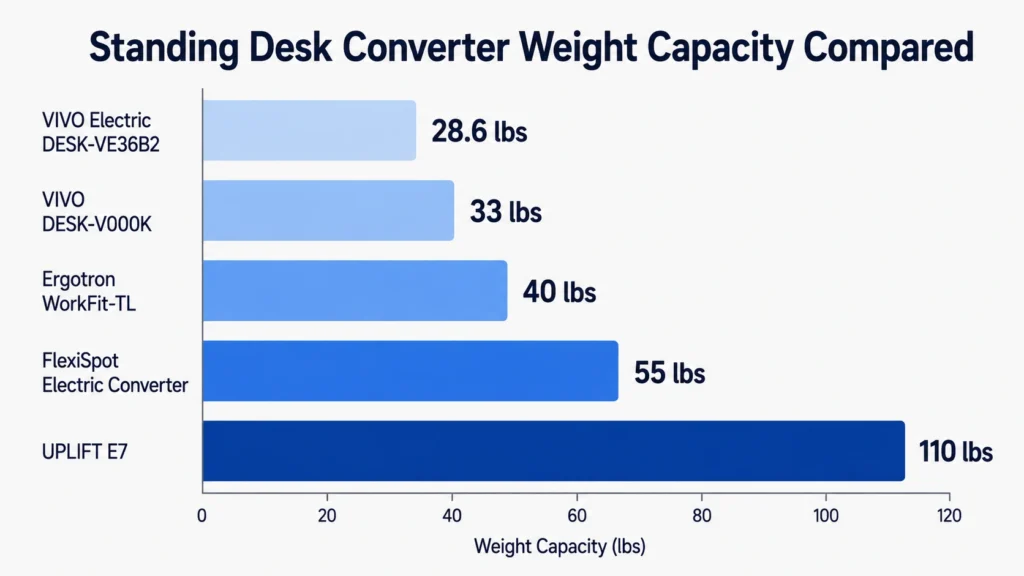
- Manual converters average 28 to 35 lbs total. Electric converters like the UPLIFT E7 handle up to 110 lbs.
- Dual 24- to 27-inch monitors with stands usually weigh 30 to 40 lbs combined, close to or past many converters’ limits.
- Platform width also matters. Dual monitors need at least 30 to 36 inches of surface width to sit side by side comfortably.
Who this guide is for: This guide is for anyone planning to run two monitors on a standing desk converter (FlexiSpot, VIVO, Ergotron, or UPLIFT) who wants to confirm it will hold the weight and fit the width before buying.
What Determines If a Standing Desk Converter Fits Dual Monitors
Three things decide whether a converter works for a dual monitor setup:
- The desktop platform’s total weight capacity, which has to cover both monitors, plus keyboard, mouse, and any accessories
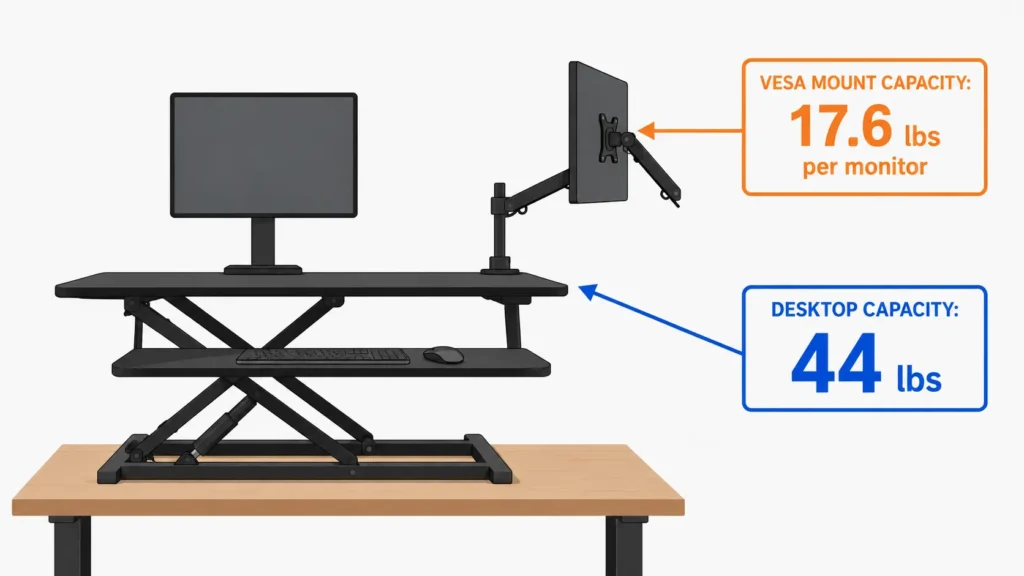
- The monitor mount’s per-screen VESA weight capacity, if the converter uses an arm instead of resting the monitors flat on the platform
- The platform’s width, since two monitors sitting side by side need real estate the smaller converters simply don’t have
Skipping the VESA-specific number is the most common mistake. A converter can have a high desktop capacity and still have a mount that only supports lighter monitors, since the two numbers are rated separately by most brands.
Step 1: Weigh Your Monitor Setup First
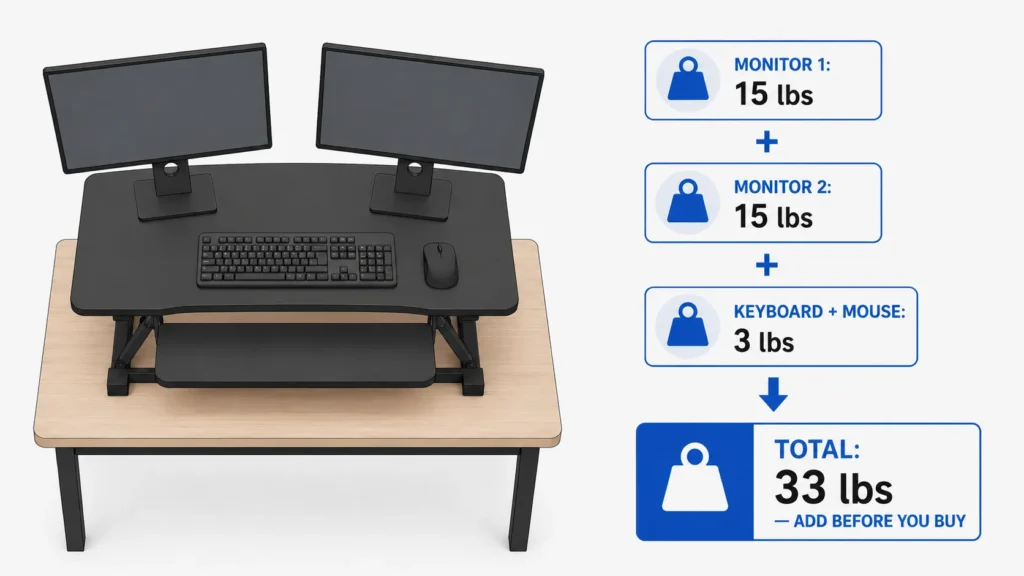
Before comparing converters, add up the actual weight being placed on it:
- Check each monitor’s weight with its stand still attached (most manufacturer spec sheets list this under “Weight, with stand”)
- Add the keyboard and mouse, generally 2 to 4 lbs combined
- If a laptop stays on the platform too, add that weight as well
- Measure the desk’s front-to-back depth too, not just the converter’s platform width. Most converters need at least 20 to 24 inches of desk depth to sit flat without overhanging the edge.
A pair of standard 24- to 27-inch monitors with stands usually lands between 30 and 40 lbs combined. Larger or curved monitors push this higher.
Step 2: Compare Against the Converter’s Real Capacity
The table below lists confirmed capacities from official brand sources.
| Converter | Desktop Weight Capacity | Monitor Mount (VESA Capacity) | Platform Width | Source |
|---|---|---|---|---|
| FlexiSpot 35″ Desk Converter | 44 lbs | Rests flat, no VESA arm | 35 in | Amazon listing (affiliate link) |
| VIVO DESK-V000K (dual monitor mount) | 33 lbs | 17.6 lbs per monitor | 31.5 in | Upmost Office / VIVO |
| VIVO Electric DESK-VE36B2 | 28.6 lbs | 16.5 lbs per monitor | 36 in | VIVO official page |
| Ergotron WorkFit-TL | 40 lbs | Rests flat, no VESA arm | 37.5 in | Haworth Store |
| UPLIFT E7 (dual/triple mount add-on) | 110 lbs | 17.6 lbs per monitor | 30 in | UPLIFT official page |
Keyboard tray weight capacity is separate from desktop capacity and covers only the keyboard and mouse, not monitors. “Rests flat” converters let monitors sit directly on the platform instead of clamping to an arm, so only the desktop capacity applies.
Beyond weight, the VESA mounting pattern also has to match. VIVO’s DESK-V000K and the UPLIFT E7 both support 75x75mm and 100x100mm hole patterns, per their official specs, so most monitors between 13 and 32 inches fit either one. If a monitor’s official spec sheet lists a different VESA pattern (some ultrawide or older monitors do), a separate adapter plate is needed before it can be mounted at all, regardless of weight.
Step 3: Match the Numbers to Your Setup
Once the monitor weight from Step 1 is known, matching it against Step 2’s table is straightforward:
- If both monitors together are under 30 lbs, most manual converters (FlexiSpot M2B, VIVO K-Series) work fine.
- If either single monitor is heavier than 17.6 lbs on its own, a VESA arm converter (VIVO, UPLIFT E7) will reject it even if the total desktop capacity looks sufficient.
- If the combined setup is close to or above 40 lbs, an electric converter like the UPLIFT E7 is the safer choice, since manual gas-spring converters at their listed maximum become noticeably harder to lift and lower.
Recommendation
FlexiSpot 35″ Desk Converter (Budget Pick, Flat Platform)
This manual converter rests both monitors flat on a 35-inch platform rather than clamping them to an arm, so there is no separate VESA limit to worry about, only the 55 lb (44 lb desktop + 11 keyboard tray lb) desktop capacity.
Best for: Two lighter monitors (21 to 24 inches) with stands, where combined weight stays under 44 lbs.
(affiliate link)
UPLIFT E7 (Heavy Setup Pick, Electric with VESA Mount)
With a 110 lb desktop capacity and 17.6 lbs per monitor on the VESA mount, this covers even large or curved dual monitor setups without hitting a limit, according to the official UPLIFT spec sheet.
Best for: Dual 27-inch or larger monitors, or setups where combined weight is already close to 40 lbs.
(affiliate link)
Summary
For dual monitor setups under 30 lbs combined, a manual converter with a flat platform, like the FlexiSpot 35″ Desk Converter, is enough and costs less. For heavier or larger monitors, especially anything over 17.6 lbs per screen on a VESA arm, an electric converter with a higher-rated capacity, like the UPLIFT E7, avoids the mount rejecting the weight later. Checking both the desktop number and the VESA number separately, not just one, is what actually prevents a return. Readers deciding between a full monitor arm and a converter’s built-in mount can also check our guide on dual monitor arm desk fit for the clamp and clearance side of that decision. If a monitor arm is later added on top of the converter’s platform, our piece on whether monitor arms damage desks covers the added pressure point risk.
Still not sure if a specific converter will hold your setup? Reach out through our contact form; we’re happy to help check before you buy.
FAQ
How much weight can a standing desk converter hold for dual monitors?
Does the converter’s desktop weight capacity include the monitor mount?
What happens if I exceed a converter’s weight limit?
Can I use my own monitor arm instead of the converter’s built-in mount?
Will two 27-inch monitors physically fit side by side on a converter?
Are electric converters worth it over manual ones for dual monitors?
Every measurement and spec in this guide comes from our own research. If you notice something that doesn’t match, whether it’s a wrong number or a calculation mistake on our end, tell us through the comments or our contact form. We’ll fix it right away
Related Guides
- Will a Dual Monitor Arm Fit Your Desk? (Everything You Must Measure Before Buying)
- Do Monitor Arms Damage Desks? (What Most Buyers Don’t Realize)
- Will a Monitor Mount Fit Your Adjustable Desk? (Do Not Order Until You See This)

I got interested in home office setups and noticed most buying guides online tell you if a product is ‘good,’ but never tell you if it will actually fit your specific desk. Does It Fit My Team exists to close that gap, with real measurements, verified sources, and straight answers.