
If you’ve been shopping for a monitor arm, you’ve probably seen people ask the same question:
“Can a monitor arm damage my desk?”
It’s a fair concern. After all, a monitor arm holds a surprising amount of weight, and all that pressure is concentrated into a relatively small area where the clamp attaches.
Most desks can handle a monitor arm without any issues. However, not every desk is built the same, and that’s where problems can begin.
In this guide, we’ll look at when monitor arms can damage desks, which desk materials are most vulnerable, and what you can do to prevent problems before they happen.
How a Monitor Arm Puts Pressure on a Desk
Unlike a traditional monitor stand, a monitor arm doesn’t spread weight across a large area of the desktop.
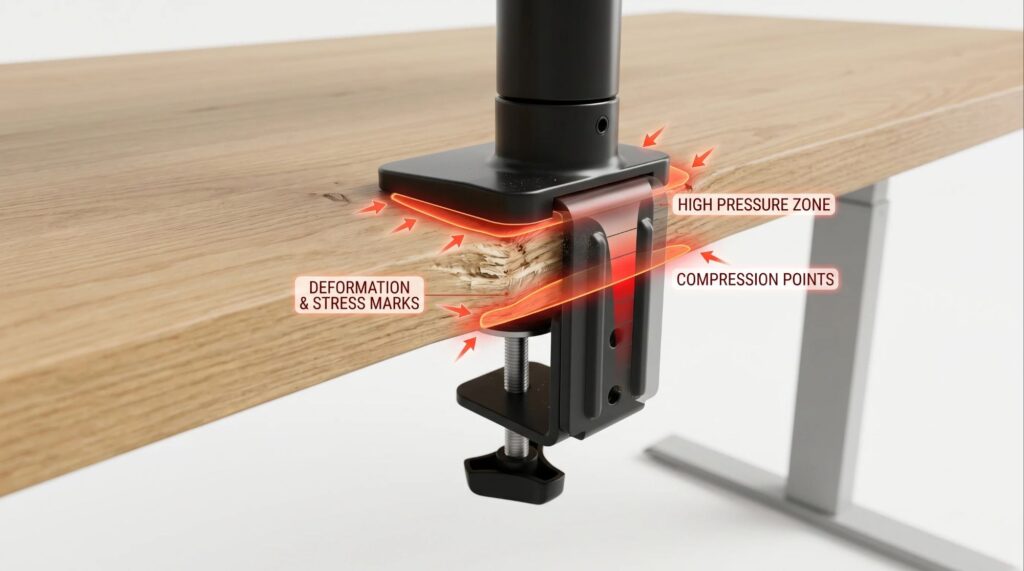
Instead, most of the force is concentrated around the clamp or mounting point. That’s why some people worry about dents, scratches, or even structural damage.
Think of it this way: a monitor sitting on its original stand spreads its weight over several inches of surface area. A monitor arm transfers that load into a much smaller section of the desk.
That doesn’t automatically mean damage will occur. What matters most is the strength of the desk and how the arm is installed.
Which Desk Materials Are Most Likely to Get Damaged?
The material of your desk matters more than the monitor arm itself.
• Particle Board Desks
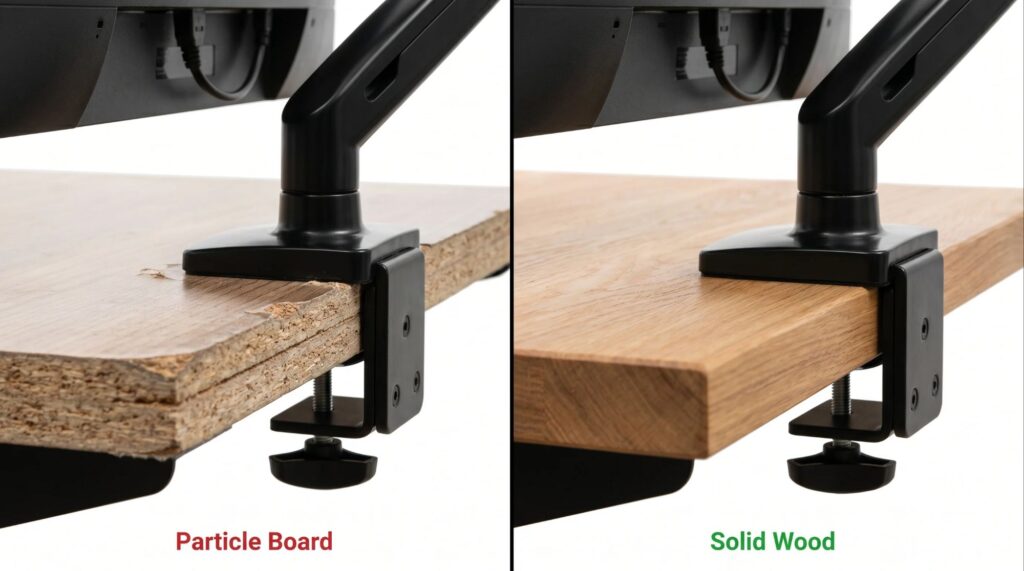
Particle board desks are usually the most vulnerable. They’re affordable and widely used, but they don’t always respond well to constant clamp pressure.
Over time, the material can compress around the clamp area, especially if you’re using a heavy monitor or a dual-monitor setup.
In most cases, the damage shows up as dents or permanent marks rather than a complete structural failure.
• MDF Desks
MDF desks generally perform a little better than particle board, but they aren’t indestructible.
A properly installed monitor arm is usually fine. However, overtightening the clamp can still leave visible impressions over time.
• Solid Wood Desks
Solid wood is often the safest option.
Most quality wood desktops can support monitor arms without significant issues. Minor clamp marks may appear after years of use, but serious damage is uncommon.
• Standing Desks
Most modern standing desks are designed to support monitors, monitor arms, and other common accessories.
If you’re planning multiple desk upgrades, you may also want to read our guide on Will a Keyboard Tray Fit Your Standing Desk?
Do Dual Monitor Arms Increase the Risk?
In short, yes.
A dual monitor arm usually carries more weight than a single-monitor arm.. It also creates more leverage, which increases the pressure placed on the clamp area.
That doesn’t mean dual monitor arms are unsafe. It simply means proper installation becomes even more important.
If you’re still deciding whether your desk can physically support a larger setup, check out our guide on Will a Dual Monitor Arm Fit Your Desk?
Signs Your Desk Might Not Be Suitable
Not every desk is well suited for a monitor arm.
Watch for these warning signs:
• A hollow desktop construction.
• Visible bending near the edges.
• Existing cracks or damage.
• Excessive desk wobble.
• Very thin desktop material.
If your desk already shakes while typing, you should address that problem first.
We covered several solutions in our guide on How to Fix a Wobbly Standing Desk.
A monitor arm won’t necessarily cause the wobble, but it can make an unstable desk feel worse.
How To Prevent Desk Damage
The good news is that preventing damage is usually simple.
- Use a Reinforcement Plate
A reinforcement plate spreads pressure across a larger area.
This is one of the easiest ways to protect particle board and MDF desks.
- Don’t Overtighten the Clamp
Many people tighten monitor arm clamps far more than necessary.
The clamp should feel secure, but it doesn’t need excessive force.
- Check Weight Ratings
Always compare:
• Monitor weight
• Monitor arm weight limit
• Desk specifications
Ignoring weight ratings is one of the most common installation mistakes.
- Inspect Your Desk Occasionally
Every few months, take a quick look at the clamp area.
Check for:
• Surface dents
• Compression marks
• Loose hardware
• New wobble
Small issues are much easier to fix before they become serious problems.
Monitor Arm vs Monitor Stand
Many people assume monitor stands are safer simply because they sit directly on the desk.
That’s partly true.
A monitor stand spreads weight across a larger area. However, it also takes up valuable desk space.
A monitor arm frees up workspace, improves ergonomics, and allows more flexibility when positioning your screen.
For most users, the benefits outweigh the risks as long as the desk is suitable and the arm is installed correctly.
Final Verdict
So, do monitor arms damage desks?
For most people, the answer is no.
Most cases of desk damage are caused by weak materials, excessive clamp pressure, or poor installation practices rather than the monitor arm itself.
If your desk is in good condition and you install the arm correctly, the chances of serious damage are very low.
For most people, the ergonomic benefits and extra desk space are well worth the small risk.
Before installing a monitor arm, take a few minutes to check your desk material, weight limits, and clamp location. That simple step can prevent most problems before they start.
Need help choosing desk accessories? Send us a message through our contact form, and we’ll do our best to help.

I got interested in home office setups and noticed most buying guides online tell you if a product is ‘good,’ but never tell you if it will actually fit your specific desk. Does It Fit My Team exists to close that gap, with real measurements, verified sources, and straight answers.