
Will a Dual Monitor Arm Fit Your Desk? Setting up a dual monitor arm is one of the best ways to clear up desk space and create a clean, professional workstation. However, before you click “Buy Now” on Amazon, there is one crucial question you need to answer: Will a dual monitor arm actually fit your desk?
Many buyers make the mistake of purchasing a heavy-duty mount, only to realize their desk is too thick, too thin, or made of a material that could crack under the pressure. To save you from a costly mistake, we have created the ultimate measurement checklist. Here is exactly what you need to measure before buying a dual monitor mount.
1. Measure Your Desk Thickness (The Clamp Capacity)
Most dual monitor arms use a C-clamp mechanism that grips the edge of your desk. Every monitor mount has a specific minimum and maximum thickness range that it can securely lock onto.
- Standard Range: Most Amazon monitor mounts support a desk thickness between 0.4 inches to 3.5 inches.
- What to do: Take a measuring tape and measure the exact thickness of your desktop. If your desk is extremely thin (like a glass desk) or incredibly thick (like a custom wooden block), you will need to check the mount’s specifications carefully.
Pro Tip: If your desk is on the thinner side, using a Monitor Mount Reinforcement Plate is highly recommended to distribute the weight evenly.
2. Check the Desk Lip and Under-Desk Clearance
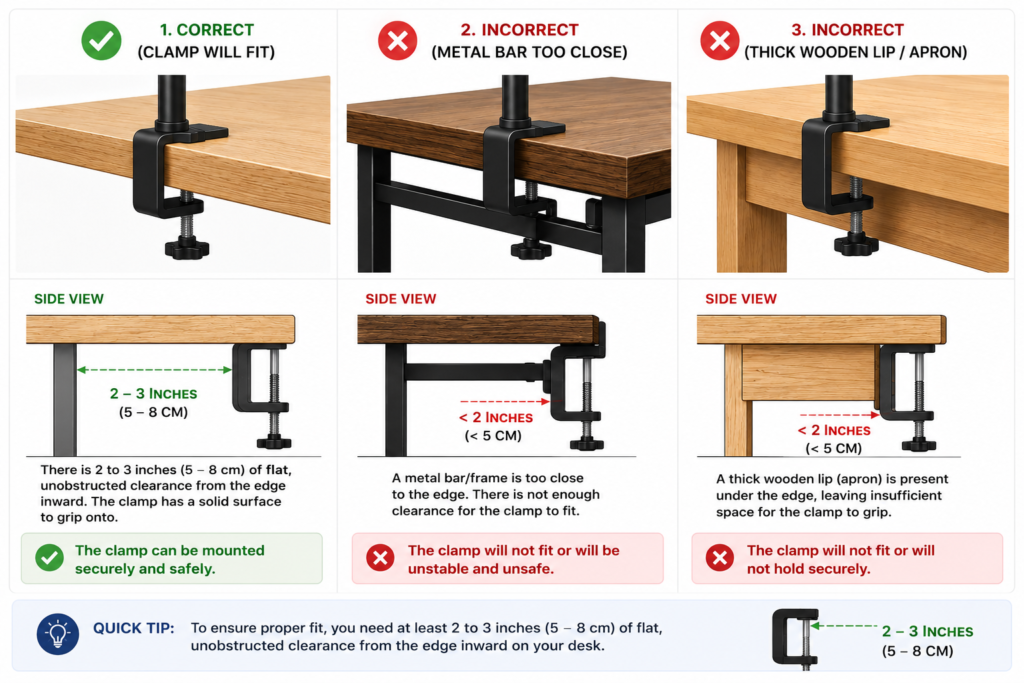
Just because the top of your desk looks flat doesn’t mean a clamp will fit underneath it. Many modern desks have metal support frames, drawers, or decorative wooden lips running right beneath the edge.
- The Problem: If a metal bar runs too close to the edge, the bottom part of the C-clamp won’t have enough flat surface to grip onto.
- The Measurement: Look under your desk. You need at least 2 to 3 inches of flat, unobstructed clearance (Desk Lip) from the edge inward for the clamp to sit flush.
3. Identify Your Desk Material (Safety First!)
The weight of two monitors combined with the steel arm creates a massive amount of downward pressure on a single point of your desk. Choosing the wrong material can lead to a disastrous desktop collapse.
- Solid Wood & Metal: 100% Safe. If your desk is made of solid oak, walnut, or has a steel frame, it can easily handle a dual monitor setup.
- Particle Board / MDF (e.g., Ikea Linnmon): Proceed with Caution. These desks are hollow or filled with paper honeycomb inside. Clamping a heavy dual arm directly onto them can crush the desk over time.
- Glass Desks: Avoid C-Clamps. Standard tightening can shatter the glass instantly. For glass, look for a Grommet Hole Mount or a free-standing desk base instead.
If you’d rather not clamp anything to your desk at all, a standing desk converter with a built-in monitor mount might be the simpler route. Check our guide on standing desk converter weight capacity for dual monitors to see which models hold two screens safely
Top Recommended Amazon US Fits For Your Setup
Now that you know your measurements, here are the best-vetted options on Amazon US that cater to different desk types:
• The Heavy-Duty Premium Pick:
Ergotron – LX Desk Mount Dual Monitor Arm. Perfect for solid wood desks and heavy gaming monitors.
• The Budget King:
EVEO Dual Monitor Stand. Great for standard office desks with thickness between 0.4 to 3.1 inches.
• The Ultimate Desk Saver Accessory:
Huanuo Monitor Mount Reinforcement Plate. A must-have steel plate if you are mounting your arm on an Ikea or MDF particleboard desk.
Conclusion:
Before upgrading your setup, spend just 2 minutes with a measuring tape. Ensure your desk thickness is within the standard 0.4 to 3.5-inch range, check for under-desk clearance, and verify your desk material. Taking these quick steps ensures your new dual monitor arm fits like a glove without damaging your workspace!

I got interested in home office setups and noticed most buying guides online tell you if a product is ‘good,’ but never tell you if it will actually fit your specific desk. Does It Fit My Team exists to close that gap, with real measurements, verified sources, and straight answers.
Pingback: Do Monitor Arms Damage Desks? Risks, Prevention & Desk Types
Pingback: Will a Cable Tray Fit Your Standing Desk? (Compatibility Guide)
Pingback: Ergotron LX Pro Dual Stacking Arm: Will It Fit? (Checked)