
Ergotron makes three different dual stacking arms, and they do not all stack monitors the same way. If you searched for the LX Pro Dual Stacking Arm specifically, you already know which one you want. What most buyers do not check before ordering is whether their actual monitor can physically stack on it.
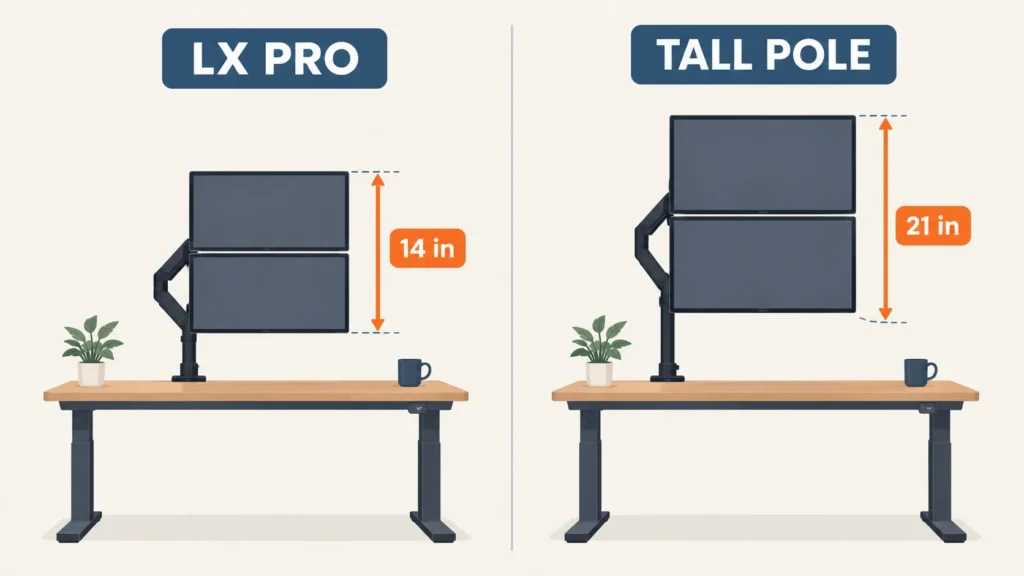
Yes, the Ergotron LX Pro Dual Stacking Arm fits most standing desks and most monitors up to 24 inches, but stacking success depends on your monitor’s outside height, not its diagonal screen size. The manufacturer caps the outside height of a stacked display at 14 inches. Many 24-inch and larger monitors, especially anything with a tall stand base or a wide bottom bezel, exceed that even though they fit the diagonal size limit.
Key Takeaways
- The LX Pro Dual Stacking Arm holds monitors up to 24 inches diagonal and 4 to 22 lbs each, but the real stacking limit is a 14-inch maximum outside display height, separate from screen size
- An older Ergotron model, the LX Dual Stacking Arm Tall Pole, allows a much taller 21-inch outside height limit, so if your monitor is too tall for the LX Pro, this older model may still work
- Both stacked monitors share one vertical column, so a common complaint is the lower arm drifting or sagging slightly under combined weight if the tension is not calibrated correctly during setup
- The desk clamp fits surfaces 0.4 to 2.36 inches thick, and VESA compatibility is limited to 75x75mm and 100x100mm only, both worth checking before you buy
Who this is for: this guide is for you if you’re considering the Ergotron LX Pro Dual Stacking Arm specifically, or you already bought it and your top monitor won’t sit right, and you want to know exactly why before you return it or start troubleshooting.
Why “Dual Stacking Arm” Is Not One Product
Search “ergotron dual stacking arm” and you’ll find at least three different products, each with a different stacking height limit. The current LX Pro Dual Stacking Arm caps outside display height at 14 inches for stacking to work properly. An older model, the LX Dual Stacking Arm Tall Pole, allows up to 21 inches, nearly 50% taller. A third, non-Pro standard LX Dual Stacking Arm sits closer to the LX Pro’s limits but with a slightly lower 20 lb per-monitor weight capacity instead of 22 lb.
None of these differences show up in the product name. If you already own a tall monitor and ordered based on the diagonal size number alone, this is very likely why your top monitor won’t tuck in properly or ends up tilted at an odd angle instead of sitting flush.
If you’re still deciding between stacking and a standard side-by-side setup before narrowing down to a specific Ergotron model, our Will a Dual Monitor Arm Fit Your Desk? guide covers the broader measurements to check first, including desk depth and extension clearance that apply regardless of brand.
Measure Your Monitor’s Outside Height, Not Just Its Screen Size
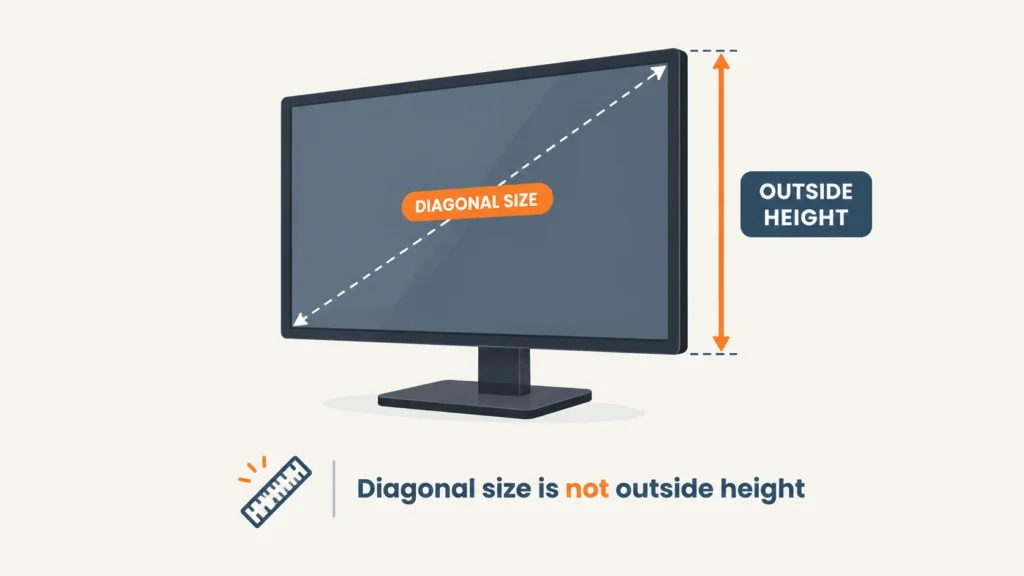
Outside height means the full physical height of the monitor including its bezel and the VESA mounting bracket area, measured with the monitor standing upright, not the diagonal screen measurement used for sizing. A 24-inch diagonal monitor can still have an outside height close to or over 14 inches depending on its bezel design and panel aspect ratio, which is exactly the gap between the size limit and the real stacking limit.
Before ordering, stand your monitor up and measure top to bottom with a tape measure, bezel included. If that number is 14 inches or under, the LX Pro Dual Stacking Arm should stack it without issue. If it’s over 14 inches but under 21, the older LX Dual Stacking Arm Tall Pole is built for exactly that case.
Weight, VESA, and Clamp Specs
| Spec | LX Pro Dual Stacking Arm | LX Dual Stacking Arm, Tall Pole |
|---|---|---|
| Max outside height for stacking | 14 in | 21 in |
| Max screen size (diagonal) | Up to 24 in (some listings show 27 in, verify on the exact listing you buy) | Up to 40 in |
| Weight capacity per monitor | 4 to 22 lbs | 7 to 22 lbs (some listings show 14–44 lbs for heavier configurations) |
| VESA compatibility | 75x75mm and 100x100mm only | 75x75mm and 100x100mm only |
| Desk clamp thickness | 0.4 to 2.36 in | Up to 2.6 in |
| Height adjustment (lift) | 13 in | 13 in |
| Tilt range | -15 to 70 degrees | -5 to 75 degrees |
What Can Go Wrong After You Install It
Both monitors on a stacking arm share the same vertical pole, so the way the arm is calibrated matters more here than on a side-by-side setup. A commonly reported issue is the lower arm slowly drifting downward over time under the combined weight of both displays, especially if the tension was not set correctly for the specific monitor weight during installation.
Ergotron builds a tension-level indicator into the LX Pro specifically to address this, letting you set and reference the correct tension for your monitor’s actual weight rather than guessing. If your stacked monitor is drifting, re-checking this tension setting against your monitor’s actual weight, not just tightening the arm further, is usually the fix.
How Much Desk Space It Actually Needs
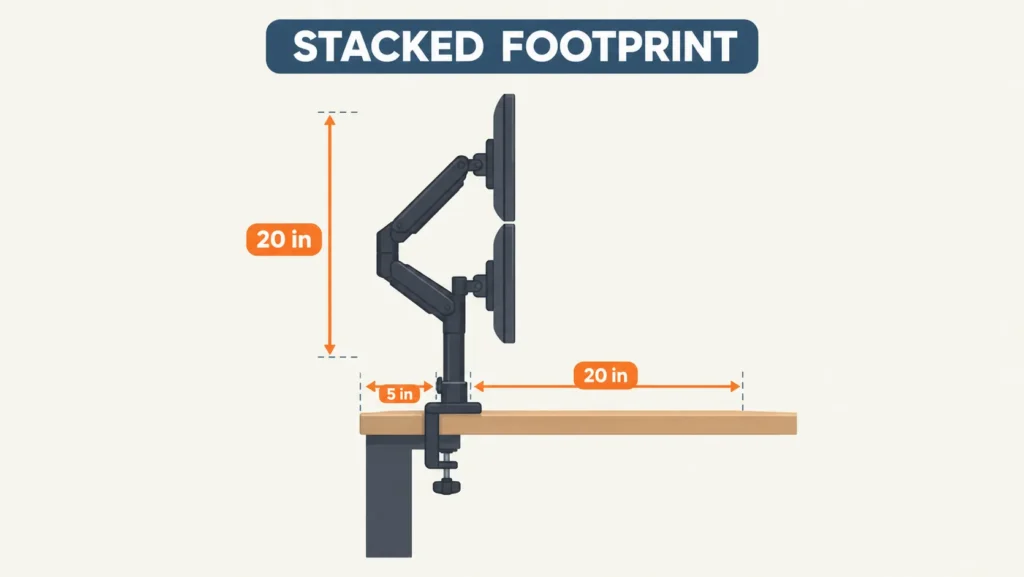
With both arms extended in a stacked position, the LX Pro Dual Stacking Arm’s footprint runs about 20 inches tall by 20 inches wide by 5 inches deep from the base. The base clamp itself is compact, but plan for the full stacked height when checking clearance under shelves or wall-mounted storage above your desk, since the built-in fold-back feature exists specifically to tuck the arm under overhead shelving when not extended.
Which One Should You Buy?
Choose the LX Pro Dual Stacking Arm if your monitor’s outside height measures 14 inches or under, which covers most standard 24-inch monitors without an unusually tall stand or bezel. It’s also the newer design with the more refined cable management and tension indicator.
Choose the LX Dual Stacking Arm Tall Pole if your monitor is taller than 14 inches outside height but under 21 inches, or if you’re stacking a monitor up to 40 inches diagonal. This is the better fit for larger displays that the LX Pro’s stacking limit rules out entirely.
If neither stacking option works for your monitor’s weight or height, a single-arm setup per monitor is still an option. Our Ergotron LX Monitor Arm guide covers the 7-25 lb single-arm tier, and our Ergotron HX Monitor Arm guide covers the heavier-duty 20-42 lb tier, in case one of your two monitors needs more support than the other.
What to Do If Your Monitor Doesn’t Fit
If your monitor’s outside height is over 14 inches, don’t force it onto the LX Pro. Look at the LX Dual Stacking Arm Tall Pole instead, which is built for exactly this case with its 21-inch limit. If your monitor is over 21 inches tall or heavier than 22 lbs, a side-by-side dual arm configuration, rather than stacking, is the safer option regardless of which Ergotron model you’re considering.
Also worth checking before you clamp anything on: our Do Monitor Arms Damage Desks? guide covers the desktop material and clamp-pressure factors that apply just as much to a stacking arm as a single arm.
Still not sure if your specific monitor will stack cleanly? Reach out through our contact form and tell us your monitor’s brand, model, and outside height, we’re happy to help you check it.
FAQ
Will the Ergotron LX Pro Dual Stacking Arm fit any 24-inch monitor?
What’s the difference between the LX Pro Dual Stacking Arm and the LX Dual Stacking Arm Tall Pole?
Why is my top monitor tilted or not sitting flush after stacking?
Can I use this arm for side-by-side monitors instead of stacking?
Is the LX Pro Dual Stacking Arm available on Amazon?
Every measurement and spec in this guide comes from our own research. If you notice something that doesn’t match, whether it’s a wrong number or a calculation mistake on our end, tell us through the comments or our contact form. We’ll fix it right away.
Related Guides
- Ergotron HX Monitor Arm: Will It Fit Your Desk? (Checked)
- Ergotron LX Monitor Arm: Will It Fit Your Desk? (Checked)
- Do Monitor Arms Damage Desks? (What Most Buyers Don’t Realize)
- Will a Dual Monitor Arm Fit Your Desk? (Everything You Must Measure Before Buying)

I got interested in home office setups and noticed most buying guides online tell you if a product is ‘good,’ but never tell you if it will actually fit your specific desk. Does It Fit My Team exists to close that gap, with real measurements, verified sources, and straight answers.