
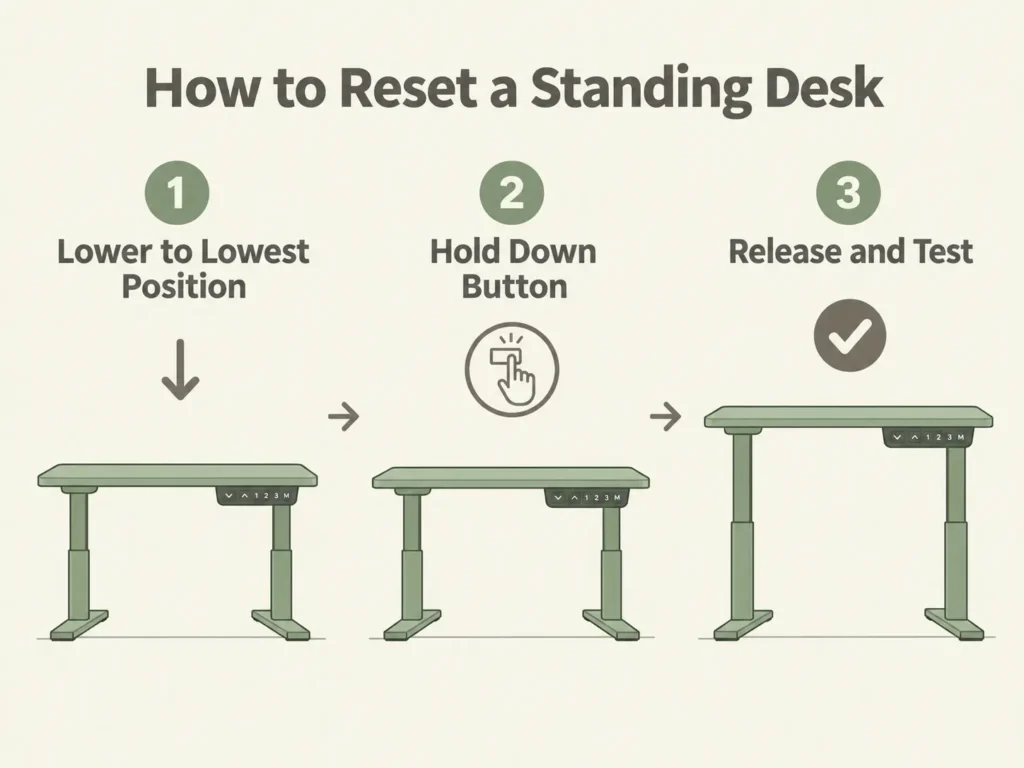
Most standing desks use the same basic reset process. Lower the desk all the way down, hold the down button, and wait for it to settle. This works on almost any electric standing desk, including FlexiSpot, Uplift, or Fezibo. But each brand uses different display messages and error codes. Knowing your brand’s exact codes saves you from guessing or from calling for a repair you don’t actually need.
Key Takeaways
- The reset process is nearly universal. Lower the desk to its lowest position, hold the down button, and release once it settles
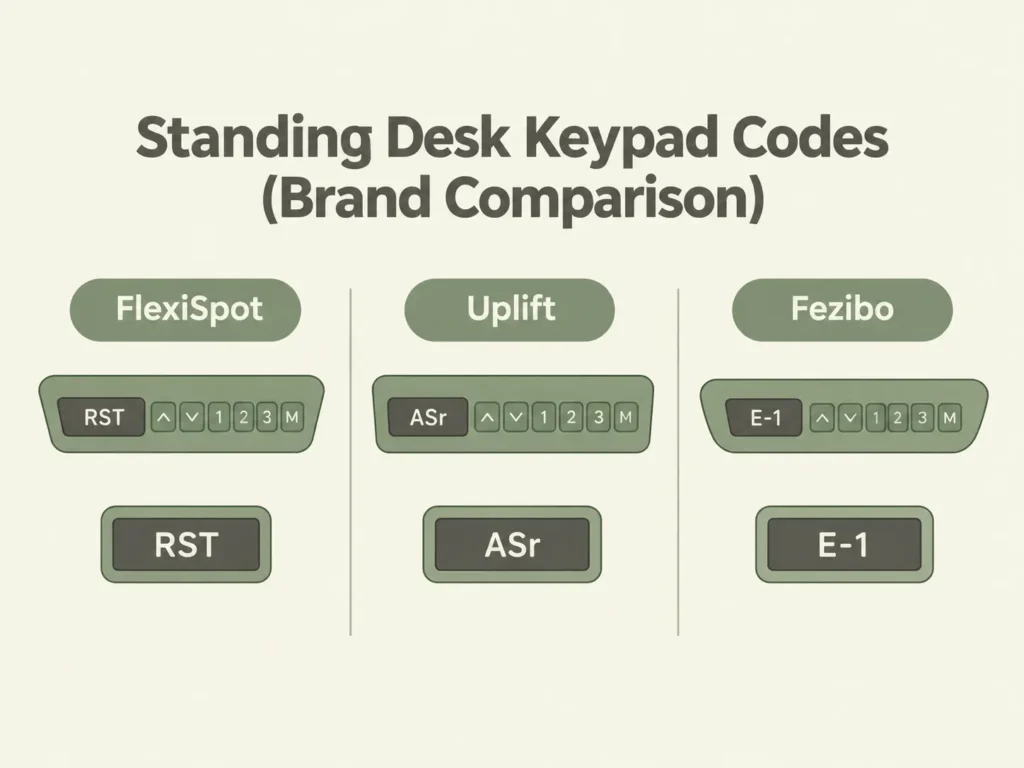
- FlexiSpot uses codes like RST, E01, E02, and E07 through E23. Most point to overheating, overload, or a motor connection issue
- Uplift’s display shows “ASr” during reset (or “RESET” on paddle keypads), and uses codes like E01 through E012 and H01
- Fezibo uses different codes entirely, including E-1, E-2, “ovr” for anti-collision, and “dut” for a communication error
- Uplift’s support page says 70% of returned control boxes weren’t actually broken. A reset fixed them
Who this is for: This guide is for you if your standing desk is stuck, unresponsive, or showing an error code. It’s also for you if you just want to know what your desk’s display is trying to tell you before you call for support.
The Universal Reset Process
Electric standing desks lose their “memory” when they lose power. This can happen after a move, a power cut, or simply unplugging the desk. Once that memory is gone, the desk no longer knows where it is. It needs to find a reference point again, and that reference point is always the lowest position. Depending on your desk, this button might be on a keypad, a handset, or a control panel mounted under the desktop.
Here’s the process for resetting most electric standing desks:
- Clear the area under and around the desk. The desk needs to move freely during reset
- Press and hold the down button
- Keep holding until the desk reaches its lowest position and stops
- Continue holding for a few more seconds. The desk may dip slightly, then settle
- Release the button and test the desk’s upward and downward movement
- If nothing happens, unplug the desk for 30 seconds, plug it back in, and repeat the steps
If your desk still won’t move after this, the issue is likely brand-specific. Check the section below for your desk brand.
FlexiSpot: Error Codes and Reset
FlexiSpot’s own support content lists several error codes. RST means the desk needs a reset and follows the universal steps above. E01 and E02 point to overheating or overuse. Give the desk 15 to 20 minutes to cool down before trying again. E03, E04, and OL all mean the desk is overloaded. Remove weight from the desktop before resetting. Codes from E07 to E23 point to a motor or wiring issue. Try the reset first, and check that all cable connections are secure if the code persists.
| FlexiSpot Code | What It Means | What To Do |
|---|---|---|
| RST | Desk needs a reset | Follow the universal reset steps above |
| E01 / E02 | Overheating or overuse | Let the desk rest for 15-20 minutes, then retry |
| E03 / E04 / OL | Overloaded | Remove weight from the desktop, then reset |
| E07 to E23 | Motor or wiring issue | Reset first, then check cable connections |
If you have the FlexiSpot E7, check our FlexiSpot E7 compatibility guide. It includes the full height range and specs, which can help with troubleshooting or checking whether it will fit.
Uplift: Error Codes and Reset
Uplift’s official support page states: 70% of control boxes returned for replacement were intact. A reset would have fixed them. Uplift’s process is similar to the standard one. However, their display shows “ASr” when the desk is ready to reset. In contrast, paddle keypads without a display show the word “RESET”. Press and hold the down button for about 10 seconds until the display changes. Hold the down button again after that message appears, and the desk will lower slightly, rise slightly, and stop.
Uplift also provides specific error codes: E01 to E012, E08 for an Advanced Keypad-specific error, and H01 for an overheated control box.
| Uplift Code | What It Means | What To Do |
|---|---|---|
| ASr / RESET | Ready to reset | Hold the down button again until the desk settles |
| E01-E012 | Varies by code, mostly connection or sensor issues | Check cable connections, then reset |
| E08 | Advanced Keypad specific error | Reset, then contact Uplift support if it persists |
| H01 | Control box overheated | Let the desk rest, then retry |
Fezibo: Error Codes and Reset
Fezibo’s official manual describes a similar process. Hold the down button to lower the desktop to its lowest height, which the manual lists as 27.6 inches (70 cm) on its Basic-2 frame. One important detail: Fezibo’s anti-collision feature turns off during a reset. So, make sure to clear the area underneath first.
Fezibo’s error codes look different from FlexiSpot’s and Uplift’s. “ovr” means the anti-collision system was triggered, not a fault with the desk. “dut” points to a communication interruption between the control box and panel.
| Fezibo Code | What It Means | What To Do |
|---|---|---|
| E-1 / rES | Manual reset required, or overloading | Remove weight, then reset |
| ovr | Anti-collision triggered | Clear the obstruction, then retry |
| E-2 | Excessive use | Wait about 15 minutes for the control box to cool |
| dut | Communication interruption | Unplug for 20 minutes, check cables, then reset |
What If the Reset Doesn’t Work?
If you’ve followed your brand’s steps and the desk still won’t respond, the problem is likely a loose cable or a hardware fault. A reset won’t fix it. Check every cable between the control box, the motor, and the keypad first. A surprising number of “broken” desks turn out to have a cable that came loose during assembly or a move.
If everything is connected and the desk still won’t move, it’s time to contact your desk’s manufacturer directly. All three brands provide direct support. Replacing a control box is usually an easy swap, not a complete desk replacement.
FAQ
Why does my standing desk need a reset in the first place?
Is it safe to reset my standing desk myself?
My desk shows a code that isn’t in this guide. What do I do?
Will resetting my desk erase my saved height presets?
How often do standing desks need to be reset?
Every measurement and spec in this guide comes from our own research. If you notice something that doesn’t match, whether it’s a wrong number or a calculation mistake on our end, tell us through the comments or our contact form. We’ll fix it right away.
Related Guides
- FlexiSpot E7 Electric Adjustable Standing Desk: Complete Compatibility Guide
- How to Fix a Wobbly Standing Desk (The Fix That Actually Works First)
- Why Does My Standing Desk Wobble on Carpet? Causes, Fixes & What Actually Works

I got interested in home office setups and noticed most buying guides online tell you if a product is ‘good,’ but never tell you if it will actually fit your specific desk. Does It Fit My Team exists to close that gap, with real measurements, verified sources, and straight answers.