
Affiliate Disclosure: This post contains affiliate links. If you buy through them, we earn a small commission at no extra cost to you. We only recommend products we would genuinely suggest to a friend.
Yes, in most cases, but only if there is at least 14 inches of front-to-back clearance between your desktop’s front edge and the crossbar underneath it. C-frame desks usually have more of this space than T-frame desks, where the crossbar sits closer to the center.
Key Takeaways
- Add-on standing desk drawers typically need about 14 inches of clearance between the desktop’s front edge and the crossbar
- C-frame desks (crossbar set back near the legs) generally offer more drawer room than T-frame desks (crossbar centered)
- Desk brand matters. FlexiSpot’s C-Frame option and IKEA’s IDÅSEN don’t offer the same amount of usable space
- Drawer depth (front to back), not width, is the single most important spec to check before buying
This guide is for you if you already have standing desk drawers on your shopping list and want to know if one will actually fit under your desk without hitting the crossbar, scraping your knees, or needing to be returned.
What Determines Whether Standing Desk Drawers Fit
Standing desk drawers are add-on units that slide onto the underside of your desktop, usually held in place with screws or brackets. Unlike a drawer built into a traditional desk, these have to share space with the crossbar, the metal bar that connects the two lifting legs and keeps the frame steady. That crossbar is the single biggest reason a standing desk drawer fits on one desk and jams into the frame on another.
The two things that decide fit are always the same: how your frame is built (T-frame or C-frame), and how much physical space exists between the front edge of your desktop and that crossbar. Get both of these right before you buy, and the sizing question mostly answers itself.
Step 1: Find Out If Your Desk Is T-Frame or C-Frame
Look underneath your desk from the front. If the crossbar runs roughly through the middle, connecting the legs in a shape that looks like a sideways T, you have a T-frame desk. If the crossbar sits closer to the back, near the legs themselves, leaving open space toward the front edge, you have a C-frame desk.
| Frame Type | Crossbar Position | Typical Drawer Room | Best For |
|---|---|---|---|
| T-frame | Centered under the desktop | Limited, drawer often has to be shallow | Slim, low-profile drawers only |
| C-frame | Set back near the rear legs | More generous, especially near the front edge | Standard-depth add on drawers |
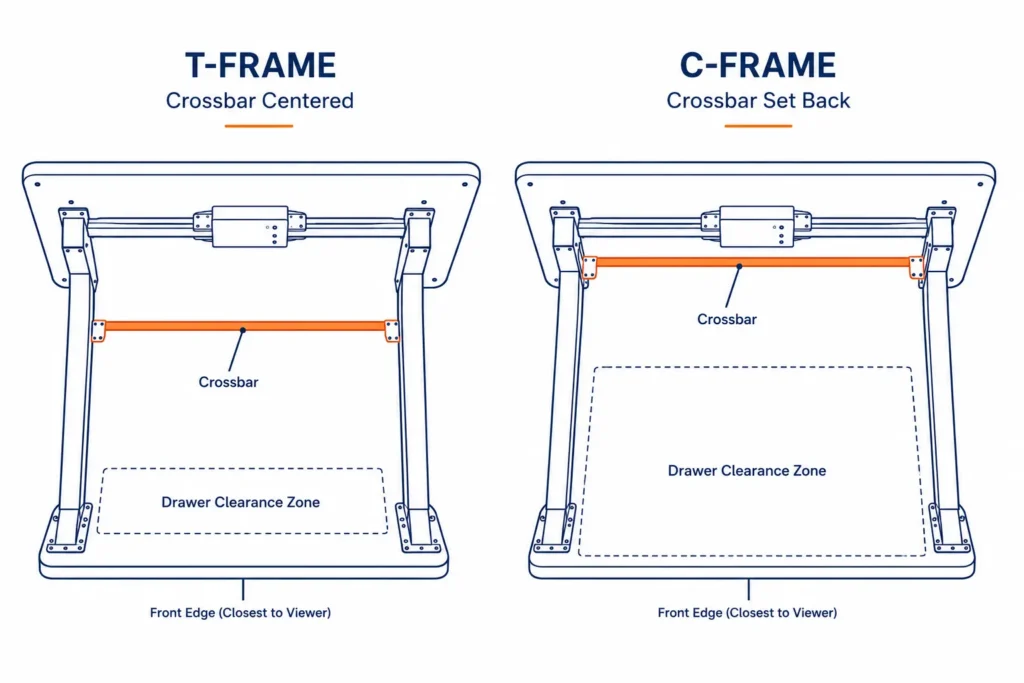
Both frame types show up across popular brands. FlexiSpot, for example, sells its E7 Pro Plus with a choice of T-Frame, High-Frame, or C-Frame, so the frame type depends on which option was ordered, not just the model name.
Step 2: Measure Your Actual Clearance (The 14-Inch Rule)
A widely used baseline from add-on drawer manufacturers is 14 inches of front-to-back clearance, measured from the front edge of your desktop to the crossbar underneath. Stand Up Desk Store states this directly on its drawer listing: the product requires at least 14 inches of clearance, and if there is less, the drawer will protrude past the desk edge.
To measure it yourself: use a tape measure and run it from the front lip of your desktop straight back to the crossbar. Do this at the spot where you actually plan to mount the drawer, not just anywhere under the desk, since some frames taper or angle slightly.
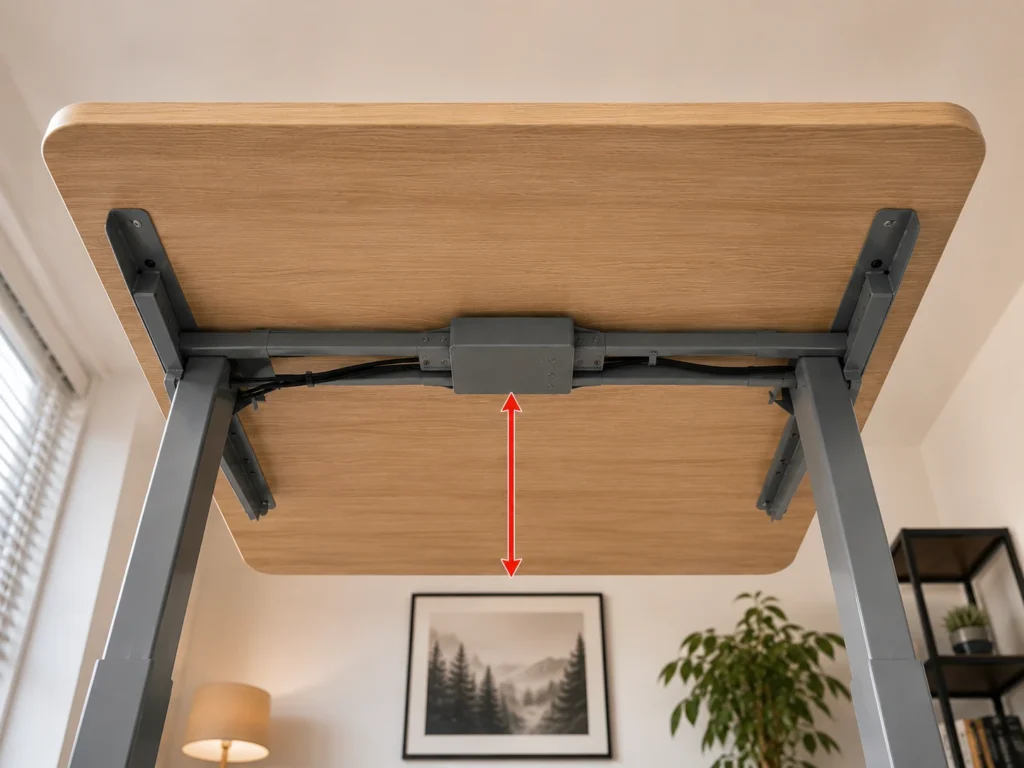
If your measurement comes in under 14 inches, don’t assume it will work with a smaller drawer without checking. Some drawers on the market are built shallower specifically for this situation. Mount-It, for instance, sells a low-profile unit with a 1.6-inch height, which clears tighter frames that a standard 2.875-inch drawer would not.
Step 3: Check Your Specific Brand’s Frame
| Brand / Model | Frame Type | What We Found | Source |
|---|---|---|---|
| FlexiSpot E7 Pro Plus | T-Frame, High-Frame, or C-Frame (buyer’s choice) | Clearance depends entirely on which frame option was ordered at checkout, not the model name alone | Tom’s Guide review |
| FlexiSpot E7 Plus | Four Leg Frame | FlexiSpot states there is ample space between the frame and the desktop underside for drawers, but does not publish an exact number, so still measure yours | FlexiSpot official product page |
| IKEA IDÅSEN | Fixed 3-piece crossbar | The crossbar has only a few fixed mounting points and cannot slide, and the frame is designed for just two specific desktop sizes | Independent desk review, cross-checked with IKEA’s official listing |
| IKEA MITTZON | Width-adjustable underframe | IKEA states the frame leaves plenty of space to move legs freely, but again gives no exact drawer clearance figure | IKEA official product page |
| iMovR Lander / Jaxson | C-Leg | Crossbar sits about two-thirds of the way back from the front edge, with more room than a typical T-leg desk | iMovR official product page |
If you’re working with a FlexiSpot E7, our full FlexiSpot E7 compatibility guide breaks down clearance for other accessories too, not just drawers.
Hulala Home desks are a slightly different case. Most of their standing desk models come with drawers already built into the desktop rather than sold as a separate frame-plus-add-on-drawer combination, so this particular clearance check usually doesn’t apply to them the same way.
Step 4: Match the Drawer’s Depth to Your Clearance
Once you know your clearance number, compare it against the drawer’s own front-to-back depth, not its width. A drawer that’s 14 inches deep needs the full 14 inches of clearance you measured, with no cushion left over for cables or brackets. As a safety margin, we’d suggest picking a drawer at least an inch shallower than your measured clearance.
Also check the weight limit before loading it up. Most add-on drawers in this category, including the Stand Up Desk Store model referenced earlier, are rated around 15 lbs, which is enough for stationery and small electronics but not for anything heavy like a laptop charger brick collection or books.
(affiliate link)
What to Do If You Don’t Have Enough Clearance
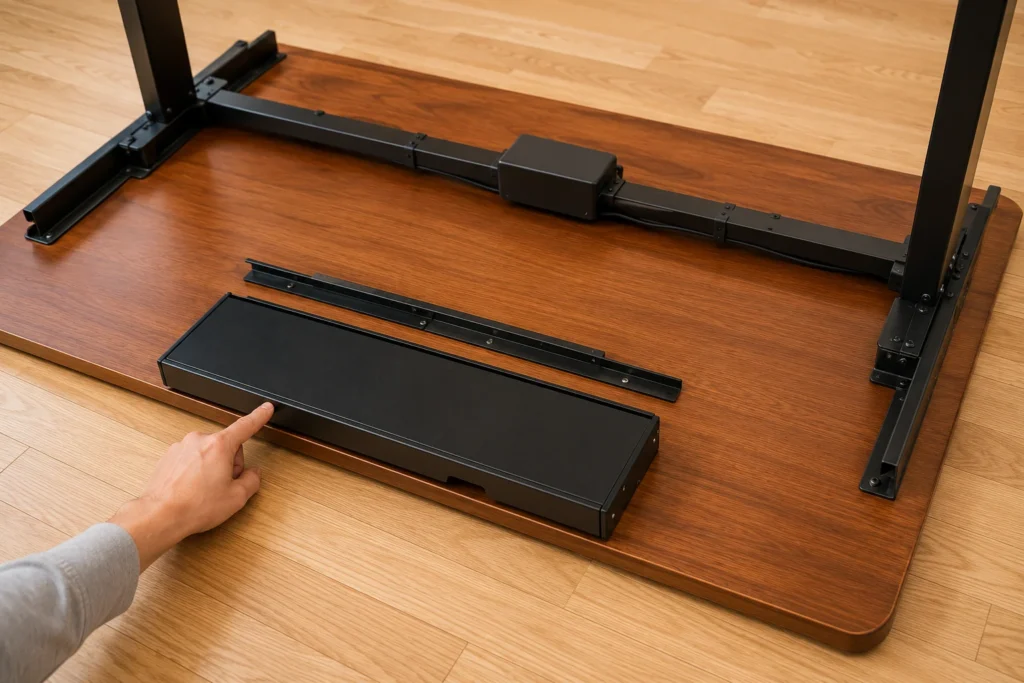
If your measurement comes in under 14 inches, you still have options before giving up on storage altogether. Low-profile drawers under 2 inches tall are built for exactly this situation. If a drawer still won’t work, a combined solution can help instead. If you’re also trying to fit a keyboard tray in that same tight space, our guide on whether a keyboard tray will fit your standing desk covers the same crossbar-clearance problem from a different angle.
And if you’re mounting more than one accessory under the same desk, like a drawer next to a CPU holder, check our CPU holder compatibility guide first. Two accessories competing for the same crossbar clearance is a common reason people end up returning one of them.
Still not sure if a drawer will fit your exact desk? Reach out through our contact form and tell us your desk brand and model, we’re happy to help you check it.
FAQ
Can I add a drawer to any standing desk?
How much clearance do I need for an under-desk drawer?
Will a drawer make my standing desk wobble?
What’s the real difference between T-frame and C-frame for drawers?
Does adding a drawer affect my desk’s warranty?
Do standing desk drawers work with wood desktops?
Every measurement and spec in this guide comes from our own research. If you notice something that doesn’t match, whether it’s a wrong number or a calculation mistake on our end, tell us through the comments or our contact form.
We’ll fix it right away.
Related Guides
- Will a Keyboard Tray Fit Your Standing Desk? (Read Before You Drill)
- CPU Holder for Standing Desk: Will It Fit Your Frame? (Brand-by-Brand Compatibility Guide)
- FlexiSpot E7 Electric Adjustable Standing Desk: Complete Compatibility Guide
- Will a Cable Tray Fit Your Standing Desk?

I got interested in home office setups and noticed most buying guides online tell you if a product is ‘good,’ but never tell you if it will actually fit your specific desk. Does It Fit My Team exists to close that gap, with real measurements, verified sources, and straight answers.