
Affiliate Disclosure: This post contains affiliate links. If you buy through them, we earn a small commission at no extra cost to you. We only recommend products we would genuinely suggest to a friend.
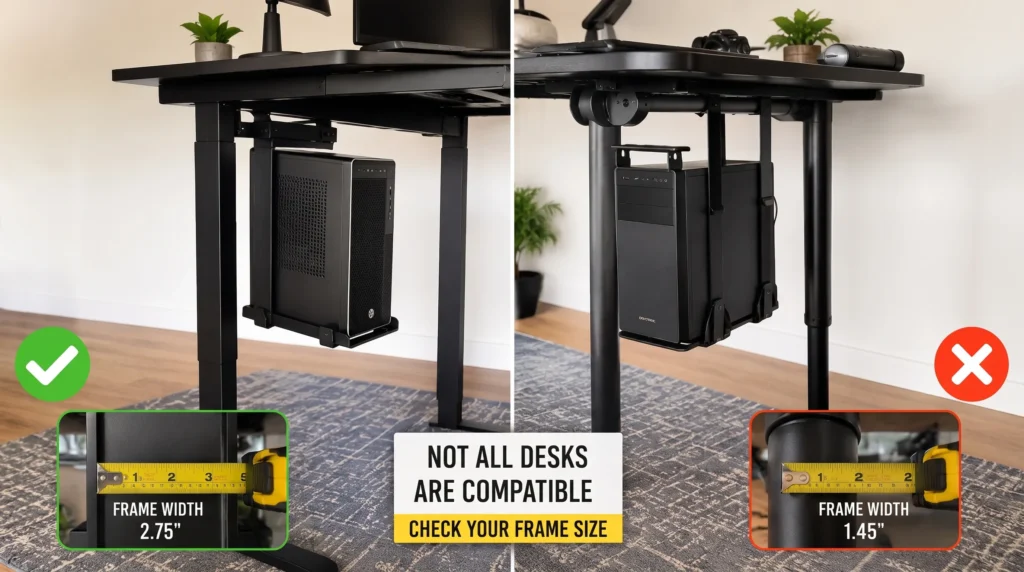
A CPU holder for a standing desk setup only fits if there is enough clearance between the desk frame’s crossbar and the underside of the desktop. Some frames, like Vari desks, have a crossbar running through the middle of the worksurface that leaves very little mounting space. Whether a CPU holder fits depends on the exact desk brand and the exact holder model, not on the desk simply being height-adjustable.
Key Takeaways
- Not every standing desk has a crossbar, so CPU holder fit depends on the exact brand and model, not just the desk being height-adjustable.
- FlexiSpot E7 and Vari desks have a crossbar. The regular Uplift V2 does not.
- Measuring the real clearance on the desk before buying a CPU holder is the single best way to avoid a return.
- Whether the frame itself (leg or crossbar) is wide enough and the right shape for the holder’s clamp to grip.
Who this guide is for: This guide is for anyone with a height-adjustable desk (FlexiSpot, Uplift, Autonomous, Vari, or similar) who wants to check CPU holder compatibility before buying one.
What Determines If a CPU Holder Fits Your Standing Desk
Three things decide whether a CPU holder will fit under a standing desk:
- Whether the desk frame has a crossbar (the horizontal support bar running between the legs)
- Where that crossbar sits relative to the desktop edge
- How much clearance does the specific CPU holder need to slide into place without hitting the frame
Skipping any one of these three checks is the most common reason CPU holders get returned after purchase.
The same three checks apply whether the desk also needs a monitor arm mounted underneath it, since both accessories compete for the same crossbar clearance.
Step 1: Check Your Desk Brand’s Crossbar
Frame design varies by brand, and sometimes by model within the same brand. The table below shows what is confirmed for each one, with a source for every claim. Before measuring, it also helps to confirm the desk’s full spec sheet using a general adjustable desk and monitor mount compatibility checklist, since crossbar position is only one of several measurements worth double-checking.
| Desk Brand | Crossbar? |
|---|---|
| FlexiSpot E7 series | Yes (adjustable) |
| Uplift V2 (standard) | Yes |
| Uplift V2-Commercial | Yes |
| Autonomous (Desk 2 and older T-frames) | Yes |
| Autonomous Desk Pro | No (the C-shape frame design removes it entirely) |
| Vari (Electric Standing Desk) | Yes |
Step 2: Measure Your Own Clearance
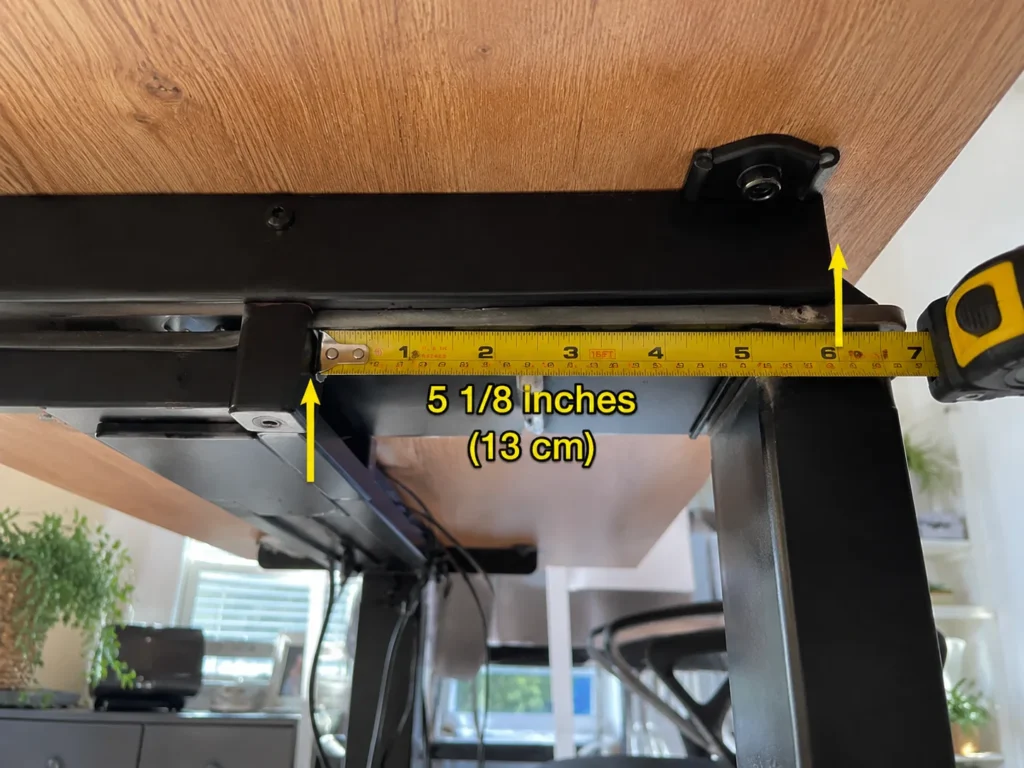
Once the desk’s crossbar situation is known from the table above, the next step is measuring the actual space available before shopping for a holder
- Use a measuring tape to check the distance from the crossbar to the desktop edge at the spot planned for mounting.
- Compare that number to the CPU holder’s listed clearance requirement (check the product page or manual, not just the box).
- If the gap is too tight, adjust the crossbar position if the desk allows it (FlexiSpot E7 series allows this within the 7.87 in maximum), or add a spacer bracket accessory such as the VIVO MOUNT-PC01-SB.
Step 3: Match a CPU Holder to Your Desk’s Clearance
Once the desk’s crossbar situation is known, matching a CPU holder becomes a matter of comparing its footprint and weight rating against the available space.
| CPU Holder | Width Range | Height Range | Weight Capacity |
|---|---|---|---|
| VIVO MOUNT-PC01 | 3.5 to 7.8 in | 11.5 to 20.5 in | 22 lbs |
| VIVO MOUNT-PC04A | 5 to 10 in | 14 to 22 in | 66 lbs |
| Mount-It! MI-7150 | 3.5 to 8 in | 11.8 to 21 in | 22 lbs |
| HUMANCENTRIC Adjustable CPU Holder | 3.5 to 7.5 in | 12 to 21 in | 22 lbs |
Recommendation
VIVO MOUNT-PC01 (Slim Adjustable CPU Holder)
This is a compact steel CPU holder that mounts to the underside of the desk or a wall, with a 135-degree swivel for easy port access. It adjusts from 3.5 to 7.8 in wide and holds up to 22 lbs.
Best for: Desks with average crossbar clearance, such as FlexiSpot E7 or Autonomous Desk Pro, where a slim footprint clears the frame without extra parts.
Check today’s price on Amazon: https://amzn.to/4xZI64B
VIVO MOUNT-PC01-SB (Spacer Bracket for Tight Clearance)
This bracket pairs with the MOUNT-PC01 and drops the mount 2.1 in below the desktop, clearing crossbars or other hardware that sit close to the desktop edge, according to the VIVO official product page.
Best for: Desks where the crossbar sits close to the desktop edge, such as Uplift V2-Commercial or Vari, and a direct mount would hit the frame.
Check today’s price on Amazon: https://amzn.to/4xZI64B
Summary
For desks with a crossbar positioned close to the desktop edge, such as Vari or Uplift V2-Commercial, a wide-footprint holder can hit the frame before it can be centered. This is exactly the situation VIVO addresses with its MOUNT-PC01-SB spacer bracket, built to clear obstacles hanging up to 2.1 inches below the desktop (VIVO official product page). Pairing a slim mount like the VIVO MOUNT-PC01 with this spacer bracket often solves the clearance problem without altering the desk frame itself. The same clearance logic applies to anyone also fitting a standing desk monitor arm on the same crossbar-equipped frame.
Still not sure if a specific CPU holder will fit? Send us a message through our contact form, happy to help check before you buy
FAQ
Do all standing desks have a crossbar?
Can the crossbar be moved to make more room for a CPU holder?
What happens if a CPU holder is too wide for the available clearance?
Will installing a third-party CPU holder void the desk’s warranty?
How much weight can a standard CPU holder hold?
Can a CPU holder be mounted without drilling into the desktop?

I got interested in home office setups and noticed most buying guides online tell you if a product is ‘good,’ but never tell you if it will actually fit your specific desk. Does It Fit My Team exists to close that gap, with real measurements, verified sources, and straight answers.