
Affiliate Disclosure: This post contains affiliate links. If you buy through them, we earn a small commission at no extra cost to you. We only recommend products we would genuinely suggest to a friend.
IKEA’s own product page for the LAGKAPTEN and LINNMON tabletops carries a direct warning: these desks were “not suitable for installation of a screen stand,” and the page specifically says not to place more than 15 kg of concentrated weight on a small area.
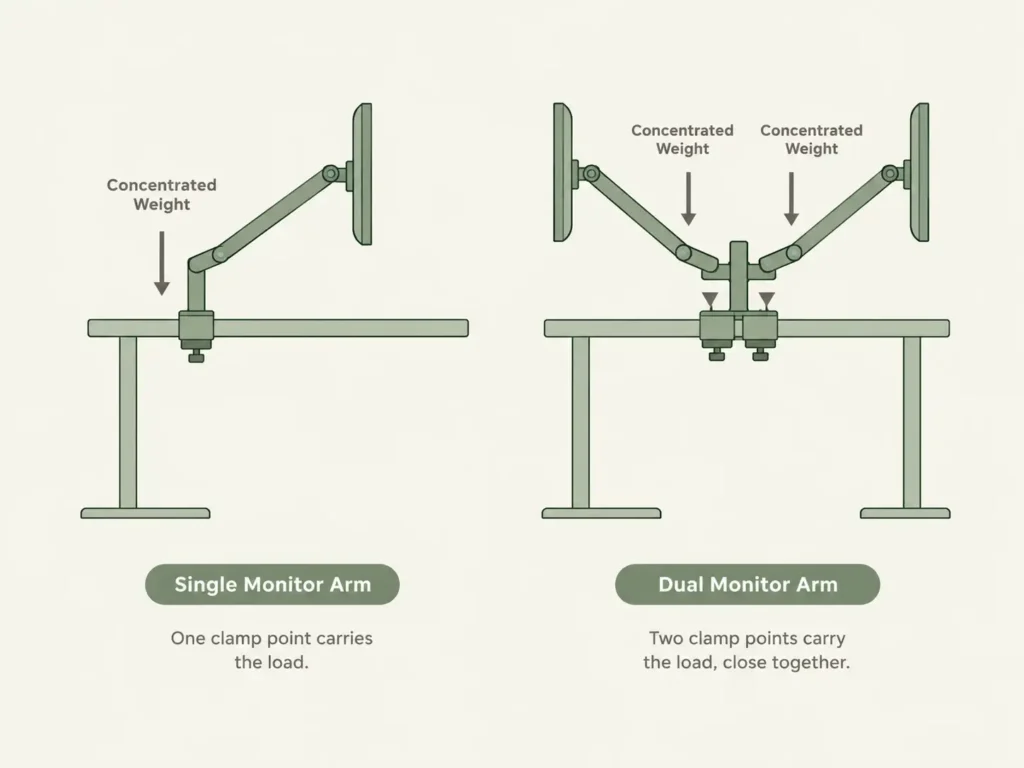
A dual monitor arm puts that concentrated weight down twice, not once, so this warning matters more here than it does for a single arm.
Not every IKEA desk carries that warning. BEKANT and MITTZON are tested to office furniture standards that LAGKAPTEN and LINNMON are not, and they handle a clamp-mounted dual arm without issue. INGO, on the other hand, can’t take a monitor arm clamp at all, confirmed directly by a monitor arm manufacturer’s own compatibility page. Which desk you have decides which of these applies to you.
Key Takeaways
- LAGKAPTEN and LINNMON tabletops carry IKEA’s own warning against screen stand installation and concentrated weight over 15 kg, a real concern with a dual arm’s two clamp points
- BEKANT and MITTZON are tested to commercial desk standards (EN 527-2 and ANSI/BIFMA X5.5) and handle a dual monitor arm clamp without the same warning
- INGO cannot take a monitor arm clamp at all. BenQ’s own support page confirms its edge structure sits too close to the desktop edge for any clamp to grip
- Most dual monitor arms need 0.4 to 3.2 inches of desk thickness to clamp on. Every IKEA desktop in this guide falls within that range, so thickness isn’t usually the blocker, the desk’s own weight rating is
- ANFALLARE is confirmed compatible with a clamp-style arm by the same manufacturer source that ruled out INGO
Who this is for: This guide is for you if you own an IKEA desk and want to mount two monitors on a shared arm, and you want to know whether your specific desk model can actually take it before you buy.
Why IKEA’s Own Warning Matters More for a Dual Arm
IKEA’s product page for LAGKAPTEN and LINNMON states plainly that the tabletop “has been developed and tested for home use and is not suitable for installation of a screen stand.” The same page sets a 15 kg limit on concentrated weight placed on a small area of the desktop. A single monitor arm clamp already puts weight on one small spot. A dual arm clamp does it twice, often close together, which is exactly the kind of concentrated load that warning is about.
This doesn’t mean a dual arm will definitely damage a LAGKAPTEN or LINNMON desk. It means IKEA hasn’t tested or rated the desk for that use, so the risk sits entirely with you if something goes wrong.
Desk-by-Desk Compatibility
LAGKAPTEN and LINNMON: Proceed With Caution
Both tabletops measure 3.4 cm (about 1.3 inches) thick, well within range for most dual arm clamps. The issue isn’t thickness, it’s the desk’s own rated use. These desktops are also not designed to pair with office-style underframes like MITTZON, TROTTEN, or IDÅSEN; they’re meant for IKEA’s own basic desk legs.
BEKANT and MITTZON: Built For This
BEKANT measures 1.6 cm thick and MITTZON measures 2.0 cm, both thinner on paper than LAGKAPTEN. But both are tested to commercial desk standards, EN 527-2 and ANSI/BIFMA X5.5 for BEKANT, with MITTZON built for business use under similar expectations. Neither carries IKEA’s screen-stand warning. If you’re specifically buying an IKEA desk for a dual-monitor setup, these two are the safer starting points.
INGO: Not Compatible
BenQ’s own support documentation for its Ergo Arm confirms INGO’s desk “has an edge structure too close to the edge, not installable.” This applies to monitor arm clamps generally, not just BenQ’s own product, since the issue is the physical shape of the desk edge itself, not the specific brand of arm.
ANFALLARE: Compatible
The same BenQ compatibility page confirms ANFALLARE works with a clamp-style arm, with no caveats noted.
| IKEA Desk | Thickness | Dual Arm Clamp Fit | Note |
|---|---|---|---|
| LAGKAPTEN / LINNMON | 3.4 cm | Fits within clamp range, but not rated for it | IKEA’s own warning against screen stands and concentrated weight |
| BEKANT | 1.6 cm | Fits, tested for this kind of use | Meets EN 527-2 and ANSI/BIFMA X5.5 commercial standards |
| MITTZON | 2.0 cm | Fits, built for business use | No screen-stand warning |
| ANFALLARE | Not published | Confirmed compatible | Per BenQ’s own compatibility page |
| INGO | Not published | Not compatible | Edge structure too close for any clamp, per BenQ |
If you only need to mount one monitor instead of two, our single-arm IKEA guide covers the lighter clamp weight that stays further under that 15 kg limit.
Clamp Thickness Usually Isn’t the Problem
Most dual monitor arms, including budget options, accept desk thickness anywhere from about 0.4 to 3.2 inches. Every IKEA desktop in this guide, even the thickest at 1.3 inches, sits comfortably inside that range. The real decision isn’t whether the clamp will physically close. It’s whether the desk underneath is rated to carry that weight without warping or pulling loose over time.
What to Do If Your Desk Isn’t Rated For It
If you own LAGKAPTEN or LINNMON and still want a dual arm, a grommet mount through a pre-drilled or self-drilled hole spreads the load differently than a clamp, though it doesn’t remove IKEA’s underlying weight caution. The lowest-risk option is choosing a lighter dual arm with lower per-monitor weight capacity, so the total concentrated load stays well under that 15 kg mark, or switching to two separate single-arm mounts spaced further apart instead of one shared dual arm.
If you’re still unsure whether any clamp-style mount is safe for your specific desktop material, our Do Monitor Arms Damage Desks? guide covers the broader damage risk beyond just IKEA models.
Our Pick
VIVO Pneumatic Arm Dual Monitor Desk Mount (STAND-V102O)
Clamps onto desks 0.4 to 3.2 inches thick, comfortably covering every IKEA desktop in this guide. Holds two monitors from 17 to 27 inches, 4.4 to 14.3 lbs each, with 75x75mm and 100x100mm VESA compatibility.
(affiliate link)
If your monitors are heavier than 14.3 lbs each, our Ergotron Dual Monitor Arm guide covers two current models built for more weight, up to 17.5 lbs per arm.
Still not sure about your exact desk model? Reach out through our contact form and tell us which IKEA desk you own, we’re happy to help you check it.
FAQ
Can I put a dual monitor arm on an IKEA LAGKAPTEN desk?
Which IKEA desks are actually built for a monitor arm?
Does a dual monitor arm fit an IKEA INGO desk?
What’s the difference between a clamp mount and a grommet mount for this?
Will the clamp even fit my IKEA desk’s thickness?
Every measurement and spec in this guide comes from our own research. If you notice something that doesn’t match, whether it’s a wrong number or a calculation mistake on our end, tell us through the comments or our contact form. We’ll fix it right away.
Related Guides
- Will a Monitor Arm Fit Your IKEA Desk? (5 Models Checked)
- Will a Dual Monitor Arm Fit Your Desk? (Everything You Must Measure Before Buying)
- Ergotron Dual Monitor Arm: Which One Still Fits? (Checked)
- IKEA Desk With Cable Management: Model-by-Model (Verified)
- Will a Keyboard Tray Fit Your IKEA Desk? (Fit Checked)
- Do Monitor Arms Damage Desks? (What Most Buyers Don’t Realize)

I got interested in home office setups and noticed most buying guides online tell you if a product is ‘good,’ but never tell you if it will actually fit your specific desk. Does It Fit My Team exists to close that gap, with real measurements, verified sources, and straight answers.