
Affiliate Disclosure: This post contains affiliate links. If you buy through them, we earn a small commission at no extra cost to you. We only recommend products we would genuinely suggest to a friend.
No, not automatically. A standing desk frame only fits a desktop that falls inside that brand’s published width and depth range, and those ranges differ more from brand to brand than most buyers expect. We checked four popular frame-only options: FlexiSpot, Uplift, VertDesk, and NewHeights. The largest supported desktop width alone runs from 78.7 inches on the FlexiSpot E5 to 96 inches on Uplift.
Key Takeaways
- Desktop width and depth must fall inside the frame’s published range, and this range varies significantly by brand
- Desktop thickness matters too, but none of these four brands publishes a minimum. VertDesk ships 5/8″ screws, so your top should be clearly thicker than that
- Your usable weight capacity is the frame’s rated capacity minus your desktop’s own weight
- Hollow-core or particleboard desktops (common in budget flat-pack furniture) can fail with screw-in frames
- NewHeights works differently from the other three brands; the Elegante XT is sold in fixed desk sizes or as a base only
Who this is for: This guide is for you if you’re buying a standing desk frame without a top, whether to reuse an existing desktop, build a custom surface, or save money, and you want to confirm it will actually fit before you order.
Can Any Desktop Fit a Standing Desk Frame?
The short answer is no. Every frame-only standing desk is engineered around a specific range of desktop widths, depths, and thicknesses. Go outside that range and you risk a desktop that overhangs the legs, wobbles at standing height, or can’t be screwed down securely.
The good news is that these ranges are published by every major brand, so checking compatibility before you buy takes a few minutes with a tape measure, not a guess.
Standing Desk Frame Compatibility By Brand (4 Brands Checked)
| Brand | Frame Width | Compatible Desktop (W x D) | Min. Thickness | Weight Cap. | Where to Buy |
|---|---|---|---|---|---|
| FlexiSpot (E5 Standard) | 43.4″-66.9″ | 47.2″-78.7″ x 23.6″-31.5″ | Not published | 220 lbs | Check the current price on Amazon |
| Uplift (V2/V2-Comm.) | 41.3″-72.2″ | 42″-96″ wide; depth not published (Uplift’s own tops: 24″ or 30″) | Not published | 355 lbs | Check the current price on Amazon |
| VertDesk (v3/v3+) | 34″-70″ | 36″-84″ x 24″-30″ | Not published (ships with 5/8″ screws) | 275 lbs (v3), 450 lbs (v3+) | Check the current price on BTOD |
| NewHeights (Elegante XT) | Not published | Fixed sizes: 36″, 48″, or 60″ W x 24″ D, or base only | Not published | 325 lbs | Check the current price on BTOD |
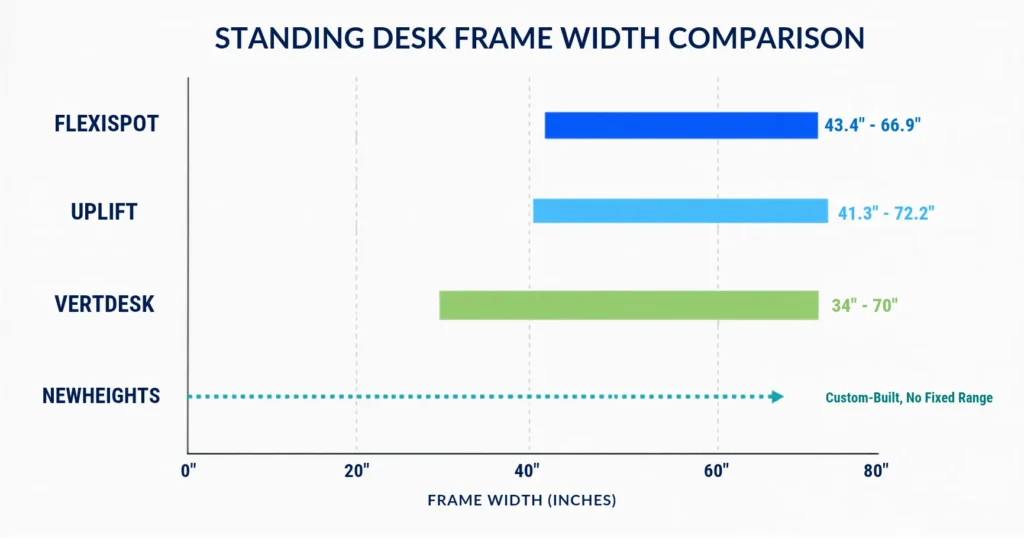
Note: NewHeights doesn’t publish an adjustable desktop range the way the other three brands do. BTOD lists the Elegante XT in fixed sizes (36″, 48″, and 60″ wide by 24″ deep) plus a base-only option. If you buy the base only, confirm your desktop size with BTOD before you order.
The 3 Measurements That Decide If Your Desktop Fits
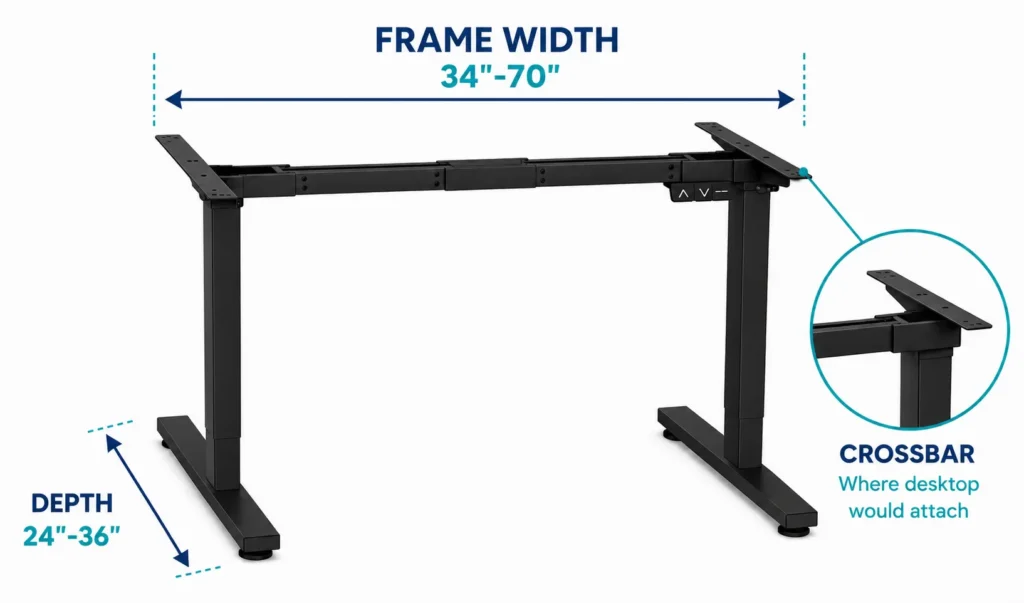
Before you buy a frame-only standing desk, measure your existing or planned desktop against these three numbers.
Width: Measure your desktop’s total width and check it against the frame’s compatible range in the table above. If the top is too narrow, it won’t reach the mounting brackets on both legs. If it’s too wide, it will overhang and wobble more at standing height.
Depth: Depth matters more than most buyers expect, especially if you plan to add a monitor arm or CPU holder later. Those need extra room behind the frame’s crossbar. Check the frame’s minimum depth, not just its maximum.
Thickness: This is the one people skip, and it’s the one that causes real damage. Screw-in brackets need enough material to bite into without poking through the top surface. None of the four brands we checked publishes a minimum desktop thickness. The VertDesk v3 ships with 5/8″ self-tapping screws, per BTOD’s v3 base page, so a top that is clearly thicker than the screw length is the safe choice.
If your desktop is too thin for the included screws, the screws can pierce straight through the surface. This is especially common with cheap, hollow flat-pack desktops that look solid but are mostly empty honeycomb board inside.
If you’re specifically planning to reuse an IKEA-style desktop with a new frame, our Will a Monitor Arm Fit My IKEA Desk? guide covers how to check if that hollow-core construction can handle mounted hardware at all, worth reading before you commit to reusing one.
How to Calculate Your Usable Weight Capacity
The weight capacity listed on a frame’s spec sheet is not what you actually get to use. Your desktop itself eats into that number before you’ve placed a single monitor on it.
The formula: Frame’s rated capacity minus desktop weight equals your usable capacity for monitors, PC, and accessories.
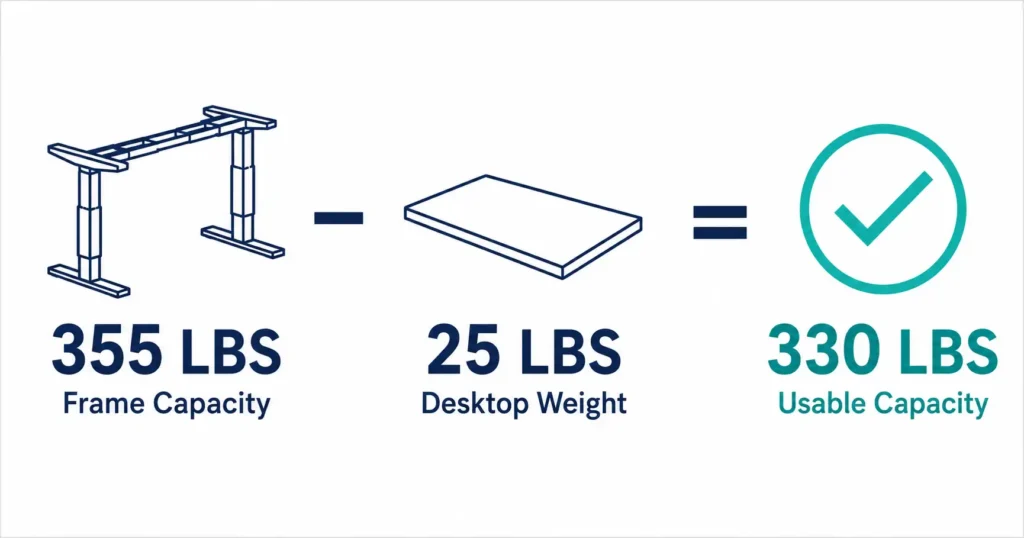
This is also where brand choice matters most for heavier setups. VertDesk’s v3+ (450 lbs) and Uplift’s V2-Commercial (355 lbs) leave the most headroom for a solid wood top plus a multi-monitor arm and desktop tower.
Which Desktop Materials Work Best
Laminate over MDF or particleboard: This is the most common choice. It’s lightweight, scratch-resistant, and easy for any frame to lift, so it works with every brand in the table above.
Solid wood or butcher block: These tops are heavier, so they eat further into your usable weight capacity. The upside is that solid wood is rigid, so screws grip securely.
Hollow-core or honeycomb desktops: These are common in the cheapest flat-pack options, and they are the ones to be careful with. If you’re set on reusing one, check our IKEA compatibility guide first.
If your desktop is already drilled or you’re planning to add a keyboard tray to whatever surface you land on, our Will a Keyboard Tray Fit Your Standing Desk? guide walks through the same thickness and crossbar-clearance checks specifically for that accessory.
FlexiSpot vs Uplift vs VertDesk vs NewHeights: Quick Take
Smallest desktops: VertDesk v3, which fits tops from 36″ wide.
Widest desktop compatibility: Uplift, which supports desktops up to 96″ wide.
Highest weight capacity: VertDesk v3+, at 450 lbs.
Mid-range option: FlexiSpot E5, which fits 47.2″ to 78.7″ wide tops and carries 220 lbs.
Fixed-size option: NewHeights Elegante XT, sold in set sizes or as a base only.
If you already know you want a FlexiSpot frame specifically, our FlexiSpot E7 Compatibility Guide goes deeper into exact accessory fit for that model, including monitor arms and CPU holders.
Still not sure if your desktop will work with a specific frame? Send us your desktop size and frame model through our contact form, and we’ll help you check it.
FAQ
Can I use my own desktop with a standing desk frame?
What happens if my desktop is too thin for the frame’s mounting screws?
Do all standing desk frames use the same mounting hardware?
Is a heavier desktop always more stable?
Can I put an IKEA desktop on a name-brand standing desk frame?
Why does NewHeights not list a compatible desktop range like the others?
How do I attach a desktop to a standing desk frame?
Do I need to drill holes, or can I use clamps to attach my desktop?
Every measurement and spec in this guide comes from our own research. If you notice something that doesn’t match, whether it’s a wrong number or a calculation mistake on our end, tell us through the comments or our contact form. We’ll fix it right away.
Related Guides
- FlexiSpot E7 Electric Adjustable Standing Desk: Complete Compatibility Guide
- Will a Monitor Arm Fit My IKEA Desk?
- Will a Keyboard Tray Fit Your Standing Desk? Read Before You Drill

I got interested in home office setups and noticed most buying guides online tell you if a product is ‘good,’ but never tell you if it will actually fit your specific desk. Does It Fit My exists to close that gap, with real measurements, verified sources, and straight answers.
About Does It Fit My · How we verify our guides