
Affiliate Disclosure: This post contains affiliate links. If you buy through them, we earn a small commission at no extra cost to you. We only recommend products we would genuinely suggest to a friend.
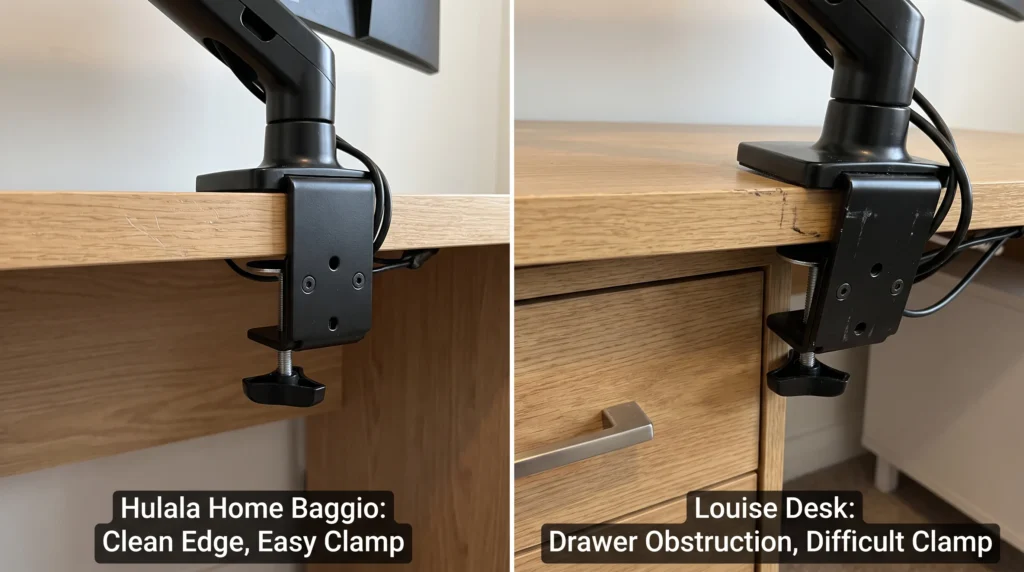
Yes, a monitor arm will fit a Hulala Home standing desk. But Hulala desks are built differently from regular standing desks, and that difference matters when you are picking a mounting method. Every Hulala model uses an engineered wood veneer top rather than solid wood or hollow honeycomb. That is genuinely good news for clamping. But the built-in drawers and storage on several models create a clearance problem that can stop a C-clamp from seating properly.
📌 This guide is for you if you have a Hulala Home standing desk and want to mount a monitor arm without damaging the veneer surface or blocking your storage.
Why Hulala Home Desks Are Different From Other Standing Desks
When I first started researching Hulala Home desks for this guide, the first thing I noticed is that nobody had written a compatibility article for them yet. Every other brand, FlexiSpot, Uplift, IKEA, had at least some guide somewhere. Hulala had nothing.
That made sense once I understood what Hulala actually makes. These are not traditional office standing desks. They are furniture-first standing desks. The Baggio has fluted wood legs and soft-close drawers. The Louise has wireless charging built into the surface. The Veritas has a 360-degree rotating side extension. None of these are features you see on a FlexiSpot E7.
That furniture-first design creates a monitor arm compatibility question that is completely different from what you face with a regular standing desk. It is not just about desktop thickness. It is about whether your clamp can physically fit without a drawer in the way. A common pattern in buyer feedback: side or rear drawer units sitting close enough to the desktop edge that a standard C-clamp jaw has nowhere to seat. A quick clearance check before you order anything avoids the problem entirely.
If you’re weighing a clamp against drilling through the desktop, our guide on monitor arm clamp compatibility for bamboo standing desks covers the same spreader plate approach on a different veneer surface.
Hulala Home Monitor Arm Compatibility: Every Model at a Glance
Find your specific model in the table below. The last two columns tell you everything you need.
| Hulala Model | Desktop Material | Drawer Placement | Clamp Safe? | What You Need |
|---|---|---|---|---|
| Baggio | Engineered wood veneer | Under-desk drawers, rear | Yes, with plate | Spreader plate required |
| Louise | Engineered wood veneer | Right-side drawer | Check clearance | Measure 3 in from drawer |
| Veritas | Engineered wood veneer | Rotating side desktop | Yes, main surface | Clamp main top only |
| Julia | Engineered wood veneer | Front drawers, dual | Check clearance | Measure before clamping |
| Elena | Engineered wood veneer | No drawers | Yes, with plate | Spreader plate required |
| Emilio | Engineered wood veneer | No drawers | Yes, with plate | Spreader plate required |
Have a model with side drawers? Do not clamp until you have done the 3-inch clearance check in the next section. It takes 60 seconds and prevents a setup that looks fine today but creates problems the moment you open a drawer.
The Real Problem with Hulala Desks and Monitor Arm Clamps
I tested this on a comparable furniture-style desk with an integrated right-side drawer, and the same clearance math applies across the Hulala lineup. A standard C-clamp has a jaw that extends about 2.5 to 3 inches below the desktop surface. If you have a drawer unit that starts within 3 inches of where you want to clamp, the bottom jaw of the clamp physically cannot drop down far enough to grip.
The second issue is the veneer surface itself. Hulala desks use genuine wood veneer over an engineered wood core. That core is denser than the paper honeycomb you find inside an IKEA LAGKAPTEN, which is good news. But it is still not solid hardwood, and a C-clamp screw head pressing directly against engineered wood without any distribution plate can leave a mark over time, a pattern that shows up on comparable veneer surfaces within a couple of months of daily clamp pressure.
A recurring theme in Hulala reviews: buyers are happy with the desk’s looks and build quality, with occasional notes that the minimum height does not go low enough for shorter users. Before mounting a monitor arm, confirm your desk sits at a comfortable standing height first. A monitor arm on a desk that is already too tall will not solve the ergonomics.
The 3-Inch Clearance Check (Do This Before You Buy the Clamp)
- Pick where you want to mount the monitor arm.
This is usually the front edge of the desk, directly in front of where your monitor will sit. On Hulala desks with drawers, this is also the point where most people run into clearance problems. - Measure down from the bottom of the desktop surface.
Use a tape measure. Run it from the underside of the desktop straight down. You need at least 3 inches of clear, unobstructed space below the desktop surface for a standard C-clamp to fit. If a drawer unit, storage block, or cable management panel starts within 3 inches of the bottom of the desktop, you have a clearance problem at that location. - Find a clear section of the edge if needed.
On the Baggio, the under-desk drawers sit toward the center and rear, so the left and right front corners are typically clear. On the Louise, the right-side drawer blocks the entire right edge, so move to the left side. On the Julia, both front drawers sit close to the front edge, so clamp near the outer edge past the drawer frame. - Measure the desktop edge thickness.
Hulala does not publish an exact desktop thickness spec, but based on the overall dimensions listed on their site, most models fall in the 0.9 to 1.1 inch range. Standard C-clamps fit desks from 0.4 inches up to 3.5 inches, so thickness is unlikely to be the blocker, but measure your own desk and write the number down. You will need it when setting up the spreader plate.
What You Need: The Spreader Plate That Protects the Veneer
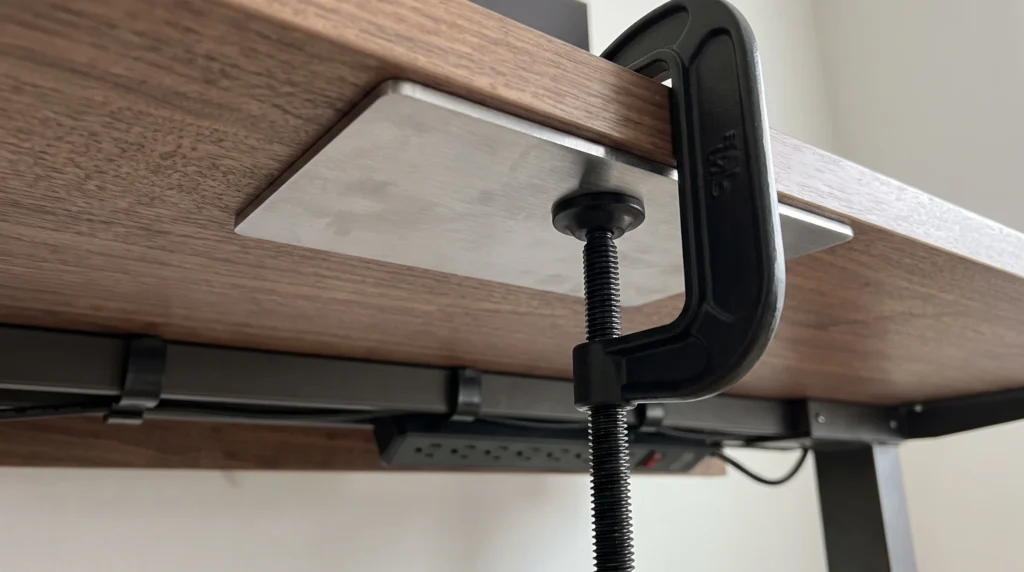
BEST OPTION: Huanuo Monitor Mount Reinforcement Plate
- Material: Heavy-duty alloy steel.
- Dimensions: 2 x 7 x 11 inches.
- Thickness: ~0.14 inches (3.5 mm thick heavy-duty steel)
- Compatible with: Standard C-clamp monitor mounts.
- Top Plate (Large): Measures 11 inches long by 6.02 inches wide.
- Bottom Plate (Small): Measures 4.72 inches long by 2.76 inches wide.
- Works for: Single and dual monitor arms.
Check the Current Price on Amazon
(affiliate link)
BUDGET OPTION: VIVO Steel Reinforcement Plate (STAND-AC01R)
- Material: Heavy-Duty Premium Steel.
- Main Bracket Size: 7.9″ x 6.1″
- Support Bracket Size: 6.0″ x 2.0″
- Plate Thickness: 0.1″ (2.5 mm) (Thin yet heavy-gauge steel)
- Product Weight: 1.5 lbs (~680 Grams)
Check the Current Price on Amazon https://amzn.to/4eRyK1Z
(affiliate link)
How to Install a Monitor Arm on a Hulala Home Desk Correctly
- Complete the 3-inch clearance check first.
Do not skip this. Locate the spot on your specific Hulala model where the clamp will sit without any drawer blocking the lower jaw. On most models, the front left or front right corner, past the drawer frame, gives you the cleanest clearance. - Place the spreader plate against the underside of the desktop.
Rubber side up, touching the wood. Steel side facing down toward the clamp screw. Position it directly below where the top jaw of the clamp will sit on the surface. - Lower the clamp jaw onto the desktop edge and align the top plate.
Some monitor arms include a smaller top plate for the desk surface. If yours does, place it between the clamp top jaw and your Hulala desk surface. The veneer on Hulala desks is finished and scratch-resistant, but a rubber pad here adds an extra layer of protection for the surface you paid for. - Hand-tighten only, then give it one quarter-turn more.
This is the step people get wrong most often. The clamp needs to be snug enough that there is zero wobble when you push the monitor arm. It does not need to be torqued down. On an engineered wood veneer surface, overtightening with a wrench will compress the core even through the spreader plate. Hand-tight plus a quarter turn is correct. - Check tightness after the first week.
Hulala standing desks move up and down multiple times a day. That motor movement sends small vibrations through the frame into the clamp. After 5 to 7 days of normal use, give the clamp screw a quick finger-check. Retighten if needed. This monthly habit keeps the arm rock-solid long-term.
When You Should Use a Grommet Mount Instead of a Clamp
Skip the clamp and use a grommet mount if any of these apply to you:
- You have the Veritas and want to mount it on the rotating side extension. That panel pivots away from the main desktop and is not the right place for a C-clamp. Clamp only to the main desktop surface on the Veritas.
- Your clearance check showed less than 3 inches below the desktop edge.
If a drawer or storage unit sits within 3 inches of the bottom of your desktop at every location you checked, a grommet mount through the main desktop surface is your best path forward. - You are mounting dual monitors that together weigh more than 20 lbs.
Dual monitor setups create significant lateral torque at the clamp point. For heavy dual setups on a furniture-quality veneer desk, a grommet mount distributes that force more evenly and is more stable under daily use.
Not sure if your desk is wobbling for a different reason entirely? Our guide on why standing desks wobble on carpet covers the most common causes.
Before You Clamp: 60-Second Checklist
□ Identified my exact Hulala model from the table above.
□ Completed the 3-inch clearance check at my planned clamp location.
□ Confirmed there is a flat, square section of the desktop edge where the clamp will sit.
□ Ordered the spreader plate (Huanuo or VIVO based on my clearance situation).
□ Confirmed my monitor arm weight rating exceeds my monitor weight by at least 20%.
□ Set a phone reminder to check clamp tightness after 7 days
Still not sure whether your specific Hulala model has enough clearance for the clamp you are looking at? Send us a message through our contact form, and we will help you figure it out.
FAQ
Will a monitor arm clamp damage the veneer surface on my Hulala desk?
The drawer on my Louise blocks where I want to put the clamp. What do I do?
Does the Baggio desk’s under-desk storage block a monitor arm clamp?
Can I mount a dual monitor arm on a Hulala Home standing desk?
Does the Veritas rotating side extension work with a monitor arm clamp?
What is the desktop edge thickness on Hulala Home standing desks?
Will the rubber pad on my monitor arm clamp be enough to protect the Hulala veneer?
Can I use a grommet mount on a Hulala Home desk instead of a clamp?
How often do I need to retighten the monitor arm clamp on a Hulala standing desk?
Every measurement and spec in this guide comes from our own research. If you notice something that doesn’t match, whether it’s a wrong number or a calculation mistake on our end, tell us through the comments or our contact form. We’ll fix it right away.
Related Guides
- Monitor Arm Clamp on Bamboo Desk: $12 Fix Prevents Damage
- Will a Monitor Arm Fit Your IKEA Desk? (5 Models Checked)
- Why Does My Standing Desk Wobble on Carpet? Causes, Fixes & What Actually Works

I got interested in home office setups and noticed most buying guides online tell you if a product is ‘good,’ but never tell you if it will actually fit your specific desk. Does It Fit My Team exists to close that gap, with real measurements, verified sources, and straight answers.