
Affiliate Disclosure: This post contains affiliate links. If you buy through them, we earn a small commission at no extra cost to you. We only recommend products we would genuinely suggest to a friend.
The FlexiSpot E7 electric adjustable standing desk works with most common home office accessories right out of the box, but a handful of items need a quick check before you buy. Its 22.8- to 48.4-inch height range, 355-pound weight capacity, and built-in cable tray cover the basics for almost every setup. CPU holders, monitor arms, and anti-fatigue mats each come with their own fit conditions, which we break down below.
Key Takeaways
- Height range (frame only, no desktop): 22.8″ to 48.4″
- With a standard 1-inch desktop added: roughly 23.8″ to 49.4″
- Weight capacity: 355 lbs
- Frame width: 43.4″ to 74.8″, built for desktops 47.2″ to 80″ wide
- Cable tray is built into the desk, no separate purchase needed for basic setups
- CPU holder is listed as a compatible accessory directly by FlexiSpot
- The E7 is not the same desk as the E7 Pro. Specs differ; see the comparison table below
Who this is for: This guide is for you if you already own a FlexiSpot E7, or you are close to ordering one, and you want to confirm your monitor arm, CPU holder, anti-fatigue mat, or cable setup will actually work with it before you spend more money.
Does the FlexiSpot E7 Fit Your Room?
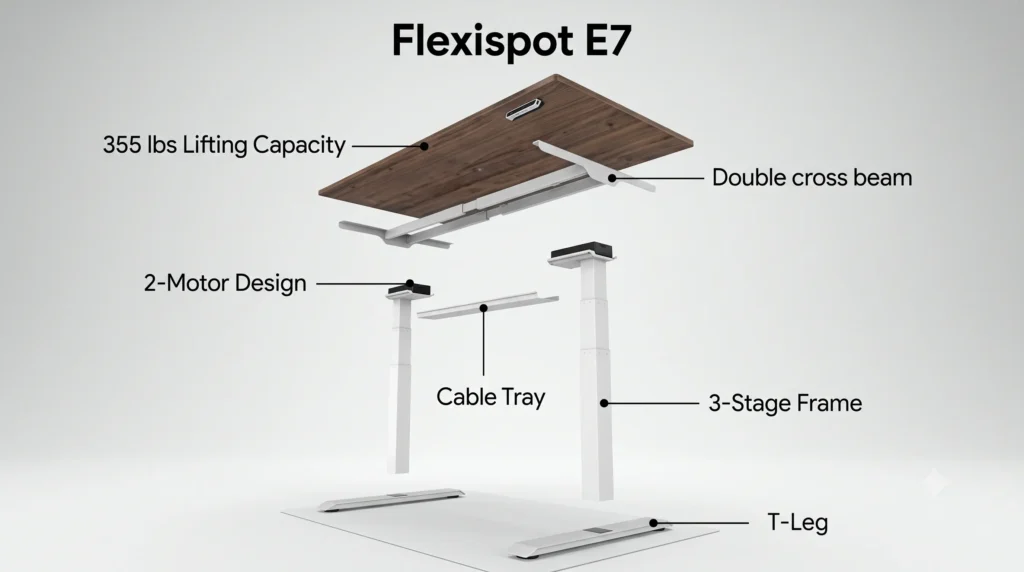
The FlexiSpot E7 frame adjusts in width from 43.4″ to 74.8″, which lets it work with desktops ranging from 47.2″ to 80″ wide and 24″ to 40″ deep. That range covers most home office desktops, but frame width is only part of the picture. You also need enough clearance behind and beside the desk for it to rise and fall without hitting a wall, shelf, or door.
Comparing the E7 against other frame-only options before you buy? Our Standing Desk Frame Compatibility Guide lines up FlexiSpot, Uplift, VertDesk, and NewHeights side by side.”
If your workspace is tight and you are not sure the E7 will physically fit in the room at all, does the FlexiSpot E7 Fit in a Small Bedroom? guide walks through the exact clearance you need on each side.
Will Your Monitor Arm Fit the FlexiSpot E7?
Most clamp-mount monitor arms clip onto the back edge of the desktop, so what matters is desktop thickness, not the frame itself. FlexiSpot desktops are typically 1 inch thick, which fits the clamp range of nearly every major monitor arm brand. The desk’s 24″ to 40″ depth also gives enough room behind most single and dual arm setups.
Grommet-mount arms need a drilled hole, and FlexiSpot desktops do not come pre-drilled for this. If your monitor arm is grommet-style, you will need to drill the hole yourself or choose a clamp-mount arm instead.
Does a CPU Holder Fit the FlexiSpot E7’s Frame?
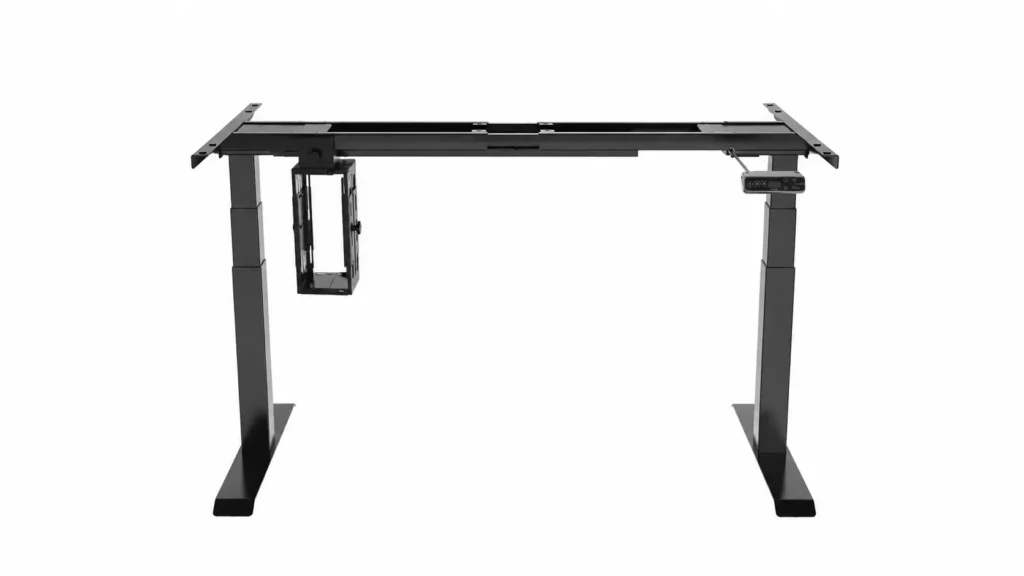
FlexiSpot lists a CPU holder as a compatible accessory directly on its own E7 product page, so mounting one is expected to work without modification.
Note: The exact crossbar thickness and mounting clearance were not listed on the public spec sheet at the time of writing. Before ordering a specific CPU holder brand, confirm its clamp range against the E7 crossbar using the official manual or by contacting FlexiSpot support, so you can verify this yourself before buying.
If you already have a CPU holder in mind, or want to know which brand fits which desk frame, our CPU Holder for Standing Desk: Will It Fit Your Frame? guide compares clamp sizes across FlexiSpot, Uplift, Autonomous, and Vari frames
Do You Need an Extra Cable Tray?
The E7 ships with a cable tray built into the underside of the desktop, which handles the cables from a monitor, keyboard, and a few small peripherals without any issue. If your setup includes a desktop PC tower, multiple monitors, or several add-on gadgets, the built-in tray can run out of room fast.
If your cables are already spilling out of the built-in tray, our Will a Cable Tray Fit Your Standing Desk? guide explains how to size a second tray around what FlexiSpot already gives you.
Will an Anti-Fatigue Mat Work With This Height Range?
An anti-fatigue mat typically adds half an inch to a full inch of extra height under your feet. This matters because it slightly changes your effective standing height. If you already set your desk near the top of the 48.4″ range for a comfortable elbow height, adding a mat could push your working height just above your ergonomic sweet spot.
The simple fix: test your comfortable standing height first without a mat, then check that the desk can still adjust down slightly to compensate once the mat is in place.
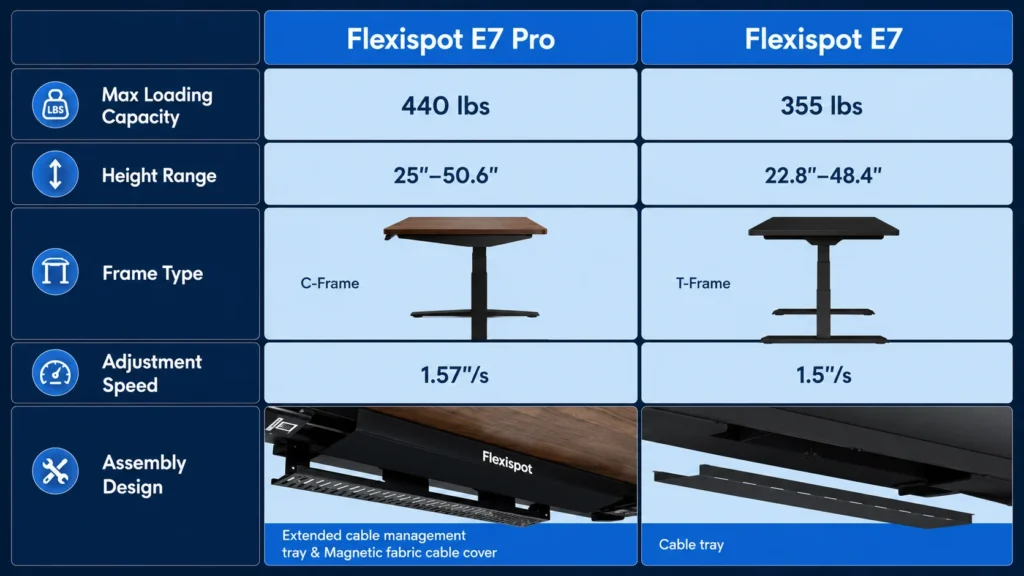
FlexiSpot E7 vs E7 Pro: Quick Spec Comparison
| Spec | E7 | E7 Pro |
|---|---|---|
| Height Range (frame only) | 22.8″ – 48.4″ | 25″ – 50.6″ |
| Weight Capacity | 355 lbs | 440 lbs |
| Frame Width | 43.4″ – 74.8″ | 43.3″ – 74.8″ |
| Frame Shape | T-leg frame | C-leg frame |
| Cable Tray | Built in | Built-in + fabric cover |
| Warranty (frame + motor) | 15 years | 15 years |
CHECK CURRENT FLEXISPOT E7 PRICE
(affiliate link)
Still not sure if something specific will fit your FlexiSpot E7? Send us a message through our contact form, and we will help you check it.
FAQ
Can the FlexiSpot E7 hold a dual monitor setup?
Does the FlexiSpot E7 come with cable management?
What is the main difference between the FlexiSpot E7 and E7 Pro?
Can you use the FlexiSpot E7 frame with a desktop from another brand?
Is the FlexiSpot E7 stable enough for a standing desk treadmill or walking pad?
Does the FlexiSpot E7 need professional installation?
Related Topics
- Does the FlexiSpot E7 Fit in a Small Bedroom?
- CPU Holder for Standing Desk: Will It Fit Your Frame?
- Will a Dual Monitor Arm Fit Your Desk?
- Will a Cable Tray Fit Your Standing Desk?
- Do Walking Pads Make Standing Desks Wobble?

I got interested in home office setups and noticed most buying guides online tell you if a product is ‘good,’ but never tell you if it will actually fit your specific desk. Does It Fit My Team exists to close that gap, with real measurements, verified sources, and straight answers.