
Affiliate Disclosure: This post contains affiliate links. If you buy through them, we earn a small commission at no extra cost to you. We only recommend products we would genuinely suggest to a friend.
Yes, a monitor arm fits an IKEA MITTZON desk, as long as the clamp grips the main tabletop and not the plug-in module. The MITTZON tabletop is 3/4 inch (2.0 cm) particleboard, which sits inside the clamp range of most arms. The 4 3/4-inch plug-in strip that joins it is a separate fiberboard piece, so keep the clamp off it.
Key Takeaways
- A MITTZON desk is two pieces: a 3/4 in (2.0 cm) particleboard tabletop plus a 4 3/4 in (12 cm) fiberboard plug-in module. Clamp the tabletop, not the module.
- The 31 1/2 in deep desk uses a 26 3/4 in deep tabletop. The 23 5/8 in deep desk uses an 18 7/8 in deep tabletop.
- IKEA’s own STUBBERGET arm lists MITTZON as a fit, but its clamp starts at exactly 3/4 in, and IKEA says it is for desks 70 cm (about 27 1/2 in) deep or more. That means the 31 1/2 in deep MITTZON, not the 23 5/8 in one.
- The sit/stand MITTZON is rated for 176 lb. The fixed MITTZON is rated for 50 kg (about 110 lb).
- The Ergotron LX (7 to 25 lb monitors) and HX (20 to 42 lb) both clamp tops from 0.4 in thick, so both fit the MITTZON tabletop.
Use This Free Tool to Know: Will Your Monitor Arm Fit Your IKEA Desk?
Pick your desk and your arm. In 5 seconds, this tool checks the clamp against IKEA’s tabletop thickness and the arm’s weight range.
Leave box 3 empty if you don’t know your monitor’s weight.
Know it? Use the weight without the stand, from your monitor’s product page. For two monitors, enter the heavier one.
Specs and links checked November 2026. Tabletop thickness from IKEA product pages (ALEX, MICKE and UTMANING from IKEA US customer support). Arm specs from each maker’s official page or Amazon listing. As an Amazon Associate we earn from qualifying purchases.
Who this is for: This guide is for you if you own a MITTZON desk, or plan to buy one, and want to mount one or two monitors on an arm without damaging the desk or buying an arm that won’t fit.
In This Guide
Your MITTZON Desk Is Two Pieces, and Only One Should Hold a Clamp
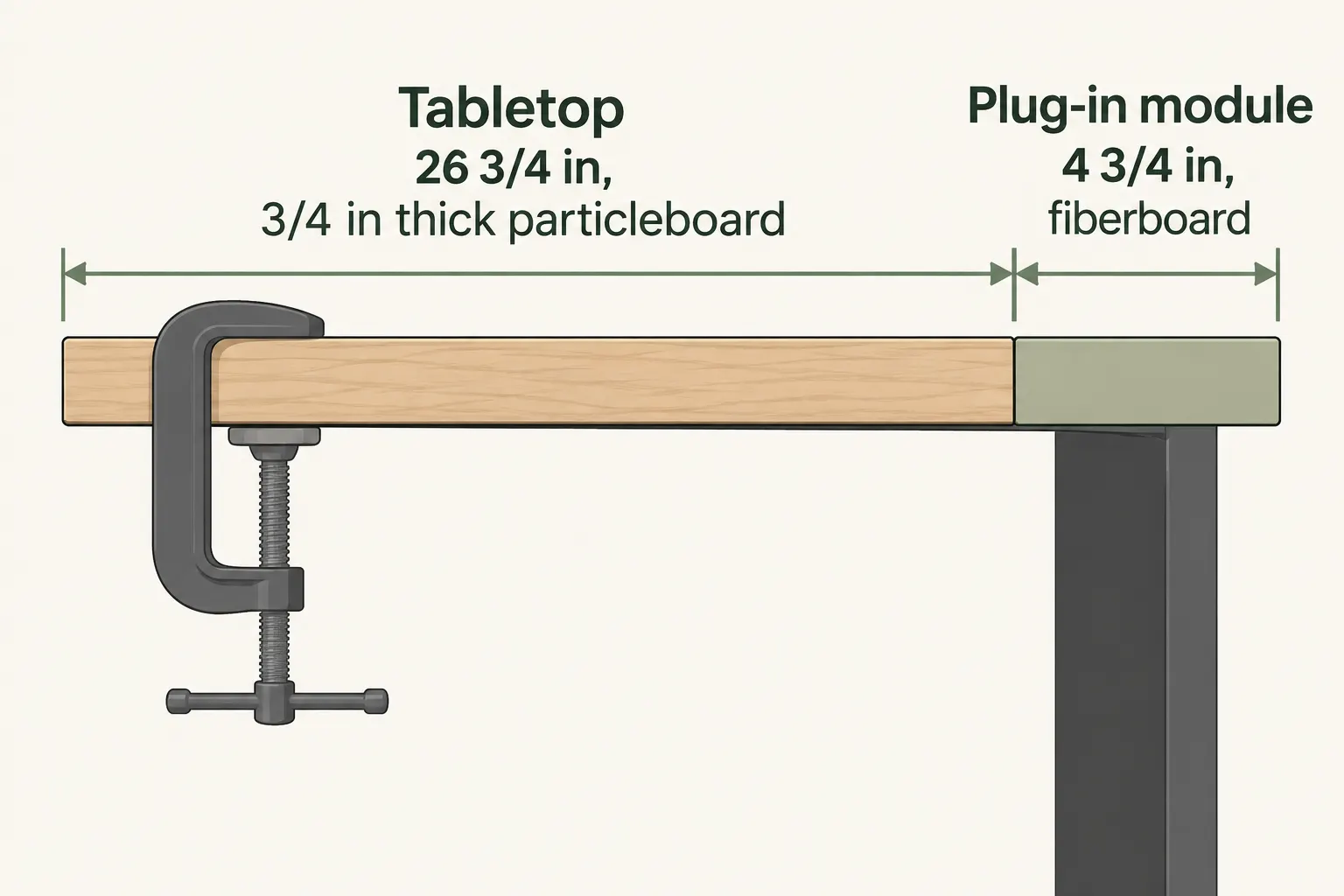
Only the main tabletop should carry a monitor arm clamp. IKEA builds every MITTZON desk from a tabletop plus a separate plug-in module, and the two pieces are made from different materials.
The tabletop is particleboard, 2.0 cm (3/4 in) thick, per IKEA’s MITTZON tabletop page. The plug-in module is a strip 12 cm (4 3/4 in) deep and 2 cm high, made from fiberboard with a powder coating, per IKEA’s plug-in module page. It holds a lidded compartment sized for a KOPPLA power strip, according to IKEA’s MITTZON desk page. IKEA doesn’t say on the product page which edge it goes on. A buyer review on IKEA’s US page places it on the back side of the tabletop, which is the edge where most people clamp a monitor arm.
| Desk Depth | Tabletop Depth | Plug-In Module | Tabletop Thickness | Source |
|---|---|---|---|---|
| 31 1/2 in (80 cm) | 26 3/4 in (68 cm) | 4 3/4 in (12 cm), fiberboard | 3/4 in (2.0 cm) | IKEA |
| 23 5/8 in (60 cm) | 18 7/8 in (48 cm) | 4 3/4 in (12 cm), fiberboard | 3/4 in (2.0 cm) | IKEA |
Where to Clamp a Monitor Arm on MITTZON
Clamp onto the main tabletop, and the side edge near a back corner is the cleanest spot. The tabletop runs the full depth of the desk on its left and right edges, so both clamp plates grip solid 3/4-inch particleboard there.
The back edge gets mixed reports. On IKEA UK’s STUBBERGET page, one buyer says that after mounting the arm on a new MITTZON, the part of the desk holding the cable compartment and KOPPLA socket started to sag. On IKEA Germany’s MITTZON page, another buyer reports two 24-inch monitors on clamp arms at the back of the table with no wobble. IKEA itself doesn’t show a clamp position for MITTZON. If you clamp at the back, check that both clamp plates sit on the tabletop and not on the module strip. If they can’t, use the side edge.
| Clamp Spot | What the Clamp Grips | Verdict |
|---|---|---|
| Side edge of the main tabletop | 3/4 in particleboard | Best choice |
| Back edge, on the plug-in module | 4 3/4 in fiberboard strip | Avoid, one buyer reports sagging |
| Grommet through the tabletop | A hole you drill yourself | Permanent, check your arm’s grommet range first |
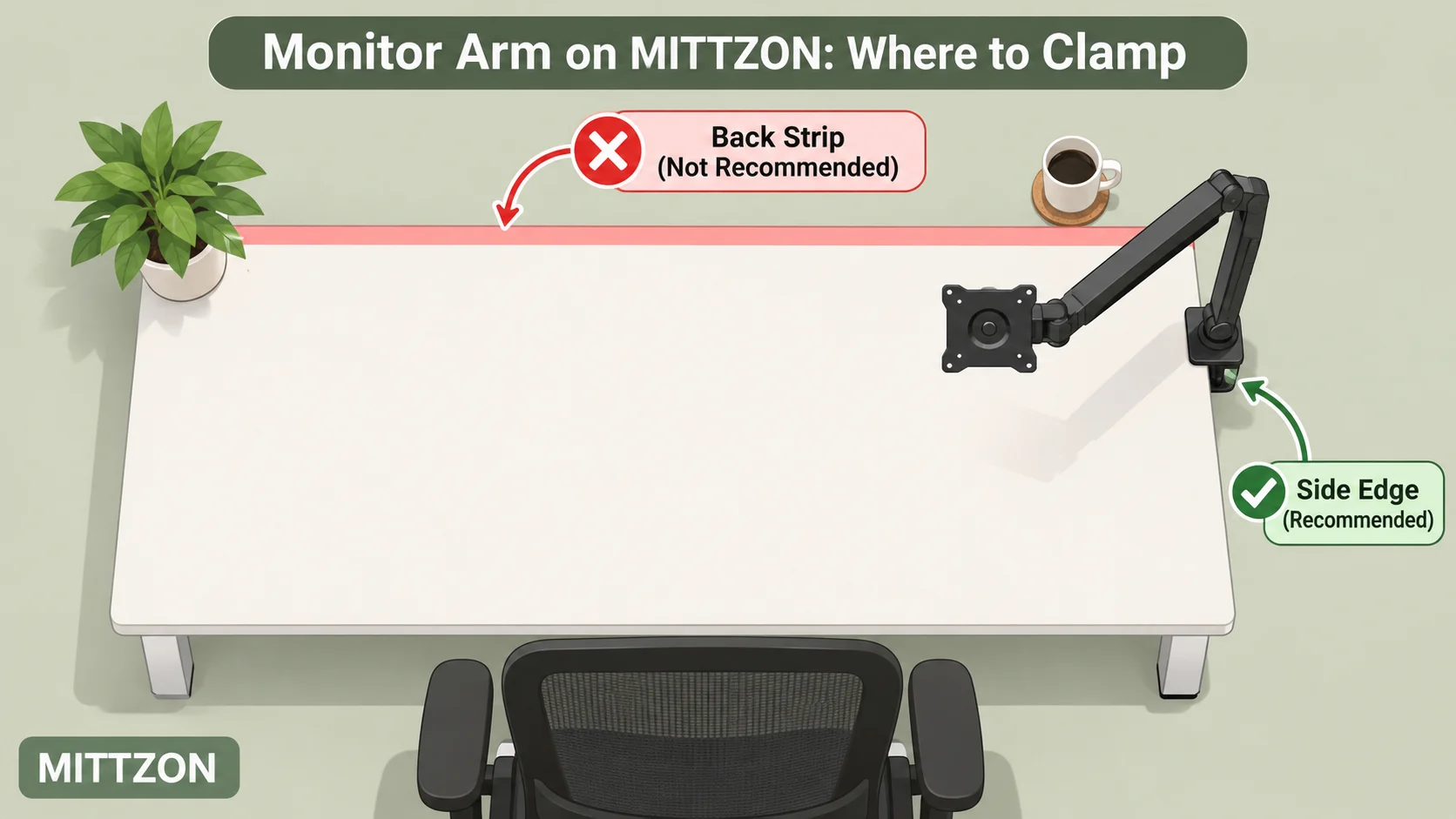
A side clamp puts the arm’s pole at the edge of the desk. To center one monitor, the arm needs to reach about half the desk’s width: about 23 5/8 in on the 47 1/4 in desk, 27 1/2 in on the 55 1/8 in desk, and 31 1/2 in on the 63 in desk. Check the arm’s listed extension before you buy. For two monitors, one arm on each side edge avoids the reach problem.
Sit/Stand or Fixed MITTZON: Check Your Load Limit
Both MITTZON versions use the same 3/4-inch tabletop, but they carry different loads. IKEA rates the electric sit/stand MITTZON for a max load of 176 lb, with a height range of 24 3/8 to 49 5/8 in, per IKEA’s US sit/stand page. The fixed MITTZON is rated for 50 kg (about 110 lb), and you set its height during assembly, up to 85 cm (about 33 1/2 in), per IKEA’s fixed desk page.
On the sit/stand version, the desk carries the arm and monitor up and down every day. If your monitor shakes when you type at standing height, our guide to monitor arm wobble on a standing desk shows how to tell whether the desk or the arm is the cause. Leave enough cable slack for the full height range, too. Our standing desk cable management guide covers how much.
IKEA STUBBERGET on MITTZON: The Fine Print
STUBBERGET fits the deeper MITTZON, but only just, and it is not meant for the shallow one. IKEA’s US STUBBERGET page lists MITTZON as a compatible desk and says the clamp takes tabletops 3/4 in to 3 in thick. The MITTZON tabletop is exactly 3/4 in, the very bottom of that range. The same page says STUBBERGET is for desks with a depth of 70 cm or more. That rules in the 31 1/2 in (80 cm) MITTZON and rules out the 23 5/8 in (60 cm) one.
The US page lists a max load of 17 lb 10 oz and a max screen size of 24 in. IKEA’s regional pages don’t all list the same max screen size, so go by your monitor’s weight without its stand.
| MITTZON Depth | Tabletop Thickness | STUBBERGET Clamp Range | STUBBERGET Depth Rule (70 cm+) | Verdict |
|---|---|---|---|---|
| 31 1/2 in (80 cm) | 3/4 in | 3/4 to 3 in (at the minimum) | Meets it | Fits |
| 23 5/8 in (60 cm) | 3/4 in | 3/4 to 3 in (at the minimum) | Below it | Not recommended by IKEA’s own rule |
Monitor Arms That Fit a 3/4-Inch MITTZON Top
Any clamp arm rated for desks 3/4 in thick or thinner fits the MITTZON tabletop, so pick the arm by your monitor’s weight. The table below compares IKEA’s own arm with the two Ergotron arms we have checked in detail.
| Arm | Monitor Weight | Clamp Range | Fits 3/4 in MITTZON Top? | Source |
|---|---|---|---|---|
| IKEA STUBBERGET | Up to 17 lb 10 oz | 3/4 to 3 in | Yes, at the minimum | IKEA |
| Ergotron LX | 7 to 25 lb | 0.4 to 2.4 in | Yes | Ergotron |
| Ergotron HX | 20 to 42 lb | 0.4 to 2.59 in | Yes | Ergotron |
For most 24 to 27 inch monitors, the Ergotron LX is the safer pick, because its weight range starts at 7 lb. Ergotron notes its lift drops above 20 lb, so a heavier screen is better on the HX. Don’t put a light monitor on the HX, though. Its spring is tuned for 20 lb and up, so a lighter screen can drift upward. Our Ergotron LX guide and Ergotron HX guide walk through the VESA and depth checks.
⭐ OUR PICK FOR MOST MITTZON SETUPS
Ergotron LX Desk Monitor Arm
- ⚖️ Capacity: 7 to 25 lb (lift drops to about 8.5″ above 20 lb)
- 🔧 Desk fit: clamp 0.4″ to 2.4″, grommet hole 0.31″ to 2″
- 🖥️ VESA: 75x75mm or 100x100mm
- 🛡️ Warranty: 10 years
👍 Best for: One monitor under 20 lb, clamped to the side edge of the MITTZON tabletop.
(affiliate link) · Specs from Ergotron’s LX product sheet
⭐ ALSO GREAT: HEAVY MONITORS ON MITTZON
Ergotron HX Desk Monitor Arm
- ⚖️ Capacity: 20 to 42 lb (28 lb if the monitor is deeper than 6″)
- 🔧 Desk fit: clamp 0.4″ to 2.59″, grommet hole 0.4″ to 2″
- 🖥️ VESA: 75×75, 100×100 and 200x200mm
- 📏 Reach: up to 23.6″ extension
👍 Best for: One heavy flat monitor, 20 to 42 lb, on the sit/stand MITTZON.
(affiliate link) · Specs from Ergotron’s HX data sheet
Running two screens on one clamp? A dual arm puts more weight on a single spot, which matters more on a two-piece desk. Our guide to dual monitor arms on IKEA desks checks MITTZON alongside four other IKEA models.
Not sure which edge of your MITTZON is free, or whether your arm will reach? Send us your desk size and monitor model through our contact form, and we’ll help you check it.
FAQ
Does IKEA STUBBERGET fit the MITTZON desk?
Can I clamp a monitor arm to the MITTZON plug-in module?
How thick is the IKEA MITTZON tabletop?
Will a monitor arm fit the 23 5/8 inch deep MITTZON?
How much weight can the MITTZON sit/stand desk hold?
Every measurement and spec in this guide comes from our own research. If you notice something that doesn’t match, whether it’s a wrong number or a calculation mistake on our end, tell us through the comments or our contact form. We’ll fix it right away.
Related Guides
- Will a Monitor Arm Fit Your IKEA Desk? (5 Models Checked)
- Will a Dual Monitor Arm Fit Your IKEA Desk? (Models Checked)
- Ergotron LX Monitor Arm: Will It Fit Your Desk? (Checked)
- Ergotron HX Monitor Arm: Will It Fit Your Desk? (Checked)
- Monitor Arm Wobble on a Standing Desk: Desk or Arm? (Checked)
- Do Monitor Arms Damage Desks? (What Most Buyers Don’t Realize)
- Best Cable Management for Standing Desks (Fit Checked)

I got interested in home office setups and noticed most buying guides online tell you if a product is ‘good,’ but never tell you if it will actually fit your specific desk. Does It Fit My exists to close that gap, with real measurements, verified sources, and straight answers.
About Does It Fit My · How we verify our guides