
Affiliate Disclosure: This post contains affiliate links. If you buy through them, we earn a small commission at no extra cost to you. We only recommend products we would genuinely suggest to a friend.
Yes, most flat 27-inch monitors fit the IKEA MÅLOMRÅDE arms. Each arm holds up to 15.4 lb, and IKEA lists the arms for flat screens up to 27 inches. Every popular 27-inch monitor we checked weighs between 8.4 and 12.6 lb without its stand. Curved screens, ultrawides, and 32-inch monitors fall outside IKEA’s limits.
Key Takeaways
- Each of the 3 built-in arms holds up to 15.4 lb (7 kg).
- IKEA lists the arms for flat monitors up to 27 inches only.
- The arms take 75 x 75 mm and 100 x 100 mm VESA patterns.
- Always use the “without stand” weight. The “with stand” number can make a monitor look too heavy when it fits fine.
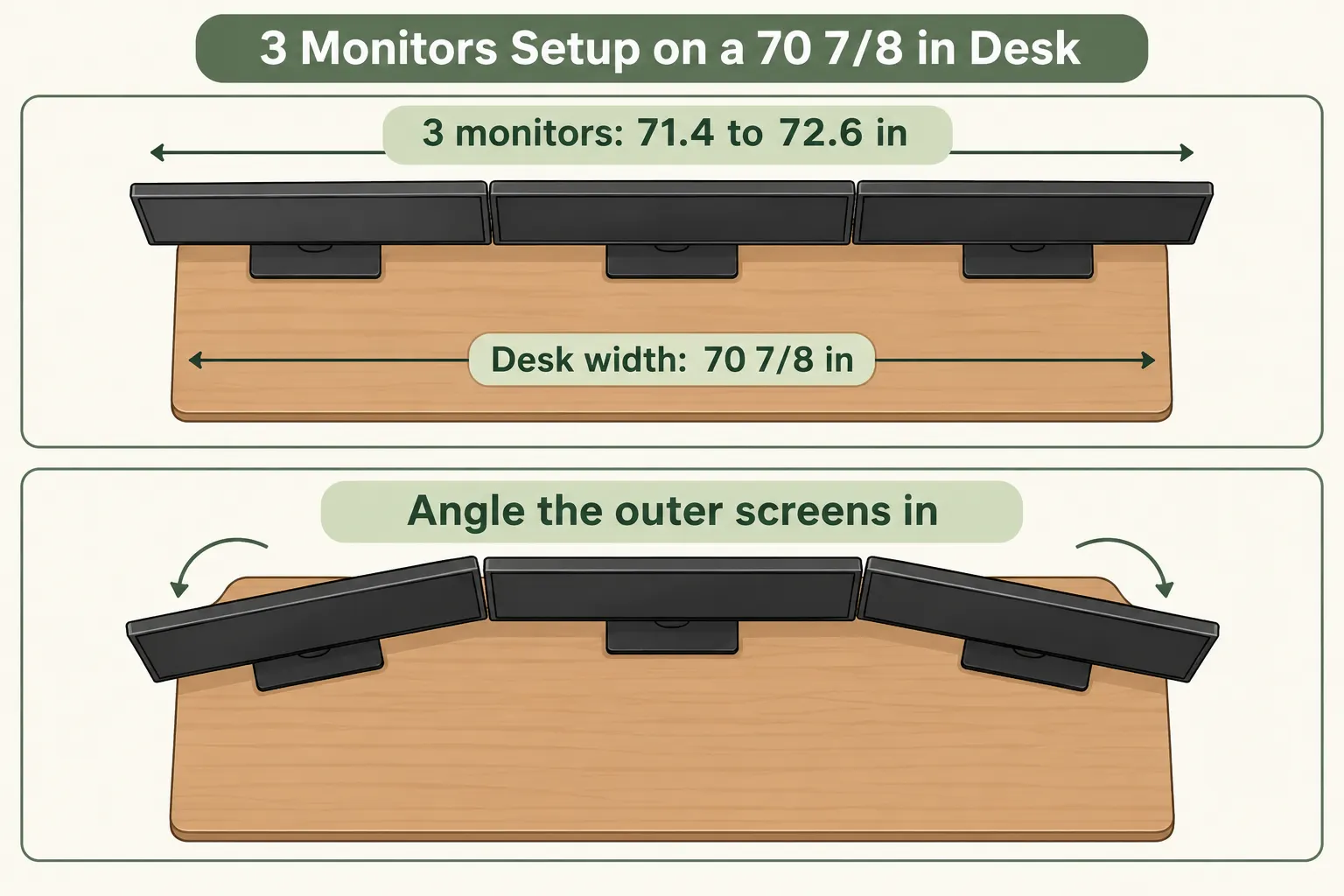
- Three 27-inch monitors in a straight line are slightly wider than the 70 7/8-inch desk, so the outer screens need to angle in.
Who this is for: anyone looking at the IKEA MÅLOMRÅDE who wants to know if their current monitor, or the one they plan to buy, will work on its built-in arms.
In This Guide
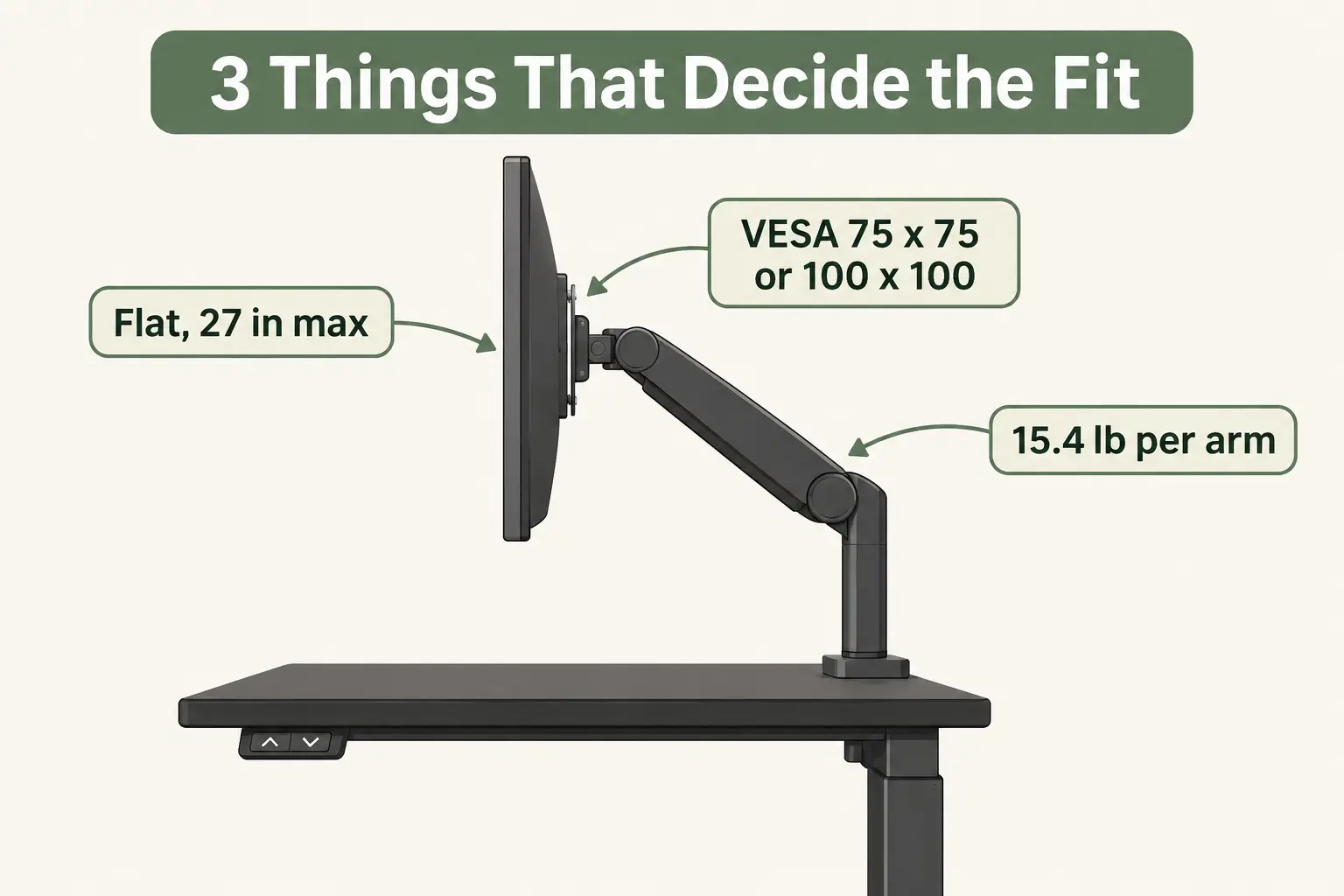
What Fits on the MÅLOMRÅDE Monitor Arms?
The MÅLOMRÅDE arms fit flat monitors up to 27 inches that weigh 15.4 lb or less and use a 75 x 75 mm or 100 x 100 mm VESA pattern. Those are the three numbers that decide everything. IKEA lists the size and weight limits on its US product page. The VESA sizes are not on the product page. We found them in the assembly instructions PDF.
One small note on weight. The US product page says 15.4 lb per arm, while the assembly manual rounds it to 16 lb. Both come from the same 7 kg limit. We use the lower 15.4 lb number in this guide to stay on the safe side.
| Spec | IKEA MÅLOMRÅDE |
|---|---|
| Monitor arms included | 3 |
| Max screen size per arm | 27 in, flat monitors |
| Max load per arm | 15.4 lb (7 kg) |
| VESA pattern | 75 x 75 mm and 100 x 100 mm |
| Desktop size | 70 7/8 x 31 1/2 in |
| Desktop height range | 26 3/4 to 49 1/4 in |
| Max desk load | 201 lb |
8 Real Monitors Checked Against the 15.4 lb Limit
The heaviest 27-inch monitor we checked, the LG 27GN95B-B, still leaves 2.8 lb of room on the arm. It weighs 12.6 lb without its stand. We pulled each weight from the maker’s own spec sheet or a listing that quotes it. We also added one 32-inch monitor to show where the real limit sits.
| Monitor | Weight without stand | Width | Fits? |
|---|---|---|---|
| Samsung Odyssey OLED G6 (G60SD) | 8.4 lb | 24.1 in | ✅ Yes |
| Alienware AW2725DF | 9.48 lb | 23.98 in | ✅ Yes |
| ASUS TUF Gaming VG27AQ1A | 9.48 lb | 24.21 in | ✅ Yes |
| Gigabyte M27Q2 | 9.5 lb | 24.1 in | ✅ Yes |
| Dell UltraSharp U2723QE | 9.88 lb | 24.07 in | ✅ Yes |
| LG UltraGear 27GS95QE-B | 11.1 lb | 23.8 in | ✅ Yes |
| LG UltraGear 27GN95B-B | 12.6 lb | 24.0 in | ✅ Yes |
| Dell UltraSharp U3223QE (32 in) | 12.6 lb | 28.1 in | ❌ No, over 27 in |
Look at the last row. The 32-inch Dell weighs the same as the heaviest 27-inch LG. It passes the weight test but fails the size test. This is the main point most buyers miss. On the MÅLOMRÅDE, screen size is the stricter limit, not weight.
Our Picks: 2 Monitors That Fit the MÅLOMRÅDE Arms
Both picks are flat 27-inch monitors with a 100 x 100 mm VESA pattern. Both weigh well under the 15.4 lb limit without their stands.
⭐ OUR PICK FOR FILLING ALL THREE ARMS
ASUS TUF Gaming VG27AQ1A (27 in)
- 📏 Screen: 27 in flat IPS, 2560 x 1440, 24.21 in wide.
- ⚖️ Weight without stand: 9.48 lb, about 5.9 lb under the arm limit.
- 🛠️ Mount: VESA 100 x 100 mm. 170 Hz refresh rate.
👍 Best for: a fast 1440p screen that leaves plenty of room on each of the three arms.
⚠️ Check first: Amazon lists an item weight of 11.9 lb, which includes the stand. The arm only carries the panel, and ASUS lists that at 9.48 lb.
(affiliate link) · Specs from ASUS and Amazon’s listing
⭐ ALSO GREAT: MOST WEIGHT HEADROOM
Samsung Odyssey OLED G6 (G60SD, 27 in)
- 📏 Screen: 27 in flat QD-OLED, 2560 x 1440, 24.1 in wide.
- ⚖️ Weight without stand: 8.4 lb, 7 lb under the arm limit. The lightest monitor in our table.
- 🛠️ Mount: VESA 100 x 100 mm. 360 Hz refresh rate, 0.03 ms response time.
👍 Best for: fast-paced gaming with the least strain on each arm.
(affiliate link) · Specs from Samsung’s spec sheet and Amazon’s listing
Why the “With Stand” Weight Fools Buyers
⚠️ Always compare the weight without the stand, because the arm replaces the stand. Many product pages show the “with stand” weight first. That number can make a monitor look too heavy when it fits fine. The LG 27GS95QE-B is a good example. LG lists it at 16.2 lb with its stand, which is over the 15.4 lb limit. Without the stand it weighs 11.1 lb, which fits with room to spare.
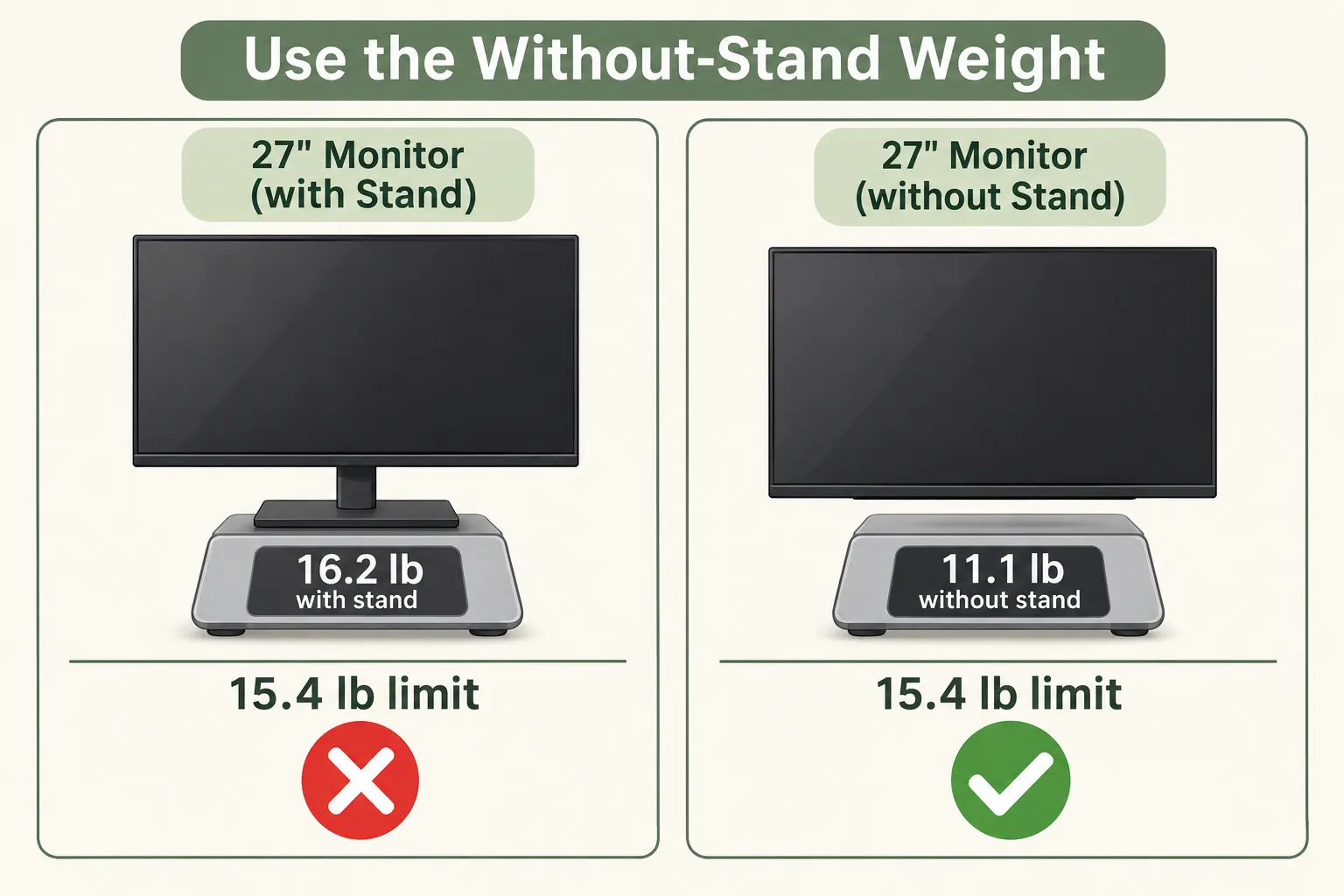
To find the right number, check your monitor’s spec sheet for a line called “weight without stand” or “panel only.” Dell spec sheets often label it “for VESA mount.” That is the number to compare against 15.4 lb.
Curved and Ultrawide Monitors: What “Flat Only” Means
IKEA lists the MÅLOMRÅDE arms for flat monitors only, so curved and ultrawide screens fall outside what IKEA supports. IKEA does not explain why. It also does not say a curved screen will fail. It only says the arms are made for flat monitors up to 27 inches. Most ultrawides are 34 inches or larger, so they are also over the size limit.
If you own a curved ultrawide, the built-in arms are not the right match. A separate heavy-duty clamp arm may be an option, but IKEA does not publish the tabletop thickness. Measure your desktop edge first, then compare it to the clamp range of any arm you consider. If you go that route, our Ergotron HX fit guide covers its HD Pivot version made for curved ultrawides.
Will Three 27-Inch Monitors Fit Side by Side?
Three 27-inch monitors in a straight line are slightly wider than the MÅLOMRÅDE desktop, so you will need to angle the two outer screens in. The desktop is 70 7/8 inches wide. The narrowest monitor in our table is 23.8 inches wide, and three of them add up to 71.4 inches. The widest is 24.21 inches, and three of them reach about 72.6 inches. That puts a flat row 0.5 to 1.8 inches wider than the desk.
This is not a dealbreaker. Most triple-monitor setups angle the side screens toward you anyway, which also shortens the total width. Just do not expect three screens to line up perfectly flat with all edges inside the desktop.
How to Check Your Own Monitor in 3 Steps
Step 1: Check the Screen Size and Shape
Your monitor must be flat and 27 inches or smaller. Check the model name on the back label or in your order history, then confirm the size on the maker’s site. If it is curved or larger than 27 inches, it is outside IKEA’s limits.
Step 2: Find the Weight Without the Stand
Look for “weight without stand” in the spec sheet, not the shipping weight or the “with stand” weight. If it is 15.4 lb or less, it passes.
Step 3: Confirm the VESA Pattern
Measure the distance between the four screw holes on the back of your monitor. If they are 75 mm or 100 mm apart in a square, they match the arms. Every monitor in our table uses 100 x 100 mm.
Will the Monitors Wobble at Standing Height?
IKEA does not publish any stability test for the arms at full standing height, so we cannot give you a number. The desktop goes up to 49 1/4 inches. Any screen on an arm can shake more as a desk gets taller. If you notice that after setup, our guide on whether a monitor arm makes a standing desk wobble explains the causes. For a fix that starts with the desk itself, see how to fix a wobbly standing desk.
Have a monitor that is not in our table?
Send us the model name through our contact form, and we will check it against the MÅLOMRÅDE limits for you.
FAQ
Can I put a 32-inch monitor on the IKEA MÅLOMRÅDE arms?
No. IKEA lists the arms for flat monitors up to 27 inches. Some 32-inch monitors weigh less than 15.4 lb, but they are still over the size limit.
Does the IKEA MÅLOMRÅDE work with curved monitors?
IKEA lists the arms for flat monitors only. It does not list curved screens as supported, so a curved monitor is outside IKEA’s stated limits.
What VESA size do the MÅLOMRÅDE monitor arms use?
The assembly instructions show 75 mm and 100 mm hole patterns. That means 75 x 75 mm and 100 x 100 mm VESA monitors match the arms.
How much weight can each MÅLOMRÅDE arm hold?
Each arm holds up to 15.4 lb (7 kg), per IKEA’s US product page. The assembly manual rounds this to 16 lb.
Do IKEA SKÅDIS accessories fit the MÅLOMRÅDE pegboard?
IKEA does not say the pegboard is SKÅDIS compatible. One US buyer review on the IKEA site reports that SKÅDIS accessories with bottom pegs do not fit properly. Check in store before buying SKÅDIS add-ons for it.
How high does the IKEA MÅLOMRÅDE desk go?
The desktop adjusts from 26 3/4 inches to 49 1/4 inches, per IKEA’s US product page.
Every measurement and spec in this guide comes from our own research. If you notice something that doesn’t match, whether it’s a wrong number or a calculation mistake on our end, tell us through the comments or our contact form. We’ll fix it right away.
Related Guides
- Will a Monitor Arm Fit Your IKEA Desk? (5 Models Checked)
- Will a Dual Monitor Arm Fit Your IKEA Desk? (Models Checked)
- Will a Monitor Arm Make a Standing Desk Wobble?
- How to Fix a Wobbly Standing Desk
- Ergotron HX Monitor Arm: Will It Fit Your Desk?
- IKEA Desk With Cable Management: Model-by-Model

I got interested in home office setups and noticed most buying guides online tell you if a product is ‘good,’ but never tell you if it will actually fit your specific desk. Does It Fit My exists to close that gap, with real measurements, verified sources, and straight answers.
About Does It Fit My · How we verify our guides