
A standing desk can make your workspace more comfortable and ergonomic, but it can also create a common problem: cable clutter.
As the desk moves up and down, cables can become tangled, hang awkwardly, or collect dust underneath the desk. A cable tray helps solve this problem by providing a dedicated space for power strips, chargers, and excess cable length.
The good news is that most standing desks can support a cable tray. However, compatibility depends on factors such as the desk frame, crossbars, motor placement, and available mounting space.
In this guide, we’ll explain how to determine whether a cable tray will fit your standing desk and what you should check before buying one.
What Is a Cable Tray?
A cable tray is an accessory that mounts underneath a desk and helps organize cables, power strips, and adapters.
Instead of allowing cables to hang below the desk, a tray keeps everything in one place and makes the workspace look cleaner
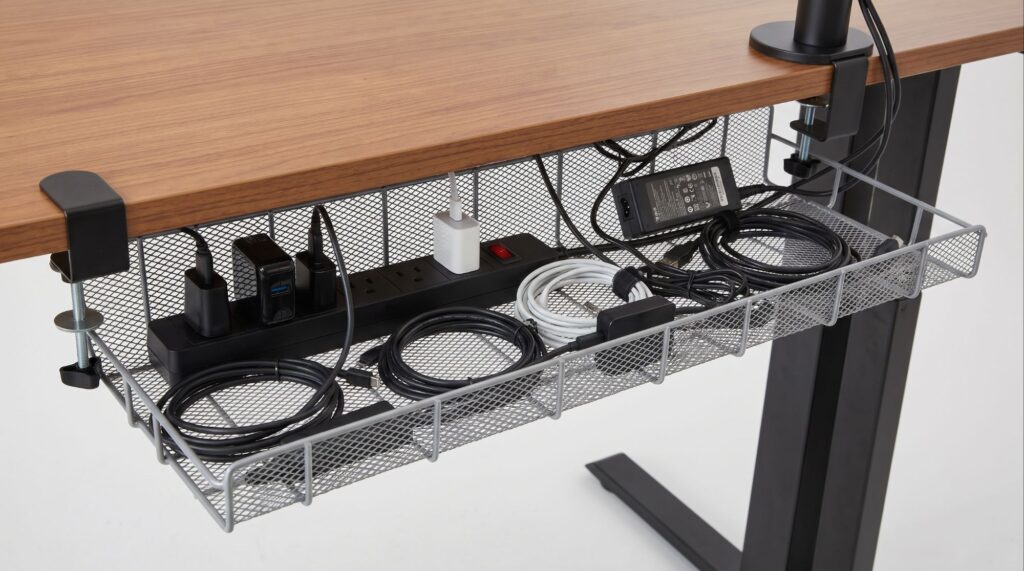
Many people install cable trays alongside monitor arms and keyboard trays to create a more organized workstation.
Will a Cable Tray Fit Your Standing Desk?
In most cases, yes.
A cable tray will fit most standing desks as long as there is enough open space underneath the desktop.
Modern standing desks are often designed with accessories in mind, which means there is usually room for cable trays, monitor arms, and other workspace upgrades.
If you’re also considering adding a keyboard tray, you may want to read our guide on Will a Keyboard Tray Fit Your Standing Desk?
✅ When a Cable Tray Will Fit
A cable tray will usually fit if:
- Your desk has open mounting space.
- There are no large crossbars blocking installation.
- The tray dimensions match the available space.
- The control box does not interfere with placement.
Most users won’t have any issues installing a cable tray if they take a few measurements beforehand.
❌ When a Cable Tray May Not Fit
A cable tray may not fit properly if:
- A large crossbar blocks the mounting area
- Motors occupy most of the available space
- The control box sits where the tray needs to be installed
- The desktop is unusually thin
While checking underneath your desk, it’s also a good idea to inspect its stability. If your desk wobbles while typing or adjusting height, our article on How to Fix a Wobbly Standing Desk may help.
How to Measure Your Desk Before Buying a Cable Tray?
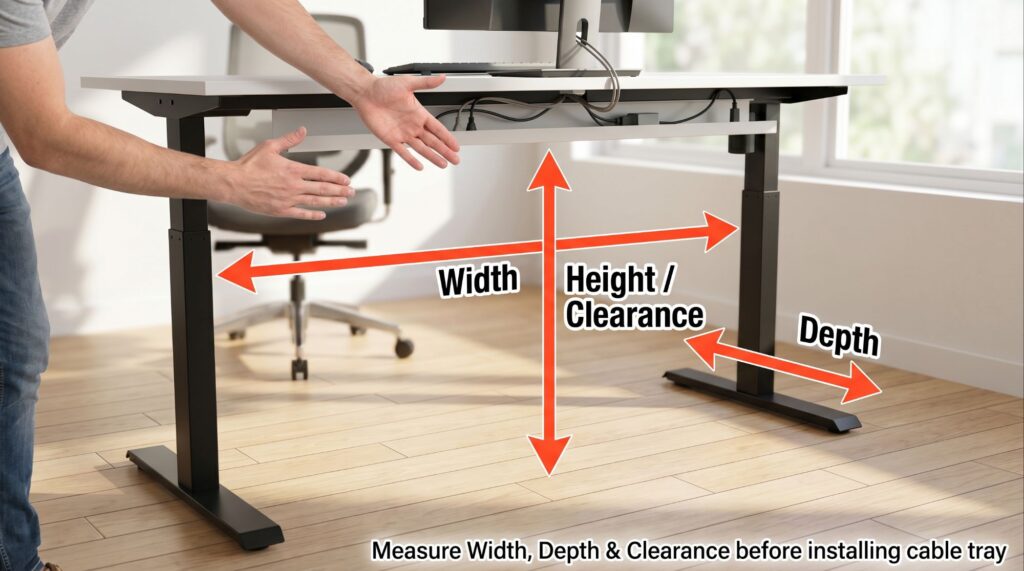
Step 1: Measure Available Width
Measure the open space underneath the desk where the tray could be installed.
Step 2: Measure Available Depth
Check the distance between the front and rear edges of the desktop.
Step 3: Look for Obstructions
Check for:
• Crossbars
• Motors
• Control boxes
• Existing accessories
Step 4: Compare Dimensions
Compare your measurements with the manufacturer’s specifications before purchasing a cable tray.
Benefits of Installing a Cable Tray
- Cleaner desk appearance
- Reduced cable clutter
- Easier cleaning
- Better cable protection
- Improved workspace organization
Proper cable management becomes even more important if you’re running multiple displays. If that’s your setup, you may also find our guide on Will a Dual Monitor Arm Fit Your Desk? useful.
Alternatives If a Cable Tray Doesn’t Fit
• Cable Sleeves
Cable sleeves bundle multiple wires together and create a cleaner appearance.
• Cable Clips
Adhesive cable clips help route cables neatly along the underside of the desk.
• Cable Raceways
Raceways hide cables inside enclosed channels for a cleaner look.
• Magnetic Cable Organizers
These organizers allow flexible cable routing without permanent installation.
Frequently Asked Questions
Do cable trays work with standing desks?
Yes. Most cable trays work with standing desks if there is enough mounting space underneath the desktop.
Can a cable tray interfere with a standing desk frame?
Sometimes. Large crossbars and control boxes may reduce available installation space.
Are cable trays worth it?
For most users, yes. They help create a cleaner and more organized workspace.
Do cable trays require drilling?
Some models require screws, while others use clamp-on mounting systems.
Need Help Checking Compatibility?
Every standing desk is different.
If you’re unsure whether a cable tray will fit your specific desk, send us a message through our contact form. We’ll do our best to help you check compatibility and answer your setup questions.
Final Verdict
A cable tray will fit most standing desks, but compatibility depends on the available space underneath the desktop.
Before purchasing one, measure your desk carefully, check for crossbars or control boxes, and compare your available space with the tray dimensions. A few minutes of measuring can save you time and help you create a cleaner, more organized workspace

I got interested in home office setups and noticed most buying guides online tell you if a product is ‘good,’ but never tell you if it will actually fit your specific desk. Does It Fit My Team exists to close that gap, with real measurements, verified sources, and straight answers.
Pingback: Does a Standing Desk Fit in a Small Bedroom? (Detailed Guide)
Pingback: Will a Monitor Mount Fit Your Adjustable Desk? (Do Not Order Until You See This) - Does It Fit My
Pingback: FlexiSpot E7 Electric Adjustable Standing Desk: Complete Compatibility Guide - Does It Fit My