
Affiliate Disclosure: This post contains affiliate links. If you purchase through them, we may earn a small commission at no extra cost to you. Every product we recommend has been carefully researched to make sure it actually solves your problem.
Quick answer: Yes, a monitor arm clamp fits most bamboo standing desks. Check that your desktop’s thickness is inside your clamp’s rated range, put a steel reinforcement plate under the clamp, and hand-tighten only. Thin bamboo tops, like FlexiSpot’s 0.7-inch desktops, need the plate every time.
In This Guide
Yes, a monitor arm clamp will fit your bamboo standing desk. But there is one thing you should do before tightening it if you want to avoid damaging the desktop over time.
So you have got a bamboo standing desk. Clean look, eco friendly, solid surface. And now you want to add a monitor arm to free up some space. Good idea. But here is what many people do not realize before tightening that clamp:
Bamboo is durable, but it is not immune to pressure damage. A standard C clamp concentrates force into a very small area, and over time that pressure can leave visible marks or indentations on the desktop surface.
It usually does not happen immediately. In many cases the desk looks perfectly fine for weeks or even months. Then one day you remove the clamp and notice a small impression where the pressure has been concentrated for a long period.
The good news? This is usually preventable with one simple fix. By the end of this guide, you will know exactly how to mount a monitor arm on a bamboo standing desk while minimizing the risk of dents and pressure marks.
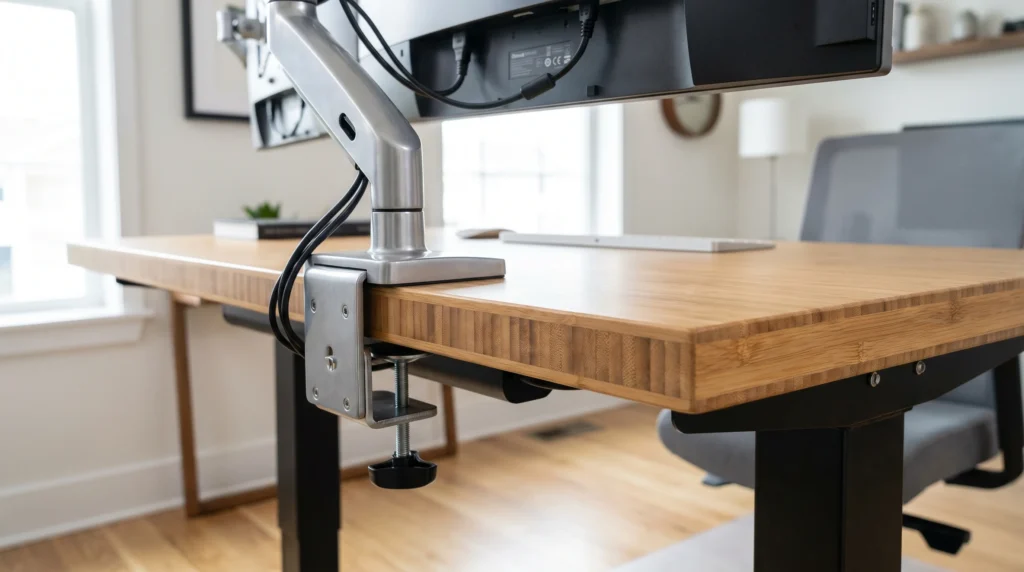
Why Bamboo Desks Are Different (And Why It Matters for Your Clamp)
Bamboo is surprisingly strong. That’s one reason it’s used in flooring, furniture, and premium standing desks.
But a monitor arm clamp concentrates force into a very small area at the edge of the desk.
Over time, that pressure can leave visible marks or indentations on some bamboo desktops, especially if the clamp is overtightened.
Standing desks add another factor. Because the desk moves up and down regularly, the clamp contact point experiences repeated stress over time.
The good news? This doesn’t mean you should avoid a monitor arm. It simply means you should take one extra step before installation.
• Standing Desk Note: A standing desk experiences more movement than a fixed desk. While a properly installed monitor arm should remain stable, repeated use can place additional stress on the clamp area over time. Using a reinforcement plate helps distribute that pressure more evenly and reduces the risk of marks or indentations.
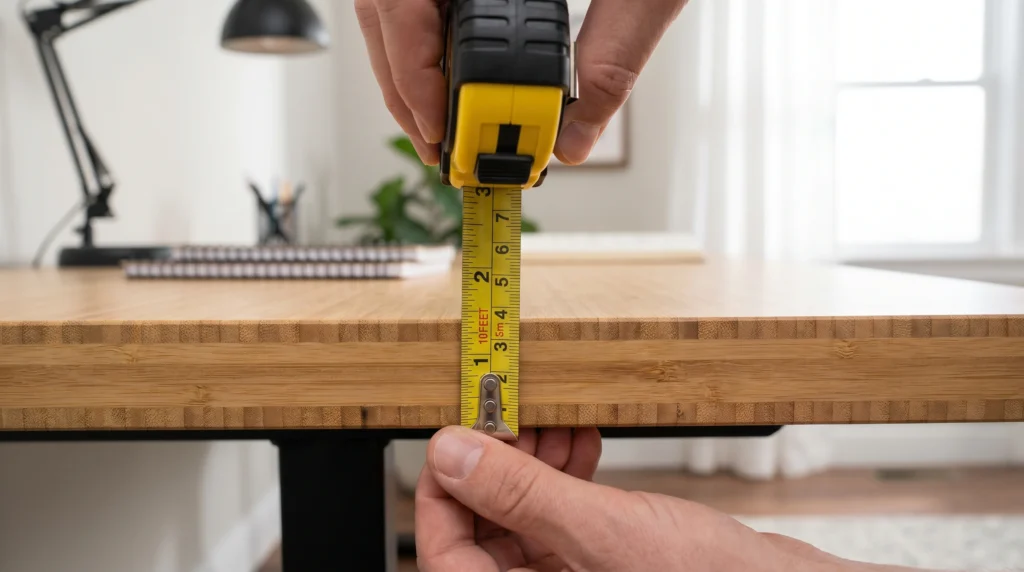
Step 1: Measure Your Bamboo Desk Thickness First (Takes 30 Seconds)
Before you do anything else, grab a tape measure or ruler and measure the thickness of your bamboo desktop at the edge where you plan to mount the clamp.
Bamboo desktops vary more than you’d expect: FlexiSpot lists its bamboo tops at 0.7 inches, while Uplift’s bamboo tops are 1 inch thick. This matters for two reasons:
- Reason 1: Your clamp has to physically fit.
Every monitor arm clamp lists a minimum and maximum desk thickness. Check that range on your arm’s listing or manual and make sure your measurement falls inside it. - Reason 2: Thinner desktops benefit from extra support.
A thinner desktop has less material around the clamp area, which makes pressure distribution more important. On a thin top, like a 0.7-inch bamboo desktop, use a reinforcement plate every time.
Write down your measurement before reading the next section. You’ll need it.
Step 2: Check Your Specific Bamboo Desk Model
Not all bamboo desks are built the same. Here’s a quick look at the most popular bamboo standing desks and what you’re working with:
| Desk | Bamboo Top Thickness | Source | Recommended Setup |
|---|---|---|---|
| FlexiSpot (bamboo tops) | 0.7″ | FlexiSpot | Clamp plus reinforcement plate |
| Uplift (bamboo tops) | 1″ | Uplift | Clamp plus reinforcement plate recommended |
| Autonomous Desk 2 (bamboo) | Not published, measure yours | Autonomous | Check your clamp’s range, plate recommended |
• Edge check: Bamboo tops often have a profiled or rounded edge (Uplift, for example, describes a triple-layer edge profile on its bamboo desktops). Look at the underside of your edge before you buy a clamp. The bottom jaw and the plate need a flat area to sit on.
Already planning to add a keyboard tray too? Make sure your desk’s crossbar won’t interfere with installation. We cover exactly how to check clearance, mounting space, and compatibility in our keyboard tray guide.
The Fix: One Steel Plate That Changes Everything
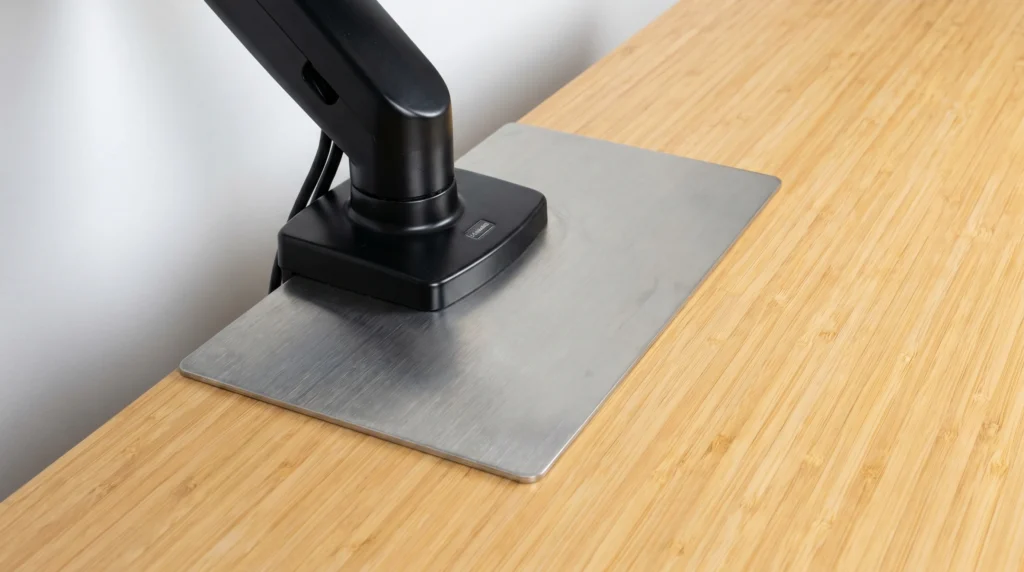
The problem with a C clamp is that it concentrates pressure on a tiny point. The solution is called a spreader plate (also sold as a monitor mount reinforcement plate on Amazon).
It’s a flat steel plate (often sold as a top plate plus a base plate) that sits between the clamp and your bamboo desk. Instead of the clamp’s screw pushing on one small spot, the plate spreads that same force over a much larger area. The HUANUO plate below, for example, has a 9.84 x 5.9-inch base plate.
Think of it like this: pressing your fingertip hard into bamboo can eventually leave a mark. Pressing a flat book with the same force spreads the pressure over a larger area. Same concept.
⭐ OUR PICK FOR BAMBOO DESKS
HUANUO Monitor Mount Reinforcement Plate (HNDA1)
- 📏 Top plate: 11.3 x 7.3 x 0.9 in
- 📐 Base plate: 9.84 x 5.9 x 0.1 in
- 🧱 Material: Steel
- 🛠️ Works with: C-clamp monitor mounts
- 🛡️ Surface protection: anti-slip rubber pads
👍 Best for: Bamboo desk owners who want to clamp a monitor arm without leaving a dent, especially on thinner tops.
(affiliate link) · Specs from HUANUO’s official product page
Which Monitor Arms Fit a Bamboo Desk?
Both Ergotron arms below clamp onto desktops from 0.4 inch thick, so they fit FlexiSpot’s 0.7-inch and Uplift’s 1-inch bamboo tops. Your monitor’s weight decides which one to pick, not your bamboo top.
One detail most guides skip: the reinforcement plate sits inside the clamp too. Add every plate piece that goes between the clamp and your desk to your desk’s thickness. Then check that total against the clamp range. For example, a plate piece 0.1 inch thick turns a 0.7-inch FlexiSpot top into 0.8 inch. That is still well inside both clamp ranges below.
| Arm | Monitor Weight | Clamp Range | Grommet Hole | FlexiSpot 0.7″ / Uplift 1″ Bamboo | Source |
|---|---|---|---|---|---|
| Ergotron LX | 7 to 25 lb | 0.4″ to 2.4″ | 0.31″ to 2″ | Fits both | Ergotron LX product sheet |
| Ergotron HX | 20 to 42 lb | 0.4″ to 2.59″ | 0.4″ to 2″ | Fits both | Ergotron HX product page |
Pick the LX if your monitor weighs 7 to 20 lb. It still holds up to 25 lb, but Ergotron says lift can drop from 13 inches to about 8.5 inches above 20 lb. Pick the HX for a heavy 20 to 42 lb screen. A screen lighter than 20 lb can drift up on the HX, because its spring is tuned for heavier monitors.
⭐ OUR PICK FOR MOST MONITORS ON BAMBOO
Ergotron LX Desk Monitor Arm
- ⚖️ Capacity: 7 to 25 lb (lift drops to about 8.5″ above 20 lb)
- 🔧 Desk fit: clamp 0.4″ to 2.4″, grommet hole 0.31″ to 2″
- 🖥️ VESA: 75x75mm or 100x100mm
- 🛡️ Warranty: 10 years
👍 Best for: One monitor under 20 lb on a FlexiSpot or Uplift bamboo top, with a plate under the clamp.
(affiliate link) · Specs from Ergotron’s LX product sheet
⭐ ALSO GREAT: HEAVY MONITORS ON BAMBOO
Ergotron HX Desk Monitor Arm
- ⚖️ Capacity: 20 to 42 lb (28 lb if the monitor is deeper than 6″)
- 🔧 Desk fit: clamp 0.4″ to 2.59″, grommet hole 0.4″ to 2″
- 🖥️ VESA: 75×75, 100×100 and 200x200mm
- 🛡️ Warranty: 10 years
👍 Best for: One heavy flat monitor, 20 to 42 lb, on a bamboo top with a plate under the clamp.
(affiliate link) · Specs from Ergotron’s HX data sheet
Not sure what your monitor weighs without its stand? Our Ergotron LX weight guide and Ergotron HX weight guide walk through the weight, VESA and depth checks before you buy.
How To Install It Safely on a Bamboo Desk (Don’t Skip Step 3)
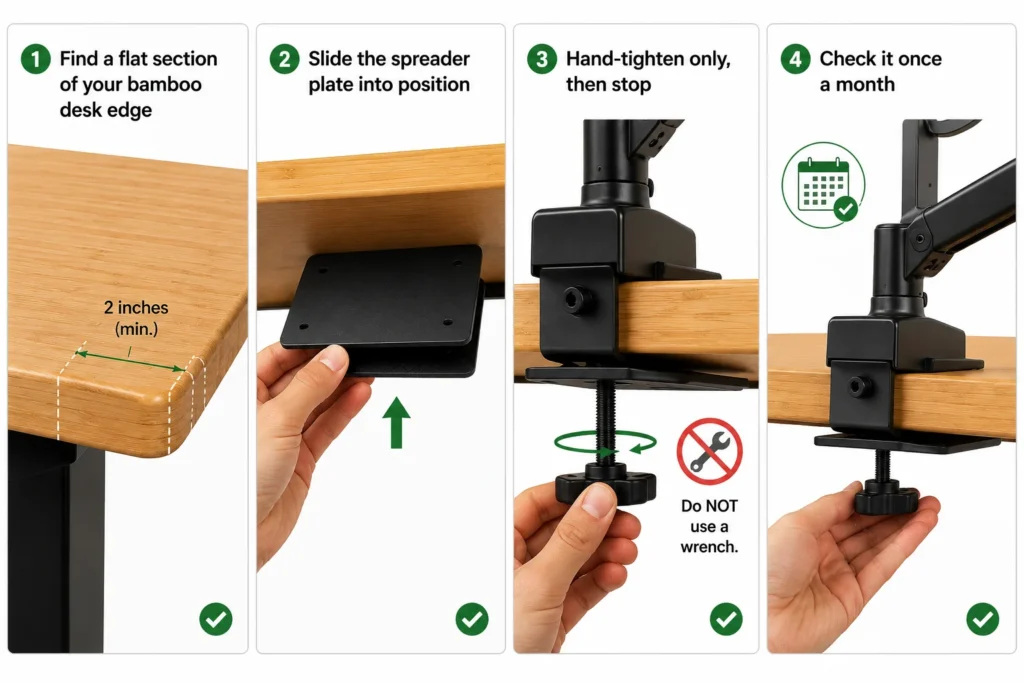
1. Find a flat section of your bamboo desk edge:
Bamboo standing desks sometimes have slightly rounded or beveled edges. You want at least 2 inches of flat, square edge for the clamp’s top jaw to sit flush against. If your entire edge is beveled, a grommet mount may work better (see the next section).
2. Put both plates in position:
Most plate kits come in two pieces. Put the large top plate on the desk, under the clamp’s top jaw. Put the base plate against the underside of the desk, where the clamp screw presses. If a plate has a rubber or padded side, that side faces your bamboo, and the steel side faces the clamp.
⚠️ 3. Hand-tighten only, then stop:
This is the step that ruins most setups. Tighten the clamp screw until it is firmly snug with no wobble and no play. Then give it one quarter-turn more with your hand. Stop there. Do NOT use a wrench. Overtightening is what causes dents on bamboo, even with a spreader plate.
4. Check it once a month:
Because your standing desk moves up and down multiple times a day, the motor’s microvibrations gradually loosen the clamp over time. A quick finger-tighten check every 3–4 weeks takes 5 seconds but prevents a lot of wobble later.
When You Should Avoid a Clamp Entirely (Use a Grommet Mount Instead)
Skip the clamp if any of these apply to you:
- Your desktop is thinner than the smallest thickness your clamp is rated for.
- You have a heavy dual-monitor setup. A single clamp point carries a lot of sideways force, and a grommet mount spreads it more evenly.
- Your bamboo desk has a fully rounded edge with no flat section. A C-clamp top jaw needs a flat surface to grip cleanly.
- You’re using an L-shape or T-shape bamboo standing desk internal beams near the edges can interfere with how the clamp distributes force.
Also worth knowing: IKEA LINNMON desktops are not bamboo. They have a honeycomb paper filling inside, so they need more care than a solid bamboo top. Our guide on mounting a monitor arm on an IKEA desk covers how to do it safely.
Quick test: knock on your desk with your knuckle. A hollow sound means a hollow core.
One More Thing: Cable Slack on Standing Desks
This trips up a lot of people, so it’s worth mentioning before you finish the setup.
When you install a monitor arm on a standing desk, your cables need extra slack. Every time the desk goes up or down, the cables travel with it. If your HDMI or DisplayPort cable is too short, it will get pulled taut when you raise the desk and eventually disconnect or get damaged.
Rule of thumb: Raise the desk to its highest setting before you trim or tie down any cable, and make sure nothing pulls tight at the top. Route the cables loosely through the monitor arm and desk frame so they can move easily with every height adjustment.
Quick Summary
• Yes, a monitor arm clamp CAN fit your bamboo standing desk.
• Bamboo is at risk of slow denting under concentrated clamp pressure, especially on a moving desk.
• Fix: Use a reinforcement plate between the clamp and your bamboo surface.
• Measure your desktop thickness first and make sure it’s inside your clamp’s rated range.
• FlexiSpot bamboo tops are 0.7 inches thick, so always use a reinforcement plate.
• Install slowly, do not overtighten, and check tightness again after one week.
Still Not Sure Which Setup Works for Your Desk?
Every bamboo desk is a little different. Edge shape, thickness, and frame design all affect which mounting option is right for you. If you are still not 100% certain, do not guess. Send us a message through our contact form, and we will sort it out with you in minutes.
FAQ
My bamboo desk already has a small dent from the clamp. Can I fix it?
Does the rubber pad that comes with my monitor arm clamp protect the bamboo from denting?
Can I use a grommet mount on a bamboo standing desk instead of a clamp?
Will the clamp loosen over time on a standing desk?
What’s the minimum bamboo desk thickness that can safely hold a monitor arm clamp?
Does the Ergotron LX work on a bamboo standing desk?
Will the clamp void my bamboo standing desk warranty?
My bamboo desk has a beveled (rounded) edge. Will a clamp still work?
How do I know if my clamp is causing damage before I can see a dent?
Every measurement and spec in this guide comes from our own research. If you notice something that doesn’t match, whether it’s a wrong number or a calculation mistake on our end, tell us through the comments or our contact form. We’ll fix it right away.
Related Articles
- Will a Keyboard Tray Fit Your Standing Desk? (Read Before You Drill)
- Will a Monitor Arm Fit Your IKEA Desk? (5 Models Checked)
- Do Monitor Arms Damage Desks? (What Most Buyers Don’t Realize)
- Ergotron LX Weight Limit (7-25 lb): Will Your Monitor Fit?
- Ergotron HX Weight Limit: 20 lb Min, 42 lb Max (Checked)

I got interested in home office setups and noticed most buying guides online tell you if a product is ‘good,’ but never tell you if it will actually fit your specific desk. Does It Fit My exists to close that gap, with real measurements, verified sources, and straight answers.
About Does It Fit My · How we verify our guides