
Affiliate Disclosure: This post contains affiliate links. If you buy through them, we earn a small commission at no extra cost to you. We only recommend products we would genuinely suggest to a friend.
To install the HUANUO HNDS6 dual monitor mount, check the fit, clamp the base, slide on the arms, hang the monitors and set the gas spring tension. Your desk must be wood, 0.59 to 3.54 in thick, with nothing under the clamp spot. Each monitor must be 13 to 32 in and 4.4 to 19.8 lb. Set the tension last, with the monitor on and the arm level.
Key Takeaways
- HUANUO’s desk rules: wood only (no glass or plastic), 0.59 to 3.54 in thick, and no cross beam or panel under the clamp spot.
- Monitor rules: 13 to 32 in, 4.4 to 19.8 lb per arm, 75×75 or 100×100 mm VESA. Some HNDS6 listings say 13 to 30 in, so check your box.
- Adjust the gas spring only with the monitor attached and the arm level. Counter-clockwise (+) adds tension. Clockwise (-) reduces it.
- Expect many turns. HUANUO’s troubleshooting guide says one full turn is roughly 1 lb.
- On a standing desk, check under the back edge for the frame crossbar, and leave cable slack for the full height range.
Who this is for: This guide is for you if you just unboxed a HUANUO dual monitor mount (model HNDS6), lost the paper manual, or set it up and your monitors keep sinking or springing up.
In This Guide
Before You Start: Will the HNDS6 Fit Your Desk and Monitors?
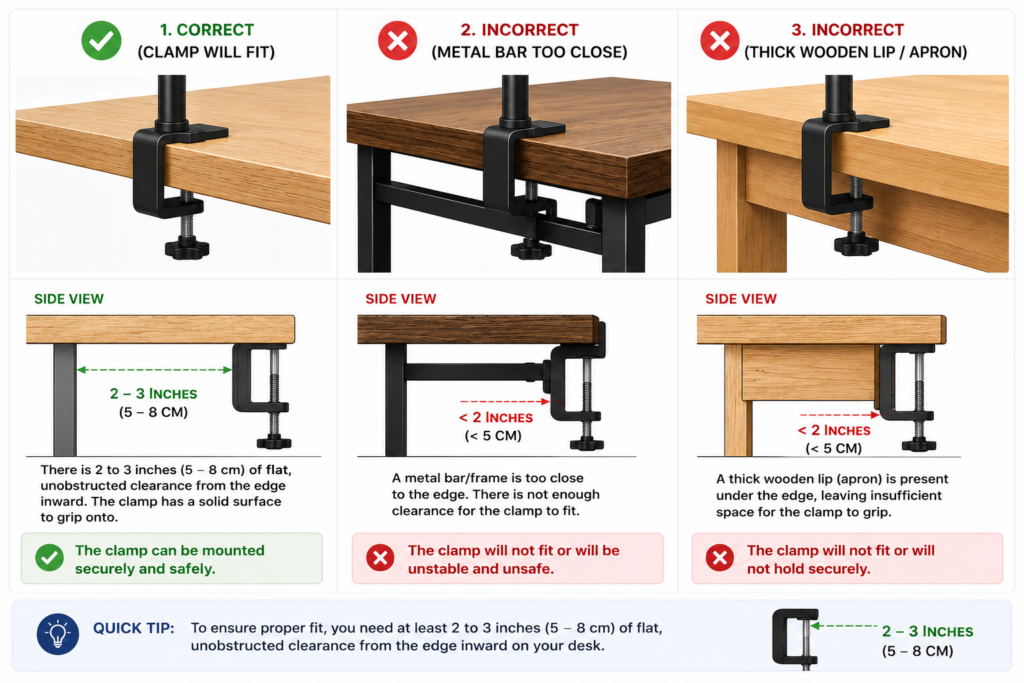
The HNDS6 fits only if your desk and both monitors pass all six checks below. HUANUO’s listing says the desk conditions must all be true at the same time, and the same goes for each monitor. If one fails, the mount can sag, wobble or not clamp at all.
| Check | HNDS6 Limit | What to Do | Source |
|---|---|---|---|
| Desk material | Wood. No glass or plastic | Knock on the top. A hollow sound means a hollow core | HUANUO listing |
| Desk thickness | 0.59 to 3.54 in | Measure at the exact edge you will clamp | HUANUO listing |
| Under the desk edge | No cross beam or panel | Look for frame bars, drawers and the control box | HUANUO listing |
| Monitor size | 13 to 32 in (some listings: 13 to 30 in) | Check the size printed on your box | HUANUO |
| Weight per arm | 4.4 to 19.8 lb | Weigh each monitor without its stand | HUANUO |
| VESA pattern | 75×75 mm or 100×100 mm | Measure the screw holes on the monitor’s back | HUANUO listing |
Too light causes problems too. A monitor under 4.4 lb may not hold the arm down, even at the lowest tension. Thinking about a different arm because your desk is too thick or thin? Our guide to dual monitor arm clamp ranges compares popular models side by side.
C-Clamp or Grommet: Which Should You Use?
Use the C-clamp if your desk has a clear, flat back edge, and the grommet if it doesn’t. The HNDS6 ships with both, so pick by your desk, not by habit.
| Mount Type | Use It When | Watch Out For |
|---|---|---|
| C-clamp | You have a clear, flat back edge | Thin or particleboard tops can dent. Add a steel plate |
| Grommet | Your desk has a cable hole, or the back edge is blocked | Needs a hole through the top. Check your manual for the hole size first |
Worried the clamp will leave a mark on your desktop? Read do monitor arms damage desks before you tighten anything.
How to Install the HUANUO Dual Monitor Mount, Step by Step
The install takes six steps, and the order matters. Mount the base first and set the tension last.
1. Mount the base.
Center the base at the back edge, between where your two screens will sit. For the C-clamp, open it to your desk thickness and slide it on. Tighten it with the Allen key from the box until the base doesn’t move when you push it. For the grommet, drop the threaded rod through the hole, fit the plate underneath and tighten from below.
2. Slide the arms onto the pole.
Set each arm at the height you want. Then tighten its set screw so it can’t slide down the pole. Point both arms roughly toward where the screens will go.
3. Attach the VESA plates to the monitors.
Lay each monitor face down on a towel or the box foam and remove its stand. Screw the VESA plate on with the screws from the hardware bag. Flat-back monitors take the short screws. Curved or recessed backs usually need the longer screws and spacers. Hand-tighten only.
4. Hang the monitors on the arms.
Lock each monitor onto its arm and make sure it is secure before you let go. Ask someone to hold the screen. The arm can spring upward before the tension is set.
5. Set the tension, then the tilt.
Follow the tension section below first. Then tilt each screen so the top sits at or just below eye level. HUANUO lists +85°/-50° tilt, 180° swivel and 360° rotation for the HNDS6. To turn a screen to portrait, raise the arm first so the corner clears the desk.
6. Route the cables.
Run the power and video cables through the clips along each arm. Swing both arms through their full range once to make sure nothing pulls tight.
⚠️ Don’t overtighten the clamp. Tighten until there is no play, then stop. Extra force doesn’t add stability. It only presses the clamp into the desktop.
How to Set the Gas Spring Tension (The Step Most People Get Wrong)
Turn the tension screw counter-clockwise if the monitor drops, and clockwise if it springs up. HUANUO’s manuals say to do this only after the monitor is installed. Keep the arm level while you turn. Turning it at an angle makes the screw hard to move and can damage the mount.
| What the Monitor Does | Turn the Screw | Why |
|---|---|---|
| Sinks or drops | Counter-clockwise (+) | Adds tension so the spring can hold the weight |
| Springs up or won’t stay low | Clockwise (-) | Reduces tension for lighter screens |
| Barely changes after a few turns | Keep going | One full turn is roughly 1 lb, so heavy screens need many turns |
Set each arm on its own. Two different monitors almost never need the same setting. If the arm is stuck high and you can’t reach the screw, HUANUO’s FAQ says to keep pressing it down slowly until it comes level.
⚠️ Never adjust tension on an empty arm. The gas spring is under pressure, and an arm with no monitor can snap upward.
Installing the HNDS6 on a Standing Desk: 3 Extra Checks
The HNDS6 works on a standing desk if the clamp spot is clear of the frame and your cables can travel with the desk. Many electric frames run a crossbar or mount the control box right under the back edge. HUANUO says nothing can sit under the clamp spot, so slide the base along the edge until it is clear. Our monitor arm for standing desk checklist shows where to look.
Cables are the second check. Raise the desk to its highest setting before you tie anything down, and make sure nothing pulls tight at the top. If your cables already hang in a mess under the desk, our guide to cable management for standing desks covers how much slack to leave.
The third check is shake at standing height. A long arm makes small desk movement look bigger on screen. If your monitors shake when you type, the monitor arm wobble test tells you whether the desk or the arm is the cause.
Common HUANUO Mount Problems and Fixes
Most HNDS6 problems come from the wrong tension or a desk outside the clamp range. Find your symptom below.
| Problem | Likely Cause | Fix |
|---|---|---|
| Monitor keeps sinking | Tension too low, or monitor over 19.8 lb | Turn counter-clockwise (+) with the arm level. If it still sinks at max, the screen is too heavy |
| Arm won’t stay down | Tension too high, or monitor under 4.4 lb | Turn clockwise (-), many turns if needed |
| Clamp won’t close | Desk outside 0.59 to 3.54 in, or something underneath | Move the base along the edge, or switch to grommet |
| VESA screws won’t reach | Curved or recessed monitor back | Use the longer screws and spacers from the hardware bag |
| Base leans forward | Clamp on a thin or soft top | Add a steel reinforcement plate |
A steel plate spreads the clamp pressure over a much larger area on thin, particleboard or bamboo tops. If your desk is bamboo, our guide to monitor arm clamps on a bamboo desk shows how to fit one.
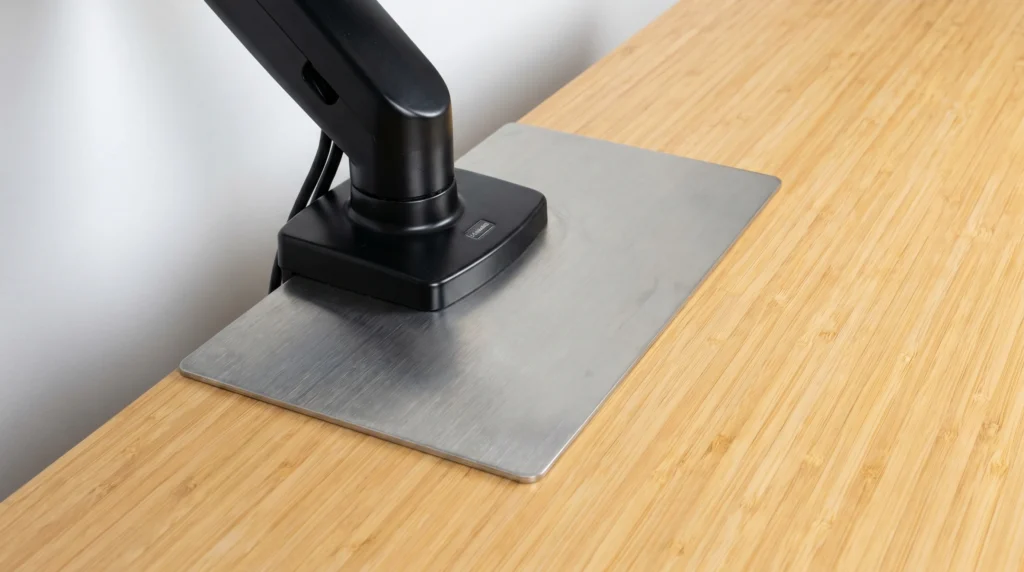
⭐ OUR PICK FOR THIN OR SOFT DESKTOPS
HUANUO Monitor Mount Reinforcement Plate (HNDA1)
- 📏 Top plate: 11.3 x 7.3 x 0.9 in
- 📐 Base plate: 9.84 x 5.9 x 0.1 in
- 🧱 Material: Steel, with anti-slip rubber pads
- 🛠️ Works with: C-clamp monitor mounts
👍 Best for: HNDS6 owners clamping onto particleboard, bamboo or a thin top. Add the plate’s thickness to your desk’s before checking the 3.54 in limit.
(affiliate link) · Specs from HUANUO’s official product page
⭐ THE MOUNT THIS GUIDE COVERS
HUANUO Dual Monitor Mount (HNDS6)
- ⚖️ Capacity: two screens, 13 to 32 in, 4.4 to 19.8 lb each
- 🔧 Desk fit: C-clamp or grommet, wooden desks 0.59 to 3.54 in
- 🖥️ VESA: 75×75 mm or 100×100 mm
- 🔄 Motion: +85°/-50° tilt, 180° swivel, 360° rotation
👍 Best for: Two standard 24 to 27 in monitors under 19.8 lb each, on a solid wooden desk with a clear back edge.
⚠️ Not for glass desks, 34 in ultrawides, or monitors over 19.8 lb.
(affiliate link) · Specs from HUANUO’s product page and listing
Not sure your desk or monitors will work with the HNDS6? Send us your desk thickness, desk material and monitor models through our contact form, and we’ll help you check it. Need diagrams or the parts list? Use the “View full manual” link on HUANUO’s HNDS6 product page.
FAQ
Which way do I turn the tension screw on a HUANUO monitor arm?
Can I install the HUANUO HNDS6 on a glass desk?
How thick a desk does the HUANUO dual monitor mount fit?
Will the HNDS6 hold a 34 inch ultrawide monitor?
Why does my HUANUO monitor arm keep drooping after I set it?
Does the HUANUO dual monitor mount work on a standing desk?
Every measurement and spec in this guide comes from our own research. If you notice something that doesn’t match, whether it’s a wrong number or a calculation mistake on our end, tell us through the comments or our contact form. We’ll fix it right away.
Related Guides
- Will a Dual Monitor Arm Fit Your Desk? Clamp Ranges (Checked)
- Monitor Arm for Standing Desk: 5 Checks (Verified)
- Monitor Arm Wobble on a Standing Desk: Desk or Arm? (Checked)
- Monitor Arm Clamp on a Bamboo Desk: The Plate That Prevents Dents
- Do Monitor Arms Damage Desks? (What Most Buyers Don’t Realize)
- Will a Dual Monitor Arm Fit Your IKEA Desk? (Models Checked)
- Best Cable Management for Standing Desks (Fit Checked)

I got interested in home office setups and noticed most buying guides online tell you if a product is ‘good,’ but never tell you if it will actually fit your specific desk. Does It Fit My exists to close that gap, with real measurements, verified sources, and straight answers.
About Does It Fit My · How we verify our guides